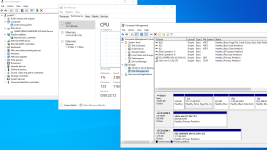
B bobshenji New Member Oct 9, 2024 8 1 3 Apr 28, 2025 #1 As the screenshot shows, which is a windows server 2022 VM on PVE, the information of disks is not shown on the Performance card of Task Manange. What is wrong?
As the screenshot shows, which is a windows server 2022 VM on PVE, the information of disks is not shown on the Performance card of Task Manange. What is wrong?
fba Well-Known Member Proxmox Subscriber Dec 4, 2024 577 247 48 online www.croit.io Apr 28, 2025 #2 Try running diskperf -y in a shell first. s. https://learn.microsoft.com/en-us/windows-server/administration/windows-commands/diskperf Reactions: bobshenji
Try running diskperf -y in a shell first. s. https://learn.microsoft.com/en-us/windows-server/administration/windows-commands/diskperf
B bobshenji New Member Oct 9, 2024 8 1 3 Apr 28, 2025 #3 fba said: Try running diskperf -y in a shell first. s. https://learn.microsoft.com/en-us/windows-server/administration/windows-commands/diskperf Click to expand... Thanks. It works.
fba said: Try running diskperf -y in a shell first. s. https://learn.microsoft.com/en-us/windows-server/administration/windows-commands/diskperf Click to expand... Thanks. It works.