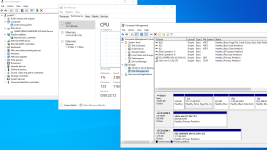
B bobshenji New Member Oct 9, 2024 8 1 3 Apr 28, 2025 #1 As the screenshot shows, which is a windows server 2022 VM on PVE, the information of disks is not shown on the Performance card of Task Manange. What is wrong?
As the screenshot shows, which is a windows server 2022 VM on PVE, the information of disks is not shown on the Performance card of Task Manange. What is wrong?
fba Renowned Member Proxmox Subscriber Dec 4, 2024 659 301 68 online www.croit.io Apr 28, 2025 #2 Try running diskperf -y in a shell first. s. https://learn.microsoft.com/en-us/windows-server/administration/windows-commands/diskperf Reactions: bobshenji
Try running diskperf -y in a shell first. s. https://learn.microsoft.com/en-us/windows-server/administration/windows-commands/diskperf
B bobshenji New Member Oct 9, 2024 8 1 3 Apr 28, 2025 #3 fba said: Try running diskperf -y in a shell first. s. https://learn.microsoft.com/en-us/windows-server/administration/windows-commands/diskperf Click to expand... Thanks. It works.
fba said: Try running diskperf -y in a shell first. s. https://learn.microsoft.com/en-us/windows-server/administration/windows-commands/diskperf Click to expand... Thanks. It works.