

Hi,
I have difficulty reading certain disks on a VM that persist even after deleting them, re-creating them, restarting the VM.
Nothing seems to fix it, there's something about Windows Disk 16/17 or SCSI14/15 that simply will not work ?
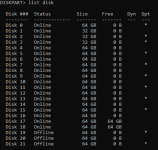
I initially noticed the issue as I was adding disks, Disk 16/17 were appearing as blank !
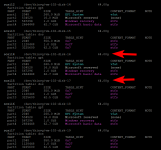
But according to my script "list-all-vm-lvm-filesystems.sh"
These LVM contained disk filesystem, were not empty, they in fact are identical to most of the disks on this list !
I don't know if the problem is with the 16th and 17th Disk on windows, or if the problem is with SCSI14/15 !
And here is my 102,conf file
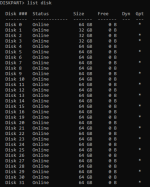
And strangely, after a while the disks simply disappeared from diskpart !!
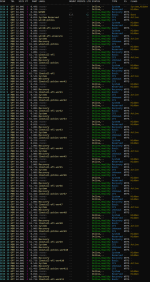
And my script showvolumes.bat also just skips over them, every other, largely identical drive, has no issue.
I have difficulty reading certain disks on a VM that persist even after deleting them, re-creating them, restarting the VM.
Nothing seems to fix it, there's something about Windows Disk 16/17 or SCSI14/15 that simply will not work ?
I initially noticed the issue as I was adding disks, Disk 16/17 were appearing as blank !
But according to my script "list-all-vm-lvm-filesystems.sh"
These LVM contained disk filesystem, were not empty, they in fact are identical to most of the disks on this list !
I don't know if the problem is with the 16th and 17th Disk on windows, or if the problem is with SCSI14/15 !
And here is my 102,conf file
Code:
/etc/pve/nodes/proxmox/qemu-server/102.conf
root@proxmox:~/longtailtoil# cat /etc/pve/nodes/proxmox/qemu-server/102.conf
audio0: device=ich9-intel-hda,driver=none
bios: ovmf
boot: order=virtio0;net0
cores: 16
cpu: host
efidisk0: local-14tb-lvm:vm-102-disk-0,efitype=4m,pre-enrolled-keys=1,size=4M
machine: pc-q35-9.2+pve1
memory: 16000
meta: creation-qemu=9.2.0,ctime=1785629727
name: BCDinvestigation
net0: virtio=BC:24:11:00:2A:61,bridge=vmbr0,firewall=1
numa: 0
ostype: win10
scsi0: local-14tb-lvm:vm-102-disk-2,size=32G
scsi1: local-14tb-lvm:vm-102-disk-3,size=32G
scsi10: local-14tb-lvm:vm-102-disk-12,size=64G
scsi11: local-14tb-lvm:vm-102-disk-13,size=64G
scsi12: local-14tb-lvm:vm-102-disk-14,size=64G
scsi13: local-14tb-lvm:vm-102-disk-15,size=64G
scsi14: local-14tb-lvm:vm-102-disk-16,size=64G
scsi15: local-14tb-lvm:vm-102-disk-17,size=64G
scsi16: local-14tb-lvm:vm-102-disk-18,size=64G
scsi17: local-14tb-lvm:vm-102-disk-19,size=64G
scsi18: local-14tb-lvm:vm-102-disk-20,size=64G
scsi19: local-14tb-lvm:vm-102-disk-21,size=64G
scsi2: local-14tb-lvm:vm-102-disk-4,size=32G
scsi20: local-14tb-lvm:vm-102-disk-22,size=64G
scsi21: local-14tb-lvm:vm-102-disk-23,size=64G
scsi22: local-14tb-lvm:vm-102-disk-24,size=64G
scsi23: local-14tb-lvm:vm-102-disk-25,size=64G
scsi24: local-14tb-lvm:vm-102-disk-26,size=64G
scsi25: local-14tb-lvm:vm-102-disk-27,size=64G
scsi26: local-14tb-lvm:vm-102-disk-28,size=64G
scsi27: local-14tb-lvm:vm-102-disk-29,size=64G
scsi28: local-14tb-lvm:vm-102-disk-30,size=64G
scsi29: local-14tb-lvm:vm-102-disk-31,size=64G
scsi3: local-14tb-lvm:vm-102-disk-5,size=64G
scsi30: local-14tb-lvm:vm-102-disk-32,size=64G
scsi4: local-14tb-lvm:vm-102-disk-6,size=64G
scsi5: local-14tb-lvm:vm-102-disk-7,size=64G
scsi6: local-14tb-lvm:vm-102-disk-8,size=64G
scsi7: local-14tb-lvm:vm-102-disk-9,size=64G
scsi8: local-14tb-lvm:vm-102-disk-10,size=64G
scsi9: local-14tb-lvm:vm-102-disk-11,size=64G
scsihw: virtio-scsi-pci
smbios1: uuid=e61af71a-6be9-4b95-9356-baffb3eb1698
sockets: 1
virtio0: local-14tb-lvm:vm-102-disk-1,cache=writeback,discard=on,iothread=1,size=64G
vmgenid: b6a7f5cb-2761-40bb-b114-3de6226634f6
And strangely, after a while the disks simply disappeared from diskpart !!
And my script showvolumes.bat also just skips over them, every other, largely identical drive, has no issue.