

[SOLVED] /dev/centos/root does not exist after migrating CentOS7 from vmware to proxmox VE
- Thread starter wong
- Start date
You are using an out of date browser. It may not display this or other websites correctly.
You should upgrade or use an alternative browser.
You should upgrade or use an alternative browser.
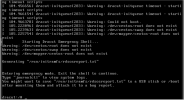
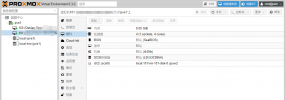

same error. suddenly we yust reboot proxmox and than this error occurse.
what can we do?
centos7 rescue did not find any disk.
we move the disk to qcow2 format and mount it from the proxmox host (/var/liv/vz/....)...partitions are there and data are there.
btw:
many thanks
in rescue
blkid did not show the disks.
what can we do?
centos7 rescue did not find any disk.
we move the disk to qcow2 format and mount it from the proxmox host (/var/liv/vz/....)...partitions are there and data are there.
btw:
many thanks
in rescue
blkid did not show the disks.
Last edited:
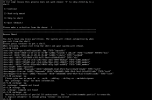
@TheMrg I know this is a little old of a thread, but I am running into this same problem, and my CentOS7 machine boots and operates fine in recovery mode. I am trying to follow your solution here, but am hitting a wall. Can you provide more details on how you did this?vgextend --restoremissing <volume group> <physical volume>
Here is the drive layout
sda
sda1 part /boot/efi
sda2 part /boot
sda3 part
centos-root lvm /
centos-swap lvm [SWAP]
centos-home lvm /home
Using the above, when you say <v_g> versus <p_v> are you referring to running the command like this:
vgextend --restoremissing sda1 sda
Or am i missing something?
In my case I did this:This problem is solved by changing the hard disk mode of the VM through the web
* Change hard disk mode to IDE (SATA did not work)
* delete CDROM to avoid issues
* detach boot disk
* edit detached disk -> specify "IDE"
(System now boots)
* Login
* Install qemu-guest agent
Code:
yum install qemu-guest-agent* Rebuild initramfs using this command (from https://endocs.ksyun.com/documents/5425)
Code:
mkinitrd -f --allow-missing \
--with=virtio_blk --preload=virtio_blk \
--with=virtio_pci --preload=virtio_pci \
--with=virtio_console --preload=virtio_console \
 /boot/initramfs-$(uname -r).img $(uname -r)
* Shutdown
* Edit VM Hardware
* Set SCSI controller to Virtio SCSI Single
* detach boot disk
* edit detached disk -> SCSI
The workstation now boots using the Virtio SCSI Single controller.
Thank you , work on Centos 8 after moving from ESXiIn my case I did this:
* Change hard disk mode to IDE (SATA did not work)
* delete CDROM to avoid issues
* detach boot disk
* edit detached disk -> specify "IDE"
(System now boots)
* Login
* Install qemu-guest agent
Code:yum install qemu-guest-agent
* Rebuild initramfs using this command (from https://endocs.ksyun.com/documents/5425)
Code:mkinitrd -f --allow-missing \ --with=virtio_blk --preload=virtio_blk \ --with=virtio_pci --preload=virtio_pci \ --with=virtio_console --preload=virtio_console \ /boot/initramfs-$(uname -r).img $(uname -r)
* Shutdown
* Edit VM Hardware
* Set SCSI controller to Virtio SCSI Single
* detach boot disk
* edit detached disk -> SCSI
The workstation now boots using the Virtio SCSI Single controller.
Thank you! Your post saved my weekend!In my case I did this:
* Change hard disk mode to IDE (SATA did not work)
Hi Same problem experienced on CentOS 9 trying to convert the VMWare .vmdk file to qcow2 format
If I change the disk type to IDE as suggested previously, I can boot up OK with the qcow2 file (so conversion has worked successfully).
However the next step was to use the mkinitrd command which is a problem now as mkinitrd has been deprecated on CentOS 9 in favour of the dracut command.
Does anybody know what parameters I need to pass to the dracut command to rebuild the initramfs for the virtio modules?
If I change the disk type to IDE as suggested previously, I can boot up OK with the qcow2 file (so conversion has worked successfully).
However the next step was to use the mkinitrd command which is a problem now as mkinitrd has been deprecated on CentOS 9 in favour of the dracut command.
Does anybody know what parameters I need to pass to the dracut command to rebuild the initramfs for the virtio modules?

Have you tried what is given in the second comment:Does anybody know what parameters I need to pass to the dracut command to rebuild the initramfs for the virtio modules?
Code:
dracut -f --regenerate-allThanks for following up. I've tried so many things , so I'm not sure anymore.
I think I focused on the reply from mmcarn as it allowed me to boot up the qcow2 image which I couldn't before plus it was more recent than the second comment - there's a lot of difference between CentOS 7 & 9.
I'm guessing that I run the dracut regenerate command in the current image and not in Rescue Mode?
I think I focused on the reply from mmcarn as it allowed me to boot up the qcow2 image which I couldn't before plus it was more recent than the second comment - there's a lot of difference between CentOS 7 & 9.
I'm guessing that I run the dracut regenerate command in the current image and not in Rescue Mode?