

Hi all, I just purchase a new DELL PowerEdge R720 with 2xCPU, 32GB RAM, SAS controller raid 10 and integrated SD (RAID 1) for boot.
I replace the 1GB SD card's with 1 x 32GB SD cards (20 MB read/write performance) I set BIOS to boot from SD card device and proceed to installation.
Next week I will receive the second SD card .
.
I boot from CD, select the 32GB disk (and let the RAID virtual disk alone), follow the installation steps, the partitions are created and the installation start.
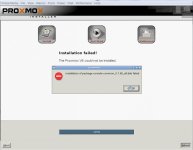
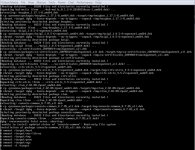
On SD slot 1 I receive error on 55-58% of installation progress (see error_1 files)
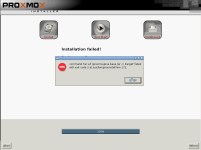
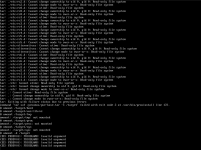
I move the SD card on slot 2 and start again...and I receive other errors (see Error_2 files)
What I need to do to install and boot from SD cards? Any clue about the errors?
I replace the 1GB SD card's with 1 x 32GB SD cards (20 MB read/write performance) I set BIOS to boot from SD card device and proceed to installation.
Next week I will receive the second SD card
.I boot from CD, select the 32GB disk (and let the RAID virtual disk alone), follow the installation steps, the partitions are created and the installation start.
On SD slot 1 I receive error on 55-58% of installation progress (see error_1 files)
I move the SD card on slot 2 and start again...and I receive other errors (see Error_2 files)
What I need to do to install and boot from SD cards? Any clue about the errors?
