Hi there,
I've been using Proxmox for some time now and am quite happy with it, however I do have a single issue with my VM's and snapshots.
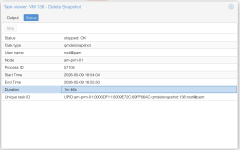
If I delete a snapshot that is even just a day-old it'll take quite a long time to delete the snapshot (up to 2 minutes). In the meanwhile the VM is 'frozen' and completely unresponsive.
The VM's are all stored on ZFS storage served from TrueNAS over NFS.
Now I've read somewhere that this can be the result of using slow storage amongst others but I dont think that my storage solution is that slow. Storage specs:
Data VDEVs
2 x RAIDZ1 | 4 wide | 3.49 TiB --- (All: Samsung PM1633a MZILS3T8HMLH0D4 3.84TB SAS 12Gb/s or equivalent)
Log VDEVs
1 x DISK | 1 wide | 260.83 GiB -- (Intel 900P Optane (SSDPED1D280GA)
The NAS has a 40Gbit uplink and the hypervisors all have a 25Gbit link, MTU is set to 9000 and the storage speed is quite OK, here is a `yabs` result:
So, te storage is quite performant I would say.
Here is the config of a example VM that is having issues:
Is the combination of qcow2 + NFS my issue here?
I have some automated jobs in-place where (on a weekly basis) snapshot all VM's, update them, reboot them and 2 days later delete the snapshots. However the downtime I now have because of the snapshot removal is killing me.
I've been using Proxmox for some time now and am quite happy with it, however I do have a single issue with my VM's and snapshots.
If I delete a snapshot that is even just a day-old it'll take quite a long time to delete the snapshot (up to 2 minutes). In the meanwhile the VM is 'frozen' and completely unresponsive.
The VM's are all stored on ZFS storage served from TrueNAS over NFS.
Now I've read somewhere that this can be the result of using slow storage amongst others but I dont think that my storage solution is that slow. Storage specs:
Data VDEVs
2 x RAIDZ1 | 4 wide | 3.49 TiB --- (All: Samsung PM1633a MZILS3T8HMLH0D4 3.84TB SAS 12Gb/s or equivalent)
Log VDEVs
1 x DISK | 1 wide | 260.83 GiB -- (Intel 900P Optane (SSDPED1D280GA)
The NAS has a 40Gbit uplink and the hypervisors all have a 25Gbit link, MTU is set to 9000 and the storage speed is quite OK, here is a `yabs` result:
Code:
fio Disk Speed Tests (Mixed R/W 50/50) (Partition 10.0.75.10:/mnt/zfs-01/px-nfs):
---------------------------------
Block Size | 4k            (IOPS) | 64k           (IOPS)
  ------   | ---            ----  | ----           ----
Read       | 122.97 MB/s  (30.7k) | 441.55 MB/s   (6.8k)
Write      | 123.29 MB/s  (30.8k) | 443.87 MB/s   (6.9k)
Total      | 246.27 MB/s  (61.5k) | 885.43 MB/s  (13.8k)
           |                      |
Block Size | 512k          (IOPS) | 1m            (IOPS)
  ------   | ---            ----  | ----           ----
Read       | 493.56 MB/s    (964) | 523.89 MB/s    (511)
Write      | 519.79 MB/s   (1.0k) | 558.78 MB/s    (545)
Total      | 1.01 GB/s     (1.9k) | 1.08 GB/s     (1.0k)
So, te storage is quite performant I would say.
Here is the config of a example VM that is having issues:
Code:
root@am-prm-01:/mnt/pve/px-nfs# qm config 138
agent: 1
balloon: 4096
boot: order=scsi0;ide2;net0
cores: 24
cpu: EPYC
hotplug: disk,network,usb
ide2: none,media=cdrom
memory: 49152
meta: creation-qemu=9.0.2,ctime=1751440419
name: xxx
net0: virtio=BC:24:11:33:5A:8A,bridge=vmbr50,firewall=1
numa: 0
ostype: l26
parent: NTB-pre-update-20260504T061508685003
scsi0: px-nfs:138/vm-138-disk-0.qcow2,discard=on,iothread=1,size=200G,ssd=1
scsihw: virtio-scsi-single
smbios1: uuid=d474f662-80ec-48a1-8898-ec8aa0933921
sockets: 1
tags: ntb-mgmt
vmgenid: 7e9b01ee-5ccb-4045-ae19-3c5af511b596
Is the combination of qcow2 + NFS my issue here?
I have some automated jobs in-place where (on a weekly basis) snapshot all VM's, update them, reboot them and 2 days later delete the snapshots. However the downtime I now have because of the snapshot removal is killing me.