

Hi there,
I just discovered proxmox a few days ago and am a bit of a noob to it and hypervisors in general, so please bear with.
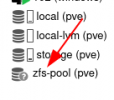
I had a couple old 2TB rust drives lying around so I threw them into my Proxmox home rig, and thought I'd mess with ZFS (also a first for me). After some messing about I was able to create a ZFS pool. However, as I'm not sure what setup I want yet, I decided to delete the pool, except I did it manually from the PVE node root shell (deleted zfs drive partitions via cfdisk and did `zfs destoy zfs-pool`). Clearly this was not a good idea as now I'm in a weird state where Proxmox still shows my ZFS pool but no zfs pool or drives exist.
Would appreciate any help removing said zfs pool from the Proxmox left side sidebar:
Thanks in advance!
I just discovered proxmox a few days ago and am a bit of a noob to it and hypervisors in general, so please bear with.
I had a couple old 2TB rust drives lying around so I threw them into my Proxmox home rig, and thought I'd mess with ZFS (also a first for me). After some messing about I was able to create a ZFS pool. However, as I'm not sure what setup I want yet, I decided to delete the pool, except I did it manually from the PVE node root shell (deleted zfs drive partitions via cfdisk and did `zfs destoy zfs-pool`). Clearly this was not a good idea as now I'm in a weird state where Proxmox still shows my ZFS pool but no zfs pool or drives exist.
Would appreciate any help removing said zfs pool from the Proxmox left side sidebar:
Thanks in advance!


