

Decrease a VM Disk Size
- Thread starter securecpu
- Start date
You are using an out of date browser. It may not display this or other websites correctly.
You should upgrade or use an alternative browser.
You should upgrade or use an alternative browser.
I've never used LVM before, after trying vgs and vgdisplay, I get nothing on on the screen, the command goes through but just blank.
I suggest you start a new thread, but if you used a ZFS-based boot/root instead of ext4 + LVM when you installed Proxmox, you're not even using LVM
You should also do some research into LVM if you want to use it - not having a grasp of the basics and trying commands blindly leads to pitfalls

Especially when running commands like lvreduce that might destroy data...especially without the needed prequisites like shrinking filesystems and partitions on that LV first.not having a grasp of the basics and trying commands blindly leads to pitfalls
Thats also the reason why PVE webUI/API/CLI won't allow you to do that.
Last edited:

Did the command reduce it by 32G or reduce it to 32G. In this case it is the same answer but I'm looking at different numbers. I couldn't find the syntax definition of "lvreduce" anywhere in the Proxmox admin guide! All I could find was "resize".excellent tutorial, a lot of fear but actually it was 2 commands:
and from 64GB it became 32GBCode:lvm lvreduce -L -32g pve/vm-103-disk-0 qm rescan
In my case I want to reduce it from 100G to 66G (ie. reduce by 34G). Would I use -34g or -66g in the first command? I wasn't sure it the - implied "minus" or simple a dash in the syntax! You'll have to excuse me, but I'm a novice with all of this!
Your assistance is much appreciated.
I couldn't find the syntax definition of "lvreduce" anywhere in the Proxmox admin guide!
because thats not a PVE thing.
man lvreduce show the docs to that command:
Code:
-L|--size [-]Size[m|UNIT]
    Specifies the new size of the LV.  The --size and
    --extents options are alternate methods of specifying
    size.  The total number of physical extents used will be
    greater when redundant data is needed for RAID levels.
    When the plus + or minus - prefix is used, the value is
    not an absolute size, but is relative and added or
    subtracted from the current size.
so should be
-34g.And a warning again, as this is a destructive command:
If you shrink a virtual disk without shinking its partitions and filesystems first, you will lose data. If you want to shrink it by 34GB, the last 34GB should be unallocated on that LV.
If you shrink a virtual disk without shinking its partitions and filesystems first, you will lose data. If you want to shrink it by 34GB, the last 34GB should be unallocated on that LV.
Last edited:
I know this thread is an antique...but I'm kind of in a pickle.
Will Gparted live be able to resize an LVM I accidentally shrank? The VM was having disk issues (100% usage) and showed plenty of space inside the vm.
I now know I made3 mistakes:
didn't check discard & shut off defrag inside the vm
Over provisioned
Shrank the LVM instead of making it larger (this was my last and fatal mistake)
EDIT: this was in GUI under VM hardware, not LVM command or in storage menu if that helps...I don't know what the underlying commands for that setting are).
Oh, I also moved the VM recently to a larger hard drive(my backup drive) and was getting everything all set up feeling protected by snapshots before I made a new backup
So maybe 6 or 7 mistakes.
Current status: borked
LVM errors out on boot saying it needs manual repair and I have scoured the Internet looking for hope. I added an additional 1tb SSD to VG but it won't extend the LVM because it can't load it.
I have 80+ android VMs running on the guest windows machine (actually not running now) and about 6 months into the project so I would prefer not to wipe it.
I'm betting if I can get in, select discard, and run trim it will fix this issue. Then I'll backup and recreate the VM.
If it helps I have a windows back up of the VM...inside the same container along with 4 worthless snapshots .
Any help would be greatly appreciated
Will Gparted live be able to resize an LVM I accidentally shrank? The VM was having disk issues (100% usage) and showed plenty of space inside the vm.
I now know I made
didn't check discard & shut off defrag inside the vm
Over provisioned
Shrank the LVM instead of making it larger (this was my last and fatal mistake)
EDIT: this was in GUI under VM hardware, not LVM command or in storage menu if that helps...I don't know what the underlying commands for that setting are).
Oh, I also moved the VM recently to a larger hard drive(my backup drive) and was getting everything all set up feeling protected by snapshots before I made a new backup
So maybe 6 or 7 mistakes.
Current status: borked
LVM errors out on boot saying it needs manual repair and I have scoured the Internet looking for hope. I added an additional 1tb SSD to VG but it won't extend the LVM because it can't load it.
I have 80+ android VMs running on the guest windows machine (actually not running now) and about 6 months into the project so I would prefer not to wipe it.
I'm betting if I can get in, select discard, and run trim it will fix this issue. Then I'll backup and recreate the VM.
If it helps I have a windows back up of the VM...inside the same container along with 4 worthless snapshots .
Any help would be greatly appreciated
Last edited:
I tried to execute the following command just to test shrinking on a cloned OpenMediaVault VM disk as was suggested above, but interestingly, it doesn't have FS.
How can the VM run? What do I miss?
How can the VM run? What do I miss?
Bash:
root@server:/mnt/storage# lvreduce -r -L 10G /dev/pve/vm-100-disk-1
fsadm: Cannot get FSTYPE of "/dev/mapper/pve-vm--100--disk--1".
  Filesystem check failed.


root@server:/mnt/storage# lsblk -f /dev/pve/vm-100-disk-1
NAME                 FSTYPE FSVER LABEL UUID FSAVAIL FSUSE% MOUNTPOINTS
pve-vm--100--disk--1

root@server:/mnt/storage# file -L -s /dev/pve/vm-100-disk-1
/dev/pve/vm-100-disk-1: DOS/MBR boot sector
Last edited:
Hi Everyone,
I'm new to Proxmox and recently ran into an issue with disk management. Here's the situation:
I created an Ubuntu 24 server VM with an initial disk size of 150 GB. Later, I realized I needed to add an additional 25 GB, but I accidentally extended the disk by 175 GB, bringing the total size to 325 GB.
The issue is that I haven’t allocated the extra disk space to the VM's filesystem yet, but now I need to reduce the disk size back to the correct size.
Here’s some additional info about my setup:
I'm new to Proxmox and recently ran into an issue with disk management. Here's the situation:
I created an Ubuntu 24 server VM with an initial disk size of 150 GB. Later, I realized I needed to add an additional 25 GB, but I accidentally extended the disk by 175 GB, bringing the total size to 325 GB.
The issue is that I haven’t allocated the extra disk space to the VM's filesystem yet, but now I need to reduce the disk size back to the correct size.
Here’s some additional info about my setup:
- LVM is used for the volume management.
- Below are the outputs of df -h and lsblk commands:
df -h:
- Filesystem Size Used Avail Use% Mounted on
tmpfs 2.0G 8.5M 2.0G 1% /run
efivarfs 256K 94K 157K 38% /sys/firmware/efi/efivars
/dev/mapper/ubuntu--vg-lv--0 145G 111G 27G 81% /
tmpfs 10G 0 10G 0% /dev/shm
tmpfs 5.0M 0 5.0M 0% /run/lock
/dev/sda2 2.0G 183M 1.7G 10% /boot
/dev/sda1 1.1G 6.2M 1.1G 1% /boot/efi
lsblk:
- NAME MAJ:MIN RM SIZE RO TYPE MOUNTPOINTS
sda 8:0 0 325G 0 disk
├─sda1 8:1 0 1G 0 part /boot/efi
├─sda2 8:2 0 2G 0 part /boot
└─sda3 8:3 0 146.9G 0 part
└─ubuntu--vg-lv--0 252:0 0 146.9G 0 lvm /
sr0 11:0 1 2.6G 0 rom
- What I Need Help With:
- Is it possible to reduce the size of the disk back to the desired size (175 GB or 150 GB)?
- If yes, what is the safest way to achieve this without affecting the data in the VM?
- Any specific steps for LVM would be greatly appreciated.
- I understand resizing can be risky, so I’m being cautious here and asking for advice before proceeding.
Thanks in advance for your guidance!

See also: https://forum.proxmox.com/threads/a...roxmox-vm-need-to-reduce-it-lvm-setup.161252/I'm new to Proxmox and recently ran into an issue with disk management. Here's the situation:
> Is it possible to reduce the size of the disk back to the desired size (175 GB or 150 GB)?
No. This is thin-provisioned, so basically you just extend the in-vm disk partition table to whatever is needed and don't worry about the rest, bc it will never grow to that size. And make a note in the VM config for yourself
Otherwise, you create a new vdisk of the appropriate size, copy everything over in-vm, detach the original. Might be more hassle than it's worth
No. This is thin-provisioned, so basically you just extend the in-vm disk partition table to whatever is needed and don't worry about the rest, bc it will never grow to that size. And make a note in the VM config for yourself
Otherwise, you create a new vdisk of the appropriate size, copy everything over in-vm, detach the original. Might be more hassle than it's worth
0) Download Arch, the live ISO has all the tools needed.
Add the ArchISO to the CD/DVD drive under VM hardware and set it as boot option 1 under VM options.
Press ESC and turn off Secureboot in order to boot into the ISO.
1) Boot liveCD.
Type "$ localectl list-keymaps" to list available keyboard layouts and then "$ loadkeys Your-Layout" to change it.
check your partition table with "$ lsblk"
$ resize2fs /dev/mapper/ubuntu--vg-ubuntu--lv New_Size_G
$ lvreduce -L New_Size_G /dev/mapper/ubuntu--vg-ubuntu--lv
Shutdown and create a new disk and add it to the VM, size of the new disk has to be at least the size of the used space on the old drive.
2) Boot into VM.
$ cfdisk /dev/source
shrink to match (Possibly slightly bigger), do not do this in live environment because it will not boot.
3) Go back to liveCD.
$ sgdisk --backup=table /dev/source
$ sgdisk --load-backup=table /dev/target
$ dd if=/dev/source_partition_1 of=/dev/target_partition_1 conv=sync status=progress
$ dd if=/dev/source_partition_2 of=/dev/target_partition_2 conv=sync status=progress
$ dd if=/dev/source_partition_3 of=/dev/target_partition_3 conv=sync status=progress
$ vgdisplay
$ pvresize /dev/pv_partition
$ lvextend -l +100%FREE /dev/mapper/ubuntu--vg-ubuntu--lv
$ vgdisplay again just to make sure its corresponding with the new disk size.
4) Shutdown, remove old boot disk in VM hardware section, add the new disk and set it as boot under options. Start VM.
Add the ArchISO to the CD/DVD drive under VM hardware and set it as boot option 1 under VM options.
Press ESC and turn off Secureboot in order to boot into the ISO.
1) Boot liveCD.
Type "$ localectl list-keymaps" to list available keyboard layouts and then "$ loadkeys Your-Layout" to change it.
check your partition table with "$ lsblk"
$ resize2fs /dev/mapper/ubuntu--vg-ubuntu--lv New_Size_G
$ lvreduce -L New_Size_G /dev/mapper/ubuntu--vg-ubuntu--lv
Shutdown and create a new disk and add it to the VM, size of the new disk has to be at least the size of the used space on the old drive.
2) Boot into VM.
$ cfdisk /dev/source
shrink to match (Possibly slightly bigger), do not do this in live environment because it will not boot.
3) Go back to liveCD.
$ sgdisk --backup=table /dev/source
$ sgdisk --load-backup=table /dev/target
$ dd if=/dev/source_partition_1 of=/dev/target_partition_1 conv=sync status=progress
$ dd if=/dev/source_partition_2 of=/dev/target_partition_2 conv=sync status=progress
$ dd if=/dev/source_partition_3 of=/dev/target_partition_3 conv=sync status=progress
$ vgdisplay
$ pvresize /dev/pv_partition
$ lvextend -l +100%FREE /dev/mapper/ubuntu--vg-ubuntu--lv
$ vgdisplay again just to make sure its corresponding with the new disk size.
4) Shutdown, remove old boot disk in VM hardware section, add the new disk and set it as boot under options. Start VM.
Last edited:
I'm new to Proxmox and recently ran into an issue with disk management. Here's the situation:
I created an Ubuntu 24 server VM with an initial disk size of 150 GB. Later, I realized I needed to add an additional 25 GB, but I accidentally extended the disk by 175 GB, bringing the total size to 325 GB.
How did you go with this ?
I too put in the new total rather than just the extra
 All of the extra space remains unallocated.
Thanks
How did you go with this ?
I too put in the new total rather than just the extra
Thanks
look at my post right above yours, since you already have the new space unallocated and you never expanded your lvm partition you can go straight to adding a new virtual drive of the correct size and start cloning the old one to it with the dd command!
if all you wanna do is extend the lvm partition to take up all the new unallocated space you assigned to it you do that with the "lvextend -l +100%FREE /dev/mapper/name-of-your-partition" command.

Last edited:
Hi, I shrinked a Vm from 600GB to 320GB by load a LiveCD and shrinking via gparted. That worked fine so far, but the GUI -> VM -> Hardware still show 600GB.
How to change the displayed size?
How to change the displayed size?

Just to be sure: You "only" changed the data inside of the virtual disk to fit into a smaller disk?Hi, I shrinked a Vm from 600GB to 320GB by load a LiveCD and shrinking via gparted. That worked fine so far, but the GUI -> VM -> Hardware still show 600GB.
How to change the displayed size?
If so, you need to change the underlying disk size with its appropriate tools (depends on the storage type, please give more information) and also in the PVE config file in /etc/pve/qemu-server/<vmid>.conf.
Another approach would be to create a new disk, boot a live iso and transport the data from one disk to the other with e.g. clonezilla, then detach both disks, add the new one as the only disk (should then have the same disk name inside) and change the bootorder.
I tried to shrink a VM hard drive on a ZFS pool. This VM (Ubuntu server 24.04 LTS) was migrated from Hyper-V (Gen 2 VM) to Proxmox, so the VM has 2 drives: an EFI drive 'vm-102-disk-0' of 1.05 MB (/dev/sda1) and a Linux Filesystem drive 'vm-102-disk-1' of 120 GiB (/dev/sda2). The partition table is GPT and the file system of sda2 is ext4.
I booted the VM into a GParted live CD and first shrank the file system to 40G with the following command from the terminal:
Then I booted into the VM Unbuntu hard drive and following the steps to change the partition size explained on Linuxconfig.org , I changed the partition size to 55G (Gibibyte) and reused the original GUID.
I then booted again into a GParted live CD and maximised the file system size by selecting the sda2 partition and choosing >Partition>Check, followed by clicking on 'Apply' to implement the change.
I then booted again into the VM Ubuntu hard drive and everything was fine: the VM booted without issues and the file system was 55G:
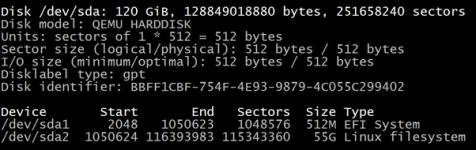
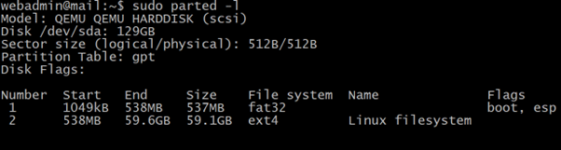
I then shut down the VM to finally shrink the VM hard drive on the ZFS pool:
When I tried to reboot the VM, it didn't boot up properly anymore and I got the following screen:
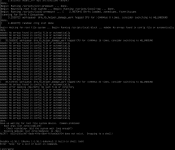
Did I perhaps not leave enough overhead (I added 1 Gibibyte to the partition size) when I shrank the hard disk on the ZFS volume? Everything was working fine before that step.
I had a backup, so I had the VM up and running again in no time but it would be nice if I managed to get the last step to work properly.
I booted the VM into a GParted live CD and first shrank the file system to 40G with the following command from the terminal:
Code:
sudo e2fsck -f /dev/sda2 && sudo resize2fs 40G /dev/sda2Then I booted into the VM Unbuntu hard drive and following the steps to change the partition size explained on Linuxconfig.org , I changed the partition size to 55G (Gibibyte) and reused the original GUID.
I then booted again into a GParted live CD and maximised the file system size by selecting the sda2 partition and choosing >Partition>Check, followed by clicking on 'Apply' to implement the change.
I then booted again into the VM Ubuntu hard drive and everything was fine: the VM booted without issues and the file system was 55G:
I then shut down the VM to finally shrink the VM hard drive on the ZFS pool:
Code:
zfs set volsize=56G local-vmpool/vm-102-disk-1
qm rescan
When I tried to reboot the VM, it didn't boot up properly anymore and I got the following screen:
Did I perhaps not leave enough overhead (I added 1 Gibibyte to the partition size) when I shrank the hard disk on the ZFS volume? Everything was working fine before that step.
I had a backup, so I had the VM up and running again in no time but it would be nice if I managed to get the last step to work properly.
Last edited:
Hi, @Proxoxosudo e2fsck -f /dev/sda2 && sudo resize2fs -40G /dev/sda2
If you really issued the above command, I suspect that you didn't shring the fs, in fact.
resize2fs accordingly to the documentation doesn't support negative number.It must be the new size, not the difference relative to the current size (see
man resize2fs ):"The size parameter specifies the requested new size of the file system."
Have you verified (e.g. with
df ) after that command, that the fs was really shrunk?
Last edited:
Sorry, that was a typo, corrected it in my original post. Indeed, I checked and the fs was really shrunk.Hi, @Proxoxo
If you really issued the above command, I suspect that you didn't shring the fs, in fact.
resize2fsaccordingly to the documentation doesn't support negative number.
It must be the new size, not the difference relative to the current size (seeman resize2fs):
"The size parameter specifies the requested new size of the file system."
Have you verified (e.g. withdf) after that command, that the fs was really shrunk?