Debian 13 Dual HDD issues

Dec 3, 2025
5
1
3
Hello,

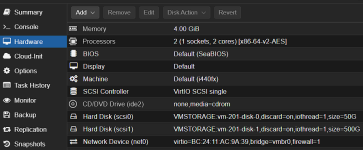
I have a Debian 13 VM on Proxmox 9 that has 2 hard drives attached from the same ZFS pool. Sometimes on boot/reboot the second hard drive doesn't mount. Not sure why. Rebooting again generally resolves the issue, and both drives mount.

Missing SDB

df -h

Filesystem Size Used Avail Use% Mounted on
udev 1.9G 0 1.9G 0% /dev
tmpfs 393M 4.4M 388M 2% /run
/dev/sdb1 47G 4.6G 40G 11% /
tmpfs 2.0G 0 2.0G 0% /dev/shm
tmpfs 5.0M 0 5.0M 0% /run/lock
tmpfs 1.0M 0 1.0M 0% /run/credentials/systemd-journald.service
tmpfs 2.0G 0 2.0G 0% /tmp
tmpfs 1.0M 0 1.0M 0% /run/credentials/getty@tty1.service
tmpfs 393M 8.0K 393M 1% /run/user/1000

REBOOT

df -h

Filesystem Size Used Avail Use% Mounted on
udev 1.9G 0 1.9G 0% /dev
tmpfs 393M 4.4M 388M 2% /run
/dev/sda1 47G 4.6G 40G 11% /
tmpfs 2.0G 0 2.0G 0% /dev/shm
tmpfs 5.0M 0 5.0M 0% /run/lock
tmpfs 1.0M 0 1.0M 0% /run/credentials/systemd-journald.service
tmpfs 2.0G 0 2.0G 0% /tmp
/dev/sdb1 492G 2.1M 467G 1% /data
tmpfs 1.0M 0 1.0M 0% /run/credentials/getty@tty1.service
tmpfs 393M 8.0K 393M 1% /run/user/1000


Suggestions?

Regards,

James
 
Noooo, you can't use the SAME ZFS HDD on the Proxmox VE server and a Debian VM.

Use the virtualization in all places.
 
Mounting of a zfs member partition isnt relevant in and of itself. does your zpool show a missing vdev when that happens?

if yes, you got hardware problems- either host port, cable or drive. if no, you can safely ignore the missing mount.
 
I'm not using the same ZFS HDD anywhere. This is the VM hardware setup.

1764782105257.png

This may be a Debian issue. I had this machine built previously with Ubuntu 24.04, same hardware and never had issues with drives on boot/reboot.

Regards,

James
 
Last edited:
/etc/fstab

# <file system> <mount point> <type> <options> <dump> <pass>
# / was on /dev/sda1 during installation
UUID=fcf6d934-225b-4819-8a16-90116f3d7bab / ext4 errors=remount-ro 0 1
# swap was on /dev/sda5 during installation
UUID=bb37c2a1-c0ac-47ae-985a-67b04e50c4fc none swap sw 0 0
/dev/sr0 /media/cdrom0 udf,iso9660 user,noauto 0 0

# Data Disk
/dev/sdb1 /data ext4 defaults 0 1


dmesg

[ 0.706980] sd 0:0:0:0: Power-on or device reset occurred
[ 0.707019] sd 1:0:0:1: Power-on or device reset occurred
[ 0.707078] sd 1:0:0:1: [sdb] 1048576000 512-byte logical blocks: (537 GB/500 GiB)
[ 0.707099] sd 1:0:0:1: [sdb] Write Protect is off
[ 0.707101] sd 1:0:0:1: [sdb] Mode Sense: 63 00 10 08
[ 0.707119] sd 1:0:0:1: [sdb] Write cache: enabled, read cache: enabled, supports DPO and FUA
[ 0.707908] sd 0:0:0:0: [sda] 104857600 512-byte logical blocks: (53.7 GB/50.0 GiB)
[ 0.707931] sd 0:0:0:0: [sda] Write Protect is off
[ 0.707932] sd 0:0:0:0: [sda] Mode Sense: 63 00 10 08
[ 0.707942] sd 0:0:0:0: [sda] Write cache: enabled, read cache: enabled, supports DPO and FUA
[ 0.726629] sdb: sdb1
[ 0.726655] sda: sda1 sda2 < sda5 >
[ 0.726714] sd 1:0:0:1: [sdb] Attached SCSI disk
[ 0.726775] sd 0:0:0:0: [sda] Attached SCSI disk
[ 1.534734] EXT4-fs (sda1): orphan cleanup on readonly fs
[ 1.534961] EXT4-fs (sda1): mounted filesystem fcf6d934-225b-4819-8a16-90116f3d7bab ro with ordered data mode. Quota mode: none.
[ 1.828022] systemd[1]: Expecting device dev-sdb1.device - /dev/sdb1...
[ 1.882515] EXT4-fs (sda1): re-mounted fcf6d934-225b-4819-8a16-90116f3d7bab r/w.
[ 2.029159] sd 0:0:0:0: Attached scsi generic sg0 type 0
[ 2.029176] sd 1:0:0:1: Attached scsi generic sg1 type 0
[ 2.427883] Adding 2715644k swap on /dev/sda5. Priority:-2 extents:1 across:2715644k
[ 2.903147] EXT4-fs (sdb1): mounted filesystem 19172752-0b97-4826-ba46-7e729f84ca39 r/w with ordered data mode. Quota mode: none.
 
Ok, rebooted and drive did not mount.

DMESG

[ 0.885583] sd 3:0:0:1: Power-on or device reset occurred
[ 0.886560] sd 0:0:0:0: Power-on or device reset occurred
[ 0.887539] sd 3:0:0:1: [sda] 1048576000 512-byte logical blocks: (537 GB/500 GiB)
[ 0.887563] sd 0:0:0:0: [sdb] 104857600 512-byte logical blocks: (53.7 GB/50.0 GiB)
[ 0.887571] sd 0:0:0:0: [sdb] Write Protect is off
[ 0.887572] sd 0:0:0:0: [sdb] Mode Sense: 63 00 10 08
[ 0.887573] sd 3:0:0:1: [sda] Write Protect is off
[ 0.887576] sd 3:0:0:1: [sda] Mode Sense: 63 00 10 08
[ 0.887582] sd 0:0:0:0: [sdb] Write cache: enabled, read cache: enabled, supports DPO and FUA
[ 0.887603] sd 3:0:0:1: [sda] Write cache: enabled, read cache: enabled, supports DPO and FUA
[ 0.902635] sda: sda1
[ 0.902675] sd 3:0:0:1: [sda] Attached SCSI disk
[ 0.902717] sdb: sdb1 sdb2 < sdb5 >
[ 0.902945] sd 0:0:0:0: [sdb] Attached SCSI disk
[ 1.418513] EXT4-fs (sdb1): orphan cleanup on readonly fs
[ 1.418738] EXT4-fs (sdb1): mounted filesystem fcf6d934-225b-4819-8a16-90116f3d7bab ro with ordered data mode. Quota mode: none.
[ 1.728221] systemd[1]: Expecting device dev-sdb1.device - QEMU_HARDDISK 1...
[ 1.790478] EXT4-fs (sdb1): re-mounted fcf6d934-225b-4819-8a16-90116f3d7bab r/w.
[ 1.916633] sd 0:0:0:0: Attached scsi generic sg0 type 0
[ 1.917063] sd 3:0:0:1: Attached scsi generic sg1 type 0
[ 1.998963] Adding 2715644k swap on /dev/sdb5. Priority:-2 extents:1 across:2715644k
 
[ 1.790478] EXT4-fs (sdb1): re-mounted fcf6d934-225b-4819-8a16-90116f3d7bab r/w.
Yes it did.

The problem you are experiencing is due to how you tell the system to mount. sda and sdb are NOT static in a linux system. you need to change your fstab entry from

/dev/sdb1 /data ext4 defaults 0 1

to

UUID=[the uuid for sdb1] /data ext4 defaults 0 1

you can get the uuid using blkid (eg, blkid /dev/sdb1)
 
That appears to be working!

blkid gave me this:

/dev/sdb1: UUID="19172752-0b97-4826-ba46-7e729f84ca39" BLOCK_SIZE="4096" TYPE="ext4" PARTUUID="5399965c-01"

Updated my fstab as follows:

# Data Disk
#/dev/sdb1 /data ext4 defaults 0 1
UUID=19172752-0b97-4826-ba46-7e729f84ca39 /data ext4 defaults 0 1

ran sudo systemctl daemon-reload and rebooted a few times. Drive mounted properly every time.

Thank you so much!

James
 
  • Like
Reactions: alexskysilk