

Hello, I am having issues with NFS and TrueNAS Scale in a VM in Proxmox. I have setup a dataset in TrueNAS for my backups and setup an NFS share for it. Then I added it as a storage medium in my PVE (Datacenter -> Storage -> Add -> NFS) like this:
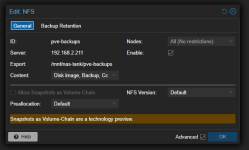
I have created a backup job that makes a backup of every VM/LXC on my PVE (excluding the TrueNAS VM) but almost everytime I run this job, my Memory Pressure Stall goes instantly from 0% to 99.76% and the whole server becomes unresponsive. The weird thing is that sometimes this job completes without any issues but most of the time this happens.
I also have an LXC setup that downloads via usenet and writes files via NFS onto my TrueNAS dataset and I am noticing the same issues there.
What is going on?
Checks I have done:
root@truenas[~]# arc_summary | head -20
------------------------------------------------------------------------
ZFS Subsystem Report Mon Jan 26 13:58:33 2026
Linux 6.12.15-production+truenas 2.3.0-1
Machine: truenas (x86_64) 2.3.0-1
ARC status:
Total memory size: 15.6 GiB
Min target size: 3.1 % 499.3 MiB
Max target size: 93.6 % 14.6 GiB
Target size (adaptive): 21.2 % 3.1 GiB
Current size: 21.2 % 3.1 GiB
Free memory size: 11.1 GiB
Available memory size: 10.5 GiB
ARC structural breakdown (current size): 3.1 GiB
Compressed size: 93.6 % 2.9 GiB
Overhead size: 4.4 % 139.9 MiB
Bonus size: 0.2 % 7.8 MiB
Dnode size: 0.8 % 24.5 MiB
root@truenas[~]# zpool list
NAME SIZE ALLOC FREE CKPOINT EXPANDSZ FRAG CAP DEDUP HEALTH ALTROOT
boot-pool 31G 5.65G 25.4G - - 18% 18% 1.00x ONLINE -
nas-tank 3.62T 599G 3.04T - - 0% 16% 1.00x ONLINE /mnt
Here's the full list of properties for this VM (maybe you can see something weird here as well):
- Memory: 16.00 GiB (ballooning turned off)
- Processors: 4 (1 sockets, 4 cores) [host]
- BIOS: OVMF (UEFI)
- Display: Default
- Machine: q35
- SCSI Controller: VirtIO SCSI single
Hard Disk (scsi0):
local-lvm:vm-211-disk-1, cache=writeback, discard=on, iothread=1, size=32G
Hard Disk (scsi1):
/dev/disk/by-id/ata-WDC_WD40EFRX-68C6CN0_WD-WXA2D15MTSH, backup=0, size=3907018584K
Hard Disk (scsi2):
/dev/disk/by-id/ata-WDC_WD40EFPX-68C6CN0_WD-WXA2D15M7RV, backup=0, size=3907018584K
Network Device (net0):
virtio=({MAC-hidden} bridge=vmbr0, firewall=1
EFI Disk:
local-lvm:vm-211-disk-0, efitype=4m, pre-enrolled-keys=0, size=4M
Logs of hanging backup job:
INFO: starting new backup job: vzdump 215 --notification-mode notification-system --mode snapshot --notes-template 'Volledige 1e versie van de stack' --storage pve-backups --node pve --compress zstd --remove 0
INFO: Starting Backup of VM 215 (lxc)
INFO: Backup started at 2026-01-28 12:57:40
INFO: status = running
INFO: CT Name: media-stack
INFO: including mount point rootfs ('/') in backup
INFO: backup mode: snapshot
INFO: ionice priority: 7
INFO: create storage snapshot 'vzdump'
Logical volume "snap_vm-215-disk-0_vzdump" created.
INFO: creating vzdump archive '/mnt/pve/pve-backups/dump/vzdump-lxc-215-2026_01_28-12_57_40.tar.zst'
INFO: Total bytes written: 3030425600 (2.9GiB, 190MiB/s)
I have created a backup job that makes a backup of every VM/LXC on my PVE (excluding the TrueNAS VM) but almost everytime I run this job, my Memory Pressure Stall goes instantly from 0% to 99.76% and the whole server becomes unresponsive. The weird thing is that sometimes this job completes without any issues but most of the time this happens.
I also have an LXC setup that downloads via usenet and writes files via NFS onto my TrueNAS dataset and I am noticing the same issues there.
What is going on?
Checks I have done:
root@truenas[~]# arc_summary | head -20
------------------------------------------------------------------------
ZFS Subsystem Report Mon Jan 26 13:58:33 2026
Linux 6.12.15-production+truenas 2.3.0-1
Machine: truenas (x86_64) 2.3.0-1
ARC status:
Total memory size: 15.6 GiB
Min target size: 3.1 % 499.3 MiB
Max target size: 93.6 % 14.6 GiB
Target size (adaptive): 21.2 % 3.1 GiB
Current size: 21.2 % 3.1 GiB
Free memory size: 11.1 GiB
Available memory size: 10.5 GiB
ARC structural breakdown (current size): 3.1 GiB
Compressed size: 93.6 % 2.9 GiB
Overhead size: 4.4 % 139.9 MiB
Bonus size: 0.2 % 7.8 MiB
Dnode size: 0.8 % 24.5 MiB
root@truenas[~]# zpool list
NAME SIZE ALLOC FREE CKPOINT EXPANDSZ FRAG CAP DEDUP HEALTH ALTROOT
boot-pool 31G 5.65G 25.4G - - 18% 18% 1.00x ONLINE -
nas-tank 3.62T 599G 3.04T - - 0% 16% 1.00x ONLINE /mnt
Here's the full list of properties for this VM (maybe you can see something weird here as well):
- Memory: 16.00 GiB (ballooning turned off)
- Processors: 4 (1 sockets, 4 cores) [host]
- BIOS: OVMF (UEFI)
- Display: Default
- Machine: q35
- SCSI Controller: VirtIO SCSI single
Hard Disk (scsi0):
local-lvm:vm-211-disk-1, cache=writeback, discard=on, iothread=1, size=32G
Hard Disk (scsi1):
/dev/disk/by-id/ata-WDC_WD40EFRX-68C6CN0_WD-WXA2D15MTSH, backup=0, size=3907018584K
Hard Disk (scsi2):
/dev/disk/by-id/ata-WDC_WD40EFPX-68C6CN0_WD-WXA2D15M7RV, backup=0, size=3907018584K
Network Device (net0):
virtio=({MAC-hidden} bridge=vmbr0, firewall=1
EFI Disk:
local-lvm:vm-211-disk-0, efitype=4m, pre-enrolled-keys=0, size=4M
Logs of hanging backup job:
INFO: starting new backup job: vzdump 215 --notification-mode notification-system --mode snapshot --notes-template 'Volledige 1e versie van de stack' --storage pve-backups --node pve --compress zstd --remove 0
INFO: Starting Backup of VM 215 (lxc)
INFO: Backup started at 2026-01-28 12:57:40
INFO: status = running
INFO: CT Name: media-stack
INFO: including mount point rootfs ('/') in backup
INFO: backup mode: snapshot
INFO: ionice priority: 7
INFO: create storage snapshot 'vzdump'
Logical volume "snap_vm-215-disk-0_vzdump" created.
INFO: creating vzdump archive '/mnt/pve/pve-backups/dump/vzdump-lxc-215-2026_01_28-12_57_40.tar.zst'
INFO: Total bytes written: 3030425600 (2.9GiB, 190MiB/s)