

Hello here!
I am totally aware that this is an unsupported configuration, I hope that anyone can answer anyway.
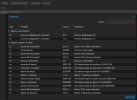
Goal: Show
Using
I figured out that the container templates shown in the GUI are described in the aplinfo.dat under
I was able to write my own script to create a
This is a preview of my own
Now to the real question, how do I now make sure that the container templates show the content of my personal `.dat` file instead of the default one by proxmox?
Thanks a lot,
Antonio
I am totally aware that this is an unsupported configuration, I hope that anyone can answer anyway.
Goal: Show
arm64 based templates for containers in the GUI with the direct linksUsing
proxmox-port I set up pve on a raspberry pi 3, with the goal of testing out various HA setups at home.I figured out that the container templates shown in the GUI are described in the aplinfo.dat under
/usr/share/doc/pve-managerI was able to write my own script to create a
.dat file structured as described here with the links to the arm64 images on the linuxcontainer.org's jenkinsThis is a preview of my own
.dat file
Code:
Package: image-alpine-3.18
Version: 3.18
Type: lxc
OS: image-alpine
Section: system
Certified: no
Maintainer: Linuxcontainers.org <https://lists.linuxcontainers.org/listinfo/lxc-devel>
Location: https://jenkins.linuxcontainers.org/job/image-alpine/lastSuccessfulBuild/architecture=arm64,release=3.18,variant=default/artifact/rootfs.tar.xz
Infopage: https://linuxcontainers.org
ManageUrl: https://jenkins.linuxcontainers.org/job/image-alpine/2634/
md5sum: md5sum_placeholder
sha512sum: sha512sum_placeholder
Description: image-alpine-3.18
  LXC default image for image-alpine-3.18.

Package: image-archlinux-current
Version: current
Type: lxc
OS: image-archlinux
Section: system
Certified: no
Maintainer: Linuxcontainers.org <https://lists.linuxcontainers.org/listinfo/lxc-devel>
Location: https://jenkins.linuxcontainers.org/job/image-archlinux/lastSuccessfulBuild/architecture=arm64,release=current,variant=default/artifact/rootfs.tar.xz
Infopage: https://linuxcontainers.org
ManageUrl: https://jenkins.linuxcontainers.org/job/image-archlinux/2742/
md5sum: md5sum_placeholder
sha512sum: sha512sum_placeholder
Description: image-archlinux-current
  LXC default image for image-archlinux-current.

Package: image-debian-bullseye
Version: bullseye
Type: lxc
OS: image-debian
Section: system
Certified: no
Maintainer: Linuxcontainers.org <https://lists.linuxcontainers.org/listinfo/lxc-devel>
Location: https://jenkins.linuxcontainers.org/job/image-debian/lastSuccessfulBuild/architecture=arm64,release=bullseye,variant=default/artifact/rootfs.tar.xz
Infopage: https://linuxcontainers.org
ManageUrl: https://jenkins.linuxcontainers.org/job/image-debian/2865/
md5sum: md5sum_placeholder
sha512sum: sha512sum_placeholder
Description: image-debian-bullseye
  LXC default image for image-debian-bullseye.

Package: image-debian-bookworm
Version: bookworm
Type: lxc
OS: image-debian
Section: system
Certified: no
Maintainer: Linuxcontainers.org <https://lists.linuxcontainers.org/listinfo/lxc-devel>
Location: https://jenkins.linuxcontainers.org/job/image-debian/lastSuccessfulBuild/architecture=arm64,release=bookworm,variant=default/artifact/rootfs.tar.xz
Infopage: https://linuxcontainers.org
ManageUrl: https://jenkins.linuxcontainers.org/job/image-debian/2865/
md5sum: md5sum_placeholder
sha512sum: sha512sum_placeholder
Description: image-debian-bookworm
  LXC default image for image-debian-bookworm.
Now to the real question, how do I now make sure that the container templates show the content of my personal `.dat` file instead of the default one by proxmox?
Thanks a lot,
Antonio
