Hello,
I'm facing a critical issue with my Proxmox VE (node pve01). After a reboot, the system failed to mount local file systems and entered Emergency Mode.
Storage Setup:
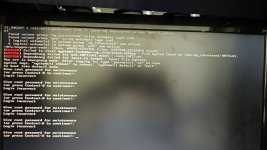
The boot screen shows multiple EXT4-fs error (device dm-10) messages and bad block bitmap checksum. I have verified the FC connections and multipath status — everything looks fine on the hardware/transport level.
Current state:
I am in the root shell (emergency mode). I am hesitant to run fsck manually because I am afraid of data loss on this volume.
I have attached a photo of the monitor with the full error trace. What is the safest procedure to recover the filesystem in a Multipath/FC environment? Should I try fsck -n first to see the damage?
Thanks in advance!
I'm facing a critical issue with my Proxmox VE (node pve01). After a reboot, the system failed to mount local file systems and entered Emergency Mode.
Storage Setup:
- Storage: External SAN (Infortrend) connected via Fibre Channel (FC).
- Configuration: Multipath is enabled.
- Partition: LVM on top of multipath device, formatted as EXT4.
- Target: /mnt/INFTIv01 (mapped to dm-10).
The boot screen shows multiple EXT4-fs error (device dm-10) messages and bad block bitmap checksum. I have verified the FC connections and multipath status — everything looks fine on the hardware/transport level.
Current state:
I am in the root shell (emergency mode). I am hesitant to run fsck manually because I am afraid of data loss on this volume.
I have attached a photo of the monitor with the full error trace. What is the safest procedure to recover the filesystem in a Multipath/FC environment? Should I try fsck -n first to see the damage?
Thanks in advance!