

O.K , I will give a bit of backstory here to explain my situation here. Just did a fresh install of Proxmox VE 3.2 I have 1 2TB Drive used as the Local/OS storage.
I have 2 * 2TB HDD configured as a RAID 0 Stripe using mdadm, I then created LVM storage of of this storage, here is the output of vgdisplay
Using the proxmox web interface I added the storage: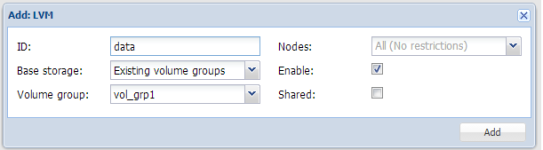
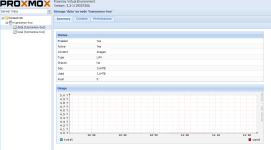
Although when I try to create a VM I get this error:
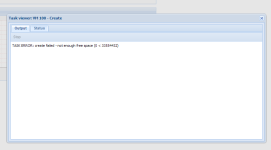
I'm sure I'm doing something drastically wrong here! I've been grinding over this for a while now, and not sure what I need to do to fix.
Any help appreciated.
Thanks.
I have 2 * 2TB HDD configured as a RAID 0 Stripe using mdadm, I then created LVM storage of of this storage, here is the output of vgdisplay
Code:
root@proxmox:~# vgdisplay
  --- Volume group ---
  VG Name               pve
  System ID
  Format                lvm2
  Metadata Areas        1
  Metadata Sequence No  4
  VG Access             read/write
  VG Status             resizable
  MAX LV                0
  Cur LV                3
  Open LV               3
  Max PV                0
  Cur PV                1
  Act PV                1
  VG Size               1.82 TiB
  PE Size               4.00 MiB
  Total PE              476804
  Alloc PE / Size       472709 / 1.80 TiB
  Free  PE / Size       4095 / 16.00 GiB
  VG UUID               W6NiIX-ecdx-Crjv-Nn3N-Zgcz-iJ2Z-7OqVAR


  --- Volume group ---
  VG Name               vol_grp1
  System ID
  Format                lvm2
  Metadata Areas        1
  Metadata Sequence No  3
  VG Access             read/write
  VG Status             resizable
  MAX LV                0
  Cur LV                1
  Open LV               0
  Max PV                0
  Cur PV                1
  Act PV                1
  VG Size               3.64 TiB
  PE Size               128.00 MiB
  Total PE              29808
  Alloc PE / Size       29808 / 3.64 TiB
  Free  PE / Size       0 / 0
  VG UUID               AVbYLd-5cgg-qUby-XjWz-GXW4-x9Gy-HgtLrO
Using the proxmox web interface I added the storage:
Although when I try to create a VM I get this error:
I'm sure I'm doing something drastically wrong here! I've been grinding over this for a while now, and not sure what I need to do to fix.
Any help appreciated.
Thanks.
