Hi Forum,
I hope someone can help me identify my current issue. I followed this tutorial also from this forum about working around EasyAntiCheat.
I figured, that using
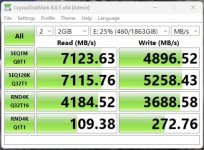
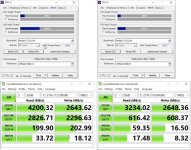
I checked my cpu, gpu and ram speed with benchmarks but saw no difference performancewise with that line appendend or removed from my "/etc/pve/qemu-server/100.conf". But what i figured was that my PCIe 4.0 Nvme drops from 8000 Mb/s to only 2000 Mb/s while in Crystalbenchmark when enabling that flags. Also removing the hypervisor part and keeping only
Looks like this argument overrides the proxmox default config, which I can check with
So what I did was add all the default arguments to my custom one
-> Still bad performance
Doing:
-> Normal good Performance but Game is not working.
Can someone explain to me what is happening and why my pcie-passthroughed Nvme get hit so hard by defining args by myself?
Here is my 100.conf file, the NVMe I passthrough is the hostpci2. It is not in any other IOMMU group with anything other.
Should further information be required, I will be happy to provide it.
Thank you very much!
Eric
-----------Edit-------
Hardware is:
AMD Ryzen 5800X3D
Asus ROG STRIX B550-I GAMING
32 Gb DDR4
RTX 3090
SkHynix Platinum P41 (To be passthroughed)
I hope someone can help me identify my current issue. I followed this tutorial also from this forum about working around EasyAntiCheat.
I figured, that using
args: -cpu host,-hypervisor fixes my issues with EasyAntiCheat at the cost of hard performance hit.I checked my cpu, gpu and ram speed with benchmarks but saw no difference performancewise with that line appendend or removed from my "/etc/pve/qemu-server/100.conf". But what i figured was that my PCIe 4.0 Nvme drops from 8000 Mb/s to only 2000 Mb/s while in Crystalbenchmark when enabling that flags. Also removing the hypervisor part and keeping only
args: -cpu host has the same performance hit.Looks like this argument overrides the proxmox default config, which I can check with
qm showcmd 100 --pretty:-cpu 'host,hv_ipi,hv_relaxed,hv_reset,hv_runtime,hv_spinlocks=0x1fff,hv_stimer,hv_synic,hv_time,hv_vapic,hv_vpindex,+kvm_pv_eoi,+kvm_pv_unhalt'So what I did was add all the default arguments to my custom one
args: -cpu host,hv_ipi,hv_relaxed,hv_reset,hv_runtime,hv_spinlocks=0x1fff,hv_stimer,hv_synic,hv_time,hv_vapic,hv_vpindex,+kvm_pv_eoi,+kvm_pv_unhalt,-hypervisor-> Still bad performance
Doing:
args: -cpu host,hv_ipi,hv_relaxed,hv_reset,hv_runtime,hv_spinlocks=0x1fff,hv_stimer,hv_synic,hv_time,hv_vapic,hv_vpindex,+kvm_pv_eoi,+kvm_pv_unhalt-> Normal good Performance but Game is not working.
Can someone explain to me what is happening and why my pcie-passthroughed Nvme get hit so hard by defining args by myself?
Here is my 100.conf file, the NVMe I passthrough is the hostpci2. It is not in any other IOMMU group with anything other.
Code:
affinity: 0-11
args: -cpu host,-hypervisor,hv_ipi,hv_relaxed,hv_reset,hv_runtime,hv_spinlocks=0x1fff,hv_stimer,hv_synic,hv_time,hv_vapic,hv_vpindex,+kvm_pv_eoi,+kvm_pv_unhalt
agent: 1
balloon: 0
bios: ovmf
boot: order=scsi0
cores: 12
cpu: host
efidisk0: local-zfs:vm-100-disk-0,efitype=4m,pre-enrolled-keys=1,size=1M
hostpci0: 0000:0a:00.3,pcie=1
hostpci1: 0000:08:00,pcie=1
hostpci2: 0000:01:00.0,pcie=1
hotplug: disk,network,usb
machine: pc-q35-10.1
memory: 24576
meta: creation-qemu=10.0.2,ctime=1762547116
name: Quantus
net0: virtio=3c:7c:3f:xx:xx:xx,bridge=vmbr0,firewall=1,tag=20
numa: 0
ostype: win11
scsi0: local-zfs:vm-100-disk-1,cache=writeback,discard=on,iothread=1,size=128G,ssd=1
scsihw: virtio-scsi-single
smbios1: uuid=9a86bf75-1801-4c4c-a727-8xxxxxxxxxxxa5,manufacturer=QVNVUw==,base64=1
sockets: 1
tpmstate0: local-zfs:vm-100-disk-2,size=4M,version=v2.0
usb0: host=8087:0029,usb3=1
vga: none
vmgenid: 4e3dc43e-f8d5-485f-b4f0-01xxxxxxxxx8
Should further information be required, I will be happy to provide it.
Thank you very much!
Eric
-----------Edit-------
Hardware is:
AMD Ryzen 5800X3D
Asus ROG STRIX B550-I GAMING
32 Gb DDR4
RTX 3090
SkHynix Platinum P41 (To be passthroughed)
Last edited: