

Hello all,
Challenge is to connect PVE to a Dell Compellent and it is not presenting like any iSCSI I have seen recently. Unfortunately, all of its host ports are on the same broadcast domain, so I will also have to contend with that.
Notice how all of the targets have the same IP (which is not actually the host port), Dell calls it the 'target'
I got by that using (eventually logging in to all of the portals):
And I ended up with:
At this point, Compellent shows connected on all paths and servers are connected. Unfortunately, when I go to include it in the GUI, I am only given a choice of one of the paths and IF I choose that, it logs out of all of the other paths.
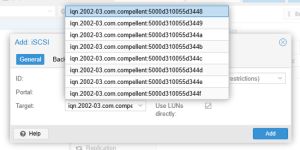
NOTE: I went through /var/lib/iscsi/nodes/<iqn>/<IP>/name and set only the outbound paths I wanted as: node.startup = automatic per PVE iSCSI IP
Question: Once I get connected and the paths seem right, how do I then proceed in the GUI to get iSCSI to show up so I can create LVM?
Thanks,
-JB
Challenge is to connect PVE to a Dell Compellent and it is not presenting like any iSCSI I have seen recently. Unfortunately, all of its host ports are on the same broadcast domain, so I will also have to contend with that.
Notice how all of the targets have the same IP (which is not actually the host port), Dell calls it the 'target'
Code:
iscsiadm -m discovery -t sendtargets -p 172.27.7.154
172.27.7.154:3260,0 iqn.2002-03.com.compellent:5000d310055d3448
172.27.7.154:3260,0 iqn.2002-03.com.compellent:5000d310055d3449
172.27.7.154:3260,0 iqn.2002-03.com.compellent:5000d310055d344a
172.27.7.154:3260,0 iqn.2002-03.com.compellent:5000d310055d344b
172.27.7.154:3260,0 iqn.2002-03.com.compellent:5000d310055d344c
172.27.7.154:3260,0 iqn.2002-03.com.compellent:5000d310055d344d
172.27.7.154:3260,0 iqn.2002-03.com.compellent:5000d310055d344e
172.27.7.154:3260,0 iqn.2002-03.com.compellent:5000d310055d344f
I got by that using (eventually logging in to all of the portals):
Code:
root@host1:/var/lib/iscsi# iscsiadm -m node -T iqn.2002-03.com.compellent:5000d310055d3448 -p 172.27.7.154 iscsi1 --login
Login to [iface: iscsi2, target: iqn.2002-03.com.compellent:5000d310055d3448, portal: 172.27.7.154,3260] successful.
Login to [iface: iscsi1, target: iqn.2002-03.com.compellent:5000d310055d3448, portal: 172.27.7.154,3260] successful.
root@host1:/var/lib/iscsi# iscsiadm -m node -T iqn.2002-03.com.compellent:5000d310055d3449 -p 172.27.7.154 iscsi1 --login
Login to [iface: iscsi2, target: iqn.2002-03.com.compellent:5000d310055d3449, portal: 172.27.7.154,3260] successful.
Login to [iface: iscsi1, target: iqn.2002-03.com.compellent:5000d310055d3449, portal: 172.27.7.154,3260] successful.
root@host1:/var/lib/iscsi# iscsiadm -m node -T iqn.2002-03.com.compellent:5000d310055d344a -p 172.27.7.154 iscsi1 --login
Login to [iface: iscsi2, target: iqn.2002-03.com.compellent:5000d310055d344a, portal: 172.27.7.154,3260] successful.
Login to [iface: iscsi1, target: iqn.2002-03.com.compellent:5000d310055d344a, portal: 172.27.7.154,3260] successful.
root@host1:/var/lib/iscsi# iscsiadm -m node -T iqn.2002-03.com.compellent:5000d310055d344b -p 172.27.7.154 iscsi1 --login
Login to [iface: iscsi2, target: iqn.2002-03.com.compellent:5000d310055d344b, portal: 172.27.7.154,3260] successful.
Login to [iface: iscsi1, target: iqn.2002-03.com.compellent:5000d310055d344b, portal: 172.27.7.154,3260] successful.
root@host1:/var/lib/iscsi# iscsiadm -m node -T iqn.2002-03.com.compellent:5000d310055d344c -p 172.27.7.154 iscsi2 --login
Login to [iface: iscsi2, target: iqn.2002-03.com.compellent:5000d310055d344c, portal: 172.27.7.154,3260] successful.
Login to [iface: iscsi1, target: iqn.2002-03.com.compellent:5000d310055d344c, portal: 172.27.7.154,3260] successful.
root@host1:/var/lib/iscsi# iscsiadm -m node -T iqn.2002-03.com.compellent:5000d310055d344d -p 172.27.7.154 iscsi2 --login
Login to [iface: iscsi2, target: iqn.2002-03.com.compellent:5000d310055d344d, portal: 172.27.7.154,3260] successful.
Login to [iface: iscsi1, target: iqn.2002-03.com.compellent:5000d310055d344d, portal: 172.27.7.154,3260] successful.
root@host1:/var/lib/iscsi# iscsiadm -m node -T iqn.2002-03.com.compellent:5000d310055d344e -p 172.27.7.154 iscsi2 --login
Login to [iface: iscsi2, target: iqn.2002-03.com.compellent:5000d310055d344e, portal: 172.27.7.154,3260] successful.
Login to [iface: iscsi1, target: iqn.2002-03.com.compellent:5000d310055d344e, portal: 172.27.7.154,3260] successful.
root@host1:/var/lib/iscsi# iscsiadm -m node -T iqn.2002-03.com.compellent:5000d310055d344f -p 172.27.7.154 iscsi2 --login
Login to [iface: iscsi2, target: iqn.2002-03.com.compellent:5000d310055d344f, portal: 172.27.7.154,3260] successful.
Login to [iface: iscsi1, target: iqn.2002-03.com.compellent:5000d310055d344f, portal: 172.27.7.154,3260] successful.
And I ended up with:
Code:
root@host1:~# multipath -ll
mpatha (36000d310055d34000000000000000028) dm-5 COMPELNT,Compellent Vol
size=15T features='1 queue_if_no_path' hwhandler='1 alua' wp=rw
`-+- policy='service-time 0' prio=50 status=active
  |- 20:0:0:1 sdd 8:48 active ready running
  `- 19:0:0:1 sde 8:64 active ready running
  root@pwd-host1:~# lsblk
NAME               MAJ:MIN RM   SIZE RO TYPE  MOUNTPOINTS
sda                  8:0    0 111.3G  0 disk
sdb                  8:16   0 111.7G  0 disk
├─sdb1               8:17   0  1007K  0 part
├─sdb2               8:18   0     1G  0 part  /boot/efi
└─sdb3               8:19   0 110.7G  0 part
  ├─pve-swap       252:0    0     8G  0 lvm   [SWAP]
  ├─pve-root       252:1    0  37.7G  0 lvm   /
  ├─pve-data_tmeta 252:2    0     1G  0 lvm
  │ └─pve-data     252:4    0  49.3G  0 lvm
  └─pve-data_tdata 252:3    0  49.3G  0 lvm
    └─pve-data     252:4    0  49.3G  0 lvm
sdc                  8:32   1     0B  0 disk
sdd                  8:48   0    15T  0 disk
└─mpatha           252:5    0    15T  0 mpath
sde                  8:64   0    15T  0 disk
└─mpatha           252:5    0    15T  0 mpath
sr0                 11:0    1   1.7G  0 rom
root@host1:~# iscsiadm -m session -P 3
At this point, Compellent shows connected on all paths and servers are connected. Unfortunately, when I go to include it in the GUI, I am only given a choice of one of the paths and IF I choose that, it logs out of all of the other paths.
NOTE: I went through /var/lib/iscsi/nodes/<iqn>/<IP>/name and set only the outbound paths I wanted as: node.startup = automatic per PVE iSCSI IP
Question: Once I get connected and the paths seem right, how do I then proceed in the GUI to get iSCSI to show up so I can create LVM?
Thanks,
-JB
Last edited:

