

Hello, I am trying to fully automate my disaster recovery solution for my Proxmox homelab.
I am using Proxmox Virtual Environment 9.1.9 and ansible [core 2.20.5]. I am also using the latest community.proxmox.promox library.
I have a set of Ansible playbooks and roles that use the various community proxmox roles to create vm_templates, clone them and create vms.
Everything seems to be working, so far, except...
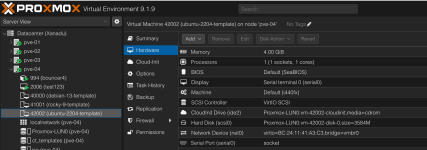
My scripts successfully create a vm_template for ubuntu 24.04. It is configured with no VLAN and cloud-init (ipconfig (net0) ip=dhcp.
I have another script that:
That 3rd script has this line:
net:
net0: "{{ create_proxmox_vm_containers_network_config }}"
The variable (create_proxmox_vm_containers_network_config) is set to "virtio,bridge=vmbr0,tag=100".
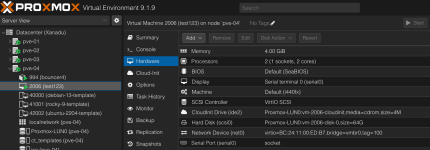
After the script finishes without errors, checking the Hardware line in the GUI shows the VLAN still set to nothing.
Even if I hardcode the line:
net:
net0: "virtio,bridge=vmbr0,tag=100"
Still no change.
To test that the role was actually doing anything, I hardcoded the name field to "test123" from what it was "naxr01".
That changed.
Finally, if I log into the Proxmox node and issue the following command:
qm set 2006 --net0 virtio,bridge=vmbr0,tag=100
It works.
I have tried looking at every possible log and used as much debugging as I could, but I can't figure this one out.
I even thought that I struck gold when I read this post, but I realized that I was already doing what was recomended.
If anyone has any insight or can offer any suggestions or help, I would really appreciate it.
Thank you in advance
Here is the relevant Ansible code:
I am using Proxmox Virtual Environment 9.1.9 and ansible [core 2.20.5]. I am also using the latest community.proxmox.promox library.
I have a set of Ansible playbooks and roles that use the various community proxmox roles to create vm_templates, clone them and create vms.
Everything seems to be working, so far, except...
My scripts successfully create a vm_template for ubuntu 24.04. It is configured with no VLAN and cloud-init (ipconfig (net0) ip=dhcp.
I have another script that:
- uses proxmox_kvm to clone the template
- uses proxmox_disk to resize the boot drive
- uses proxmox_kvm to modify the hardware and network settings
That 3rd script has this line:
net:
net0: "{{ create_proxmox_vm_containers_network_config }}"
The variable (create_proxmox_vm_containers_network_config) is set to "virtio,bridge=vmbr0,tag=100".
After the script finishes without errors, checking the Hardware line in the GUI shows the VLAN still set to nothing.
Even if I hardcode the line:
net:
net0: "virtio,bridge=vmbr0,tag=100"
Still no change.
To test that the role was actually doing anything, I hardcoded the name field to "test123" from what it was "naxr01".
That changed.
Finally, if I log into the Proxmox node and issue the following command:
qm set 2006 --net0 virtio,bridge=vmbr0,tag=100
It works.
I have tried looking at every possible log and used as much debugging as I could, but I can't figure this one out.
I even thought that I struck gold when I read this post, but I realized that I was already doing what was recomended.
If anyone has any insight or can offer any suggestions or help, I would really appreciate it.
Thank you in advance
Here is the relevant Ansible code:
Code:
- name: Create Proxmox VMs | Set variable for network configuration with vlan
  ansible.builtin.set_fact:
    create_proxmox_vm_containers_network_config: "virtio,bridge=vmbr0,tag={{ item.vlan }}"
  when: item.vlan is defined

- name: Create Proxmox VMs | Set variable for network configuration with NO vlan
  ansible.builtin.set_fact:
    create_proxmox_vm_containers_network_config: "virtio,bridge=vmbr0"
  when: item.vlan is not defined

- name: Create Proxmox VMs | Set variable for IP config
  ansible.builtin.set_fact:
    create_proxmox_vm_containers_ipconfig: "ip={{ item.ip_address }},gw={{ item.gateway }}"
  when: item.ip_address is defined and item.gateway is defined

- name: Create Proxmox VMs | Clone VM from template
  community.proxmox.proxmox_kvm:
    # Credentials and api host to work from
    api_user: "{{ create_proxmox_vm_containers_proxmox_username }}"
    api_token_id: "{{ create_proxmox_vm_containers_proxmox_api_token_id }}"
    api_token_secret: "{{ create_proxmox_vm_containers_proxmox_api_token_secret }}"
    api_host: "{{ ansible_facts['nodename'] }}"
    validate_certs: false

    # Basic VM info
    node: "{{ item.node }}" # Node the VM will be created on
    vmid: "{{ item.template }}"
    clone: template
    full: true
    newid: "{{ item.vmid }}"
    name: "{{ item.name }}"
    storage: "{{ item.storage }}"
    timeout: 600
    state: present

- name: Create Proxmox VMs | Resize boot drive
  community.proxmox.proxmox_disk:
    api_user: "{{ create_proxmox_vm_containers_proxmox_username }}"
    api_token_id: "{{ create_proxmox_vm_containers_proxmox_api_token_id }}"
    api_token_secret: "{{ create_proxmox_vm_containers_proxmox_api_token_secret }}"
    api_host: "{{ ansible_facts['nodename'] }}"
    validate_certs: false
    vmid: "{{ item.vmid }}"
    disk: scsi0
    size: "{{ item.disk_size }}"
    storage: "{{ item.storage }}"
    state: resized

- name: Create Proxmox VMs | Update VM hardware
  community.proxmox.proxmox_kvm:
    api_user: "{{ create_proxmox_vm_containers_proxmox_username }}"
    api_token_id: "{{ create_proxmox_vm_containers_proxmox_api_token_id }}"
    api_token_secret: "{{ create_proxmox_vm_containers_proxmox_api_token_secret }}"
    api_host: "{{ ansible_facts['nodename'] }}"
    validate_certs: false

    # VMID and name of VM to update
    vmid: "{{ item.vmid }}"
#    name: "{{ item.name }}"
    name: "test123"

    # Hardware info
    memory: "{{ item.memory | default(omit) }}"
    cores: "{{ item.cores | default(omit) }}"
    node: "{{ item.node }}"

    # We need to be doing this:
    # qm set 2006 --net0 virtio,bridge=vmbr0,tag=100

    # Network info
    net:
#      net0: "{{ create_proxmox_vm_containers_network_config }}"
      net0: "virtio,bridge=vmbr0,tag=100"
    ipconfig:
      ipconfig0: "{{ create_proxmox_vm_containers_ipconfig | default(omit) }}"
    nameservers: "{{ item.nameservers | default(omit) }}"

    # Cloud-init info
    ciuser: "{{ item.ciuser | default(omit) }}"
    cipassword: "{{ item.cipassword | default(omit) }}"
    sshkeys: "{{ item.sshkeys | default(omit) }}"

    # Desired state
    state: present
    update: true

- name: Create Proxmox VMs | Start the VM
  community.proxmox.proxmox_kvm:
    vmid: "{{ item.vmid }}"
    api_user: "{{ create_proxmox_vm_containers_proxmox_username }}"
    api_token_id: "{{ create_proxmox_vm_containers_proxmox_api_token_id }}"
    api_token_secret: "{{ create_proxmox_vm_containers_proxmox_api_token_secret }}"
    api_host: "{{ ansible_facts['nodename'] }}"
    validate_certs: false
    state: started
...
Attachments
Last edited:

