would there be a way to create a cloud type user, who can only see his VMs without the nodes or the cluster info? I want him to manage and see only his VMs


cloud user
- Thread starter toto-ets
- Start date
You are using an out of date browser. It may not display this or other websites correctly.
You should upgrade or use an alternative browser.
You should upgrade or use an alternative browser.

This can be done, bit it requires a bit more setup upfront.
What you want do is create a pool for each user and add the VMs to the user pool.
Then add the correct permissions to the user but make sure it is only for that user pool.
This way the user can only see there own VMs.
What you want do is create a pool for each user and add the VMs to the user pool.
Then add the correct permissions to the user but make sure it is only for that user pool.
This way the user can only see there own VMs.
I'm trying, I created a pool for the user, but I don't understand where to add the VMs to the pool.

You can adds VMs to a pool by e.g. selecting the target pool in the sidebar on the left, navigating the its "Members" page and then clicking "Add" in the top barbut I don't understand where to add the VMs to the pool.

but I have to navigate in the VM menu, or in the datacenter, because I can't find the member item
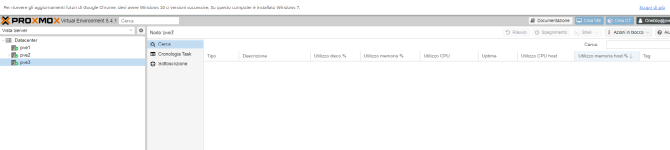
You need to expand the node itself.I did as you say, but the user continues to see all the nodes, I want him to see only his VM
All your node (and there items) are collapsed and thus not visible.
Maybe I didn't explain myself well, I want the user to see only his VMs, and not the nodes of the cluster
I am not 100% sure but if I remember correctly, that is not possible.
Via the permission system you can block access to things like system stats and all of those things but the node name itself is always listed.
This is due to the VMs and containers only existing on one node. And thus needs to know on which node it is.
Via the permission system you can block access to things like system stats and all of those things but the node name itself is always listed.
This is due to the VMs and containers only existing on one node. And thus needs to know on which node it is.

Can anyone from TIM Proxmox confirm all this?
Is there a way to make users see only POOL VIEW mode?
Is there a way to make users see only POOL VIEW mode?
Last edited:
You have an support subscription, havn't you? Then I would open a support ticket.
What I'm wondering what do you want to achieve? Or why should it problematic if a user knows how many nodes are inside your cluster?
One way to approach this might be to utilize nested virtualization, so every user has it's own ProxmoxVE instance as a VM but this has it's own issues (Performance and other things).
What I'm wondering what do you want to achieve? Or why should it problematic if a user knows how many nodes are inside your cluster?
One way to approach this might be to utilize nested virtualization, so every user has it's own ProxmoxVE instance as a VM but this has it's own issues (Performance and other things).
I don't want users to know how much I have, it's like if I subscribe to a hosting service and I see the whole cluster, instead I subscribe and I only see my VMs

You may need additional software to achieve your goal, i.e. whmcs, multiportal, and one more that I cant recall now.
Blockbridge : Ultra low latency all-NVME shared storage for Proxmox - https://www.blockbridge.com/proxmox
Blockbridge : Ultra low latency all-NVME shared storage for Proxmox - https://www.blockbridge.com/proxmox
nobody does everything by itself
Blockbridge : Ultra low latency all-NVME shared storage for Proxmox - https://www.blockbridge.com/proxmox
Blockbridge : Ultra low latency all-NVME shared storage for Proxmox - https://www.blockbridge.com/proxmox