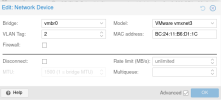
New member here. Want to ask. When I tried to install Cisco ISE as a VM (from .iso file installation), it failed to detect the allocated disk. Previously, the NIC also not detected. NIC became detected when I switched the Network Device model to VMWare (image attached).
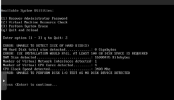
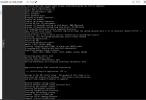
For the disk issue, it shows this error message when tested using the installer's VM resource check (image attached):
ERROR: ISE INSTALLATION WOULD FAIL. AT LEAST 100 GB DISK SPACE IS REQUIRED
ERROR: UNABLE TO PERFORM DISK I/O TEST AS NO DISK DEVICE DETECTED.
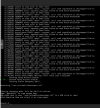
When selecting installation setup menu, it redirected into Emergency Mode (also shows some error message before).
I use Cisco ISE 3.4 full installation (source link : https://software.cisco.com/download/home/283801620/type/283802505/release/3.4.0 ) - ISO file. The general requirements for the evaluation/testing are:
- 16 GB memory
- 300 GB disk
- 4 CPUs
(more requirements: https://www.cisco.com/c/en/us/td/do...nGuide27_chapter_01.html#linuxkvmrequirements)
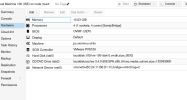
I already tried changing some parameters. Such as trying UEFI instead of BIOS, changing SCSI controllers, CPU models, Disk Bus/Device and it seems doesn't solve the issue.
Thanks
For the disk issue, it shows this error message when tested using the installer's VM resource check (image attached):
ERROR: ISE INSTALLATION WOULD FAIL. AT LEAST 100 GB DISK SPACE IS REQUIRED
ERROR: UNABLE TO PERFORM DISK I/O TEST AS NO DISK DEVICE DETECTED.
When selecting installation setup menu, it redirected into Emergency Mode (also shows some error message before).
I use Cisco ISE 3.4 full installation (source link : https://software.cisco.com/download/home/283801620/type/283802505/release/3.4.0 ) - ISO file. The general requirements for the evaluation/testing are:
- 16 GB memory
- 300 GB disk
- 4 CPUs
(more requirements: https://www.cisco.com/c/en/us/td/do...nGuide27_chapter_01.html#linuxkvmrequirements)
I already tried changing some parameters. Such as trying UEFI instead of BIOS, changing SCSI controllers, CPU models, Disk Bus/Device and it seems doesn't solve the issue.
Thanks