

Hello friends
My system got completely screwed over and it was my doing but I thought because I had my datastore backups through pbs and on my drives i would be fine.
so I reinstalled proxmox from 8 to 9 (I used 8 but reinstalled the latest one which is 9.1) and I tried to pass my drives through and then mounted them and ticked "reuse datastore"
I have qcow2 images for the vm
but then I get the error
this post is very very close to my issue but I tried the fix, and it didn't work
I made a video showcasing it in more detail video
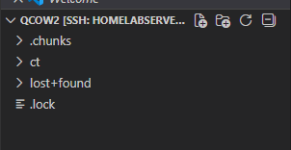
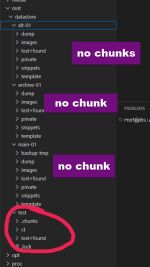
my image shows my .chunks folder on the test pbs I made and it's ON the drive
so my question is why can i not find it on the drives I used for pbs
Backups I have below
POTENTIAL SOLUTION WILL UPDATE AFTER TRANSFER:
because i have the qcow2 image I simply mounted it to see the files inside and I see the .chunks AND the CT folder I opened it and it looks like it's my backups from my main drive.
It's transferring to my passed-through datastore and I will update if it works or not (transferring on a hdd) it's gonna take a while I believe
My system got completely screwed over and it was my doing but I thought because I had my datastore backups through pbs and on my drives i would be fine.
so I reinstalled proxmox from 8 to 9 (I used 8 but reinstalled the latest one which is 9.1) and I tried to pass my drives through and then mounted them and ticked "reuse datastore"
I have qcow2 images for the vm
but then I get the error
Code:
unable to open existing chunk store path "/mnt/qnap_backup" - permissions or owner not correctI also had the problem, to add an existing datastore from my former PBS under the previous OS-release to a new installed PBS on different hardware (less energy consuming Dell Wyse 5070 with external HDD) under the latest PBS 4.0.14 OS.
I tried a lot and got the message about wrong or missing permissions again and again even though i followed the hints in different posts in different threads about this issue.
In one i found Hannes Laimers link...
I tried a lot and got the message about wrong or missing permissions again and again even though i followed the hints in different posts in different threads about this issue.
In one i found Hannes Laimers link...

I made a video showcasing it in more detail video
my image shows my .chunks folder on the test pbs I made and it's ON the drive
so my question is why can i not find it on the drives I used for pbs
Backups I have below
Code:
VM Disk Images
On sda1 (1.8TB):

vm-701-disk-0.raw [666GB]
vm-703-disk-0.raw [5.5GB]
vm-704-disk-0.raw [6.3GB]
vm-705-disk-0.raw [3.6GB]

On sdd1 (6TB):

vm-150000-disk-0.qcow2 [1.4TB] ← Old PBS VM disk

On sdb1 (500GB):

vm-150000-disk-0.qcow2 [220GB] ← Old PBS VM disk

On sdc1 (1TB):

vm-150000-disk-0.qcow2 [742MB] ← Old PBS VM disk

On nvme2 (1TB):

vm-150000-disk-0.qcow2 [3.5GB] ← Current PBS VM disk


System Backups
On sda1 (1.8TB):

nvme0n1-backup-20260124.img.gz [23GB] ← Full system backup from Jan 24 (this crashes every so often but the vm for pbs is on it but it doesn't start ([B]possible avenue to get this and run it for as long as I can to retrieve information[/B])
POTENTIAL SOLUTION WILL UPDATE AFTER TRANSFER:
because i have the qcow2 image I simply mounted it to see the files inside and I see the .chunks AND the CT folder I opened it and it looks like it's my backups from my main drive.
It's transferring to my passed-through datastore and I will update if it works or not (transferring on a hdd) it's gonna take a while I believe
Attachments
Last edited:
