I am not a linus and not a Proxmox expert. I have one network card in my proxmox host and I want to change to a different card with higher speed.
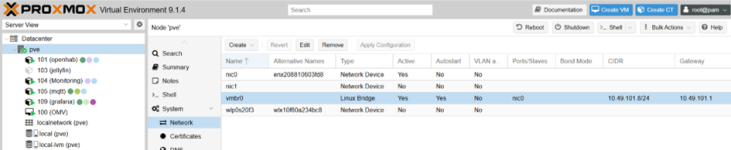
The proxmox configuration before adding the new network card via USB 3.2:
after adding the new network card ... one more "Network Device":
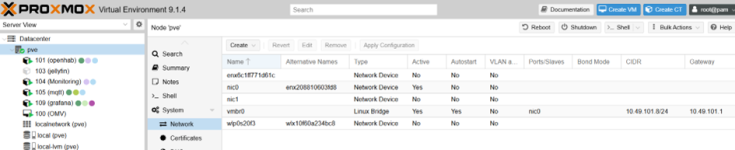
Device overview after adding the new network card:
root@pve:/etc/network# lspci
00:00.0 Host bridge: Intel Corporation Device 4e28
00:02.0 VGA compatible controller: Intel Corporation JasperLake [UHD Graphics] (rev 01)
00:04.0 Signal processing controller: Intel Corporation Dynamic Tuning service
00:08.0 System peripheral: Intel Corporation Gaussian Mixture Model and Neural Network Accelerator (GNA)
00:14.0 USB controller: Intel Corporation Jasper Lake USB 3.1 xHCI Host Controller (rev 01)
00:14.2 RAM memory: Intel Corporation Jasper Lake Shared SRAM (rev 01)
00:14.3 Network controller: Intel Corporation Jasper Lake PCH CNVi WiFi (rev 01)
00:16.0 Communication controller: Intel Corporation Management Engine Interface (rev 01)
00:1c.0 PCI bridge: Intel Corporation Device 4dba (rev 01)
00:1c.4 PCI bridge: Intel Corporation Jasper Lake PCIe Root Port #5 (rev 01)
00:1f.0 ISA bridge: Intel Corporation Jasper Lake eSPI Controller (rev 01)
00:1f.3 Audio device: Intel Corporation Jasper Lake HD Audio (rev 01)
00:1f.4 SMBus: Intel Corporation Jasper Lake SMBus (rev 01)
00:1f.5 Serial bus controller: Intel Corporation Jasper Lake SPI Controller (rev 01)
01:00.0 Ethernet controller: Realtek Semiconductor Co., Ltd. RTL8111/8168/8211/8411 PCI Express Gigabit Ethernet Controller (rev 15)
02:00.0 Non-Volatile memory controller: Toshiba Corporation BG3 x2 NVMe SSD Controller (DRAM-less) (rev 01)
Network interfaces:
root@pve:/etc/network# cat interfaces
auto lo
iface lo inet loopback
iface nic0 inet manual
auto vmbr0
iface vmbr0 inet static
address 10.49.101.8/24
gateway 10.49.101.1
bridge-ports nic0
bridge-stp off
bridge-fd 0
iface nic1 inet manual
source /etc/network/interfaces.d/*
How can I test the new card?
How to change configuration from current network card to new network card with the same IP-address?
Thanks for your help!
The proxmox configuration before adding the new network card via USB 3.2:
after adding the new network card ... one more "Network Device":
Device overview after adding the new network card:
root@pve:/etc/network# lspci
00:00.0 Host bridge: Intel Corporation Device 4e28
00:02.0 VGA compatible controller: Intel Corporation JasperLake [UHD Graphics] (rev 01)
00:04.0 Signal processing controller: Intel Corporation Dynamic Tuning service
00:08.0 System peripheral: Intel Corporation Gaussian Mixture Model and Neural Network Accelerator (GNA)
00:14.0 USB controller: Intel Corporation Jasper Lake USB 3.1 xHCI Host Controller (rev 01)
00:14.2 RAM memory: Intel Corporation Jasper Lake Shared SRAM (rev 01)
00:14.3 Network controller: Intel Corporation Jasper Lake PCH CNVi WiFi (rev 01)
00:16.0 Communication controller: Intel Corporation Management Engine Interface (rev 01)
00:1c.0 PCI bridge: Intel Corporation Device 4dba (rev 01)
00:1c.4 PCI bridge: Intel Corporation Jasper Lake PCIe Root Port #5 (rev 01)
00:1f.0 ISA bridge: Intel Corporation Jasper Lake eSPI Controller (rev 01)
00:1f.3 Audio device: Intel Corporation Jasper Lake HD Audio (rev 01)
00:1f.4 SMBus: Intel Corporation Jasper Lake SMBus (rev 01)
00:1f.5 Serial bus controller: Intel Corporation Jasper Lake SPI Controller (rev 01)
01:00.0 Ethernet controller: Realtek Semiconductor Co., Ltd. RTL8111/8168/8211/8411 PCI Express Gigabit Ethernet Controller (rev 15)
02:00.0 Non-Volatile memory controller: Toshiba Corporation BG3 x2 NVMe SSD Controller (DRAM-less) (rev 01)
Network interfaces:
root@pve:/etc/network# cat interfaces
auto lo
iface lo inet loopback
iface nic0 inet manual
auto vmbr0
iface vmbr0 inet static
address 10.49.101.8/24
gateway 10.49.101.1
bridge-ports nic0
bridge-stp off
bridge-fd 0
iface nic1 inet manual
source /etc/network/interfaces.d/*
How can I test the new card?
How to change configuration from current network card to new network card with the same IP-address?
Thanks for your help!


 .
.