CEPH setup

PmUserZFS

Renowned Member
Feb 2, 2018
155
9
83
I have 6 nodes with the following drives

4x HP PM9A3 480GB(M.2 NVMe PCIe 4.0) slow due to 480gb, not fast as the u.2 and larger drives, benchmarks hard to find on the m.2 480gb.
5x PM1655 800GB(SAS 24 Gbps)
3x PM897(SATA 6 Gbps)

This will be a proxmox cluster with ceph, running in a lab, so often not that bussy, but we all hate slow performance ...
I will use FastEC not replica 3, sas and sata in the same pool.

any input/ideas how to optimize this hardware?
 
Are you using Ceph 20.2.x as EC got major improvement with 20.2.x ?

If you are mixing drives, expect the storage to be as "fast" as the slowest disk.

Maybe instead of mixing disks you could create different pools with different crush rules. It really depends on your needs.

In general, expect replica 3 to be the fastest.
 
Ceph is RAM hungry, not really great at high ram cost right now. As we are lucky and have enough ram(still) we are using 2gb per 1tb of NVMe storage.

The default setting in Proxmox is 2GB(flat) and that is waaaay too low for large NVMe disks. Dont even try to use 2gb for large NVMe disks, we have tried and it is not good.
 
  • Like
Reactions: Johannes S
Are you using Ceph 20.2.x as EC got major improvement with 20.2.x ?

If you are mixing drives, expect the storage to be as "fast" as the slowest disk.

Maybe instead of mixing disks you could create different pools with different crush rules. It really depends on your needs.

In general, expect replica 3 to be the fastest.
I will use 20.2.3 yes, with fast EC, but its still slower, but I hope not too noticable, only in benchmarks.
I will use affinity, maybe 0.5 on the sata drive to offset the somewhat slowness, they will get much less iops at least,

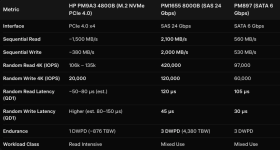
Estimated pm9a3 numbers, since there are no benchmarks I have found on them, they are basically boot drives so ..

1787232271168.png
 
Last edited:
Ceph is RAM hungry, not really great at high ram cost right now. As we are lucky and have enough ram(still) we are using 2gb per 1tb of NVMe storage.

The default setting in Proxmox is 2GB(flat) and that is waaaay too low for large NVMe disks. Dont even try to use 2gb for large NVMe disks, we have tried and it is not good.
osd_memory_target is 4GB by default? no? I will increase it to 8GB per OSD so 64GB will be rad cache per host, when I have build the cluster.

For now Im gonna setup one host and bench the drives, im curious about he pm9a3, how bad is it...
 
Last edited:
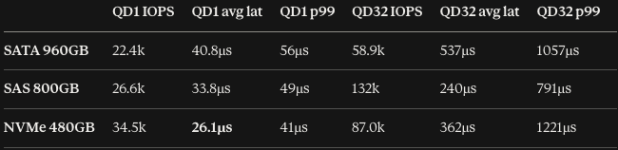
fio benchmark here:

fio --name=test --filename=/mnt/$mnt/testfile --size=2G --rw=randwrite --bs=4k --iodepth=$qd --ioengine=libaio --direct=1 --time_based --runtime=10 --group_reporting

1787248480334.png


Hm really dont know what to do with these drives now-- hm

separate ceph pools? dbwal on the nvme ?


NAME SIZE MODEL ROTA
sda 745.2G MO000800PZWSF 0
sdb 745.2G MO000800PZWSF 0
sdc 745.2G MO000800PZWSF 0
sdd 745.2G MO000800PZWSF 0
sde 745.2G MO000800PZWSF 0
sdf 894.3G MK000960GZXRB 0
sdg 894.3G MK000960GZXRB 0
sdh 894.3G MK000960GZXRB 0
sdi 14.5G STORE N GO 1
nvme0n1 447.1G VR000480KXLXF 0
nvme3n1 447.1G VR000480KXLXF 0
nvme2n1 447.1G VR000480KXLXF 0
nvme1n1 447.1G VR000480KXLXF 0

hm ...
 
You told it is slow but did not told the numbers.

With ceph you can create CRUSH rules where pool must save data. You can create new class, new root to distribute the data.
 
You told it is slow but did not told the numbers.

With ceph you can create CRUSH rules where pool must save data. You can create new class, new root to distribute the data.
Above is the write numbers which is most important for db/wal , since I couldnt find any review I had to guess prior. But as you can see its decent and good enough.

I currentl leaning on a SAS vm pool with replica and db/wal on the nvmes and thw sata drives with FastEC 3+2, and maybe also db/wal on 30ish GB on the nvmes
 
SSD as DB/WAL for SSD may not give expected performance. What was Ceph slow performance at the beginning ( not disk itself )?

As of small/lab Ceph cluster I do not see much lose of using EC vs replica.
 
osd_memory_target is 4GB by default? no? I will increase it to 8GB per OSD so 64GB will be rad cache per host, when I have build the cluster.

For now Im gonna setup one host and bench the drives, im curious about he pm9a3, how bad is it...
Maybe you are right, it is 4, but still way too low for large NVMe disk (7.68 or 15TB). Fine for smaller drives like 1 to 4TB I would say.