Ceph Performance Problem trotz guter Ceph Benchmarks

LgAltair

Member
Jun 6, 2023
5
1
8
Hallo zusammen,


ich habe einen Ceph-Testcluster aufgebaut (NVMe + 25G NICs). Grundsätzlich läuft alles stabil, aber ich sehe ein starkes Performance-Delta bei Writes in einer Windows-VM.


Setup​


  • 3 Nodes, alle identisch
  • Je Node: 2× NVMe
  • 25G NICs, direkt/mesh verbunden
  • Proxmox 9.12 mit alle Updates

Problem​


Wenn ich den Pool mit rados bench teste, sind die Werte sehr gut (Read und auch Write ok).
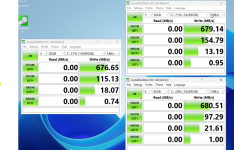
Sobald ich jedoch eine Windows-VM installiere und dort CrystalDiskMark ausführe, sind die Write-Werte extrem schlecht (ca. ~500 MB/s Write).
Read passt und liegt ungefähr im Bereich der erwarteten Werte.


Hat jemand eine Idee, woran das liegen kann bzw. welche Einstellungen ich prüfen sollte (Ceph / RBD / Client / Hypervisor / Windows)?


Ceph Read Benchmark​

rados bench -p CephTest 10 rand
hints = 1
sec Cur ops started finished avg MB/s cur MB/s last lat(s) avg lat(s)
0 0 0 0 0 0 - 0
1 16 1546 1530 6119.29 6120 0.00905856 0.0100738
2 15 3147 3132 6262.91 6408 0.0070221 0.00987384
3 16 4745 4729 6304.4 6388 0.0197218 0.00980264
4 16 6341 6325 6324.15 6384 0.0175492 0.0097843
5 16 7924 7908 6325.61 6332 0.00362649 0.00977957
6 15 9485 9470 6312.45 6248 0.00692158 0.00980722
7 16 11082 11066 6322.59 6384 0.00638146 0.00979609
8 15 12583 12568 6283.01 6008 0.00615494 0.00986136
9 16 14148 14132 6279.7 6256 0.0168098 0.00986748
10 13 15745 15732 6291.68 6400 0.00397737 0.00984817
Total time run: 10.0122
Total reads made: 15745
Read size: 4194304
Object size: 4194304
Bandwidth (MB/sec): 6290.33
Average IOPS: 1572
Stddev IOPS: 33.9863
Max IOPS: 1602
Min IOPS: 1502
Average Latency(s): 0.00984981
Max latency(s): 0.0666916
Min latency(s): 0.0017844


Ceph Write Benchmark​

Maintaining 16 concurrent writes of 4194304 bytes to objects of size 4194304 for up to 10 seconds or 0 objects
Object prefix: benchmark_data_PXCeph02_614661
sec Cur ops started finished avg MB/s cur MB/s last lat(s) avg lat(s)
0 0 0 0 0 0 - 0
1 16 637 621 2483.65 2484 0.0144227 0.0253965
2 16 1314 1298 2595.7 2708 0.0175309 0.0245174
3 16 1980 1964 2618.2 2664 0.0293656 0.0242988
4 16 2672 2656 2655.59 2768 0.0195877 0.0240187
5 16 3358 3342 2673.21 2744 0.0273688 0.0238998
6 16 4045 4029 2685.63 2748 0.0117017 0.0237922
7 16 4735 4719 2696.21 2760 0.0130485 0.0236858
8 16 5530 5514 2756.65 3180 0.0147448 0.0231958
9 16 6351 6335 2815.21 3284 0.0150851 0.022698
10 16 7174 7158 2862.86 3292 0.0206247 0.0223292
Total time run: 10.0105
Total writes made: 7174
Write size: 4194304
Object size: 4194304
Bandwidth (MB/sec): 2866.58
Stddev Bandwidth: 282.067
Max bandwidth (MB/sec): 3292
Min bandwidth (MB/sec): 2484
Average IOPS: 716
Stddev IOPS: 70.5168
Max IOPS: 823
Min IOPS: 621
Average Latency(s): 0.0223162
Stddev Latency(s): 0.00695996
Max latency(s): 0.126924
Min latency(s): 0.00836278
root@PXCeph02:~#

pveversion -v
proxmox-ve: 9.1.0 (running kernel: 6.17.4-1-pve)
pve-manager: 9.1.2 (running version: 9.1.2/9d436f37a0ac4172)
proxmox-kernel-helper: 9.0.4
proxmox-kernel-6.17.4-1-pve-signed: 6.17.4-1
proxmox-kernel-6.17: 6.17.4-1
proxmox-kernel-6.17.2-2-pve-signed: 6.17.2-2
proxmox-kernel-6.14.11-4-pve-signed: 6.14.11-4
proxmox-kernel-6.14: 6.14.11-4
proxmox-kernel-6.14.8-2-pve-signed: 6.14.8-2
ceph: 19.2.3-pve2
ceph-fuse: 19.2.3-pve2
corosync: 3.1.9-pve2
criu: 4.1.1-1
frr-pythontools: 10.4.1-1+pve1
ifupdown2: 3.3.0-1+pmx11
intel-microcode: 3.20250812.1~deb13u1
ksm-control-daemon: 1.5-1
libjs-extjs: 7.0.0-5
libproxmox-acme-perl: 1.7.0
libproxmox-backup-qemu0: 2.0.1
libproxmox-rs-perl: 0.4.1
libpve-access-control: 9.0.5
libpve-apiclient-perl: 3.4.2
libpve-cluster-api-perl: 9.0.7
libpve-cluster-perl: 9.0.7
libpve-common-perl: 9.1.1
libpve-guest-common-perl: 6.0.2
libpve-http-server-perl: 6.0.5
libpve-network-perl: 1.2.4
libpve-rs-perl: 0.11.4
libpve-storage-perl: 9.1.0
libspice-server1: 0.15.2-1+b1
lvm2: 2.03.31-2+pmx1
lxc-pve: 6.0.5-3
lxcfs: 6.0.4-pve1
novnc-pve: 1.6.0-3
proxmox-backup-client: 4.1.0-1
proxmox-backup-file-restore: 4.1.0-1
proxmox-backup-restore-image: 1.0.0
proxmox-firewall: 1.2.1
proxmox-kernel-helper: 9.0.4
proxmox-mail-forward: 1.0.2
proxmox-mini-journalreader: 1.6
proxmox-offline-mirror-helper: 0.7.3
proxmox-widget-toolkit: 5.1.5
pve-cluster: 9.0.7
pve-container: 6.0.18
pve-docs: 9.1.1
pve-edk2-firmware: 4.2025.05-2
pve-esxi-import-tools: 1.0.1
pve-firewall: 6.0.4
pve-firmware: 3.17-2
pve-ha-manager: 5.0.8
pve-i18n: 3.6.6
pve-qemu-kvm: 10.1.2-4
pve-xtermjs: 5.5.0-3
qemu-server: 9.1.2
smartmontools: 7.4-pve1
spiceterm: 3.4.1
swtpm: 0.8.0+pve3
vncterm: 1.9.1
zfsutils-linux: 2.3.4-pve1
 
Last edited:
Kannst Du bitte mal dein Setup genauer beschreiben.
  • ceph osd df tree
  • qm config <VMID>
  • ceph osd pool ls detail
  • ceph osd pool autoscale-status
Bitte setze dein Output immer in [ CODE ] tags (oben im Menü das "</>"), dann kann man das deutlich besser lesen, danke!
 
Last edited:
  • Like
Reactions: gurubert
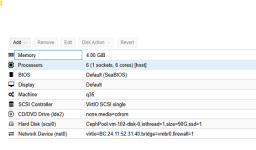
@gurubert Genau Windows-VM "VirtIo SCSI Single"

Also
ceph osd df tree

Code:
root@PXCeph03:~# ceph osd df tree
ID  CLASS  WEIGHT    REWEIGHT  SIZE     RAW USE  DATA     OMAP    META     AVAIL    %USE   VAR   PGS  STATUS  TYPE NAME  
-1         19.45238         -   19 TiB  3.1 TiB  3.1 TiB  70 KiB  2.8 GiB   16 TiB  15.89  1.00    -          root default
-5          7.45200         -  7.5 TiB  1.0 TiB  1.0 TiB  27 KiB  714 MiB  6.4 TiB  13.82  0.87    -              host PXCeph01
 1   nvme   3.72600   1.00000  3.7 TiB  593 GiB  592 GiB  10 KiB  416 MiB  3.1 TiB  15.53  0.98   18      up          osd.1
 5   nvme   3.72600   1.00000  3.7 TiB  462 GiB  462 GiB  17 KiB  299 MiB  3.3 TiB  12.11  0.76   15      up          osd.5
-3          4.54839         -  4.5 TiB  1.0 TiB  1.0 TiB  11 KiB  1.5 GiB  3.5 TiB  22.66  1.43    -              host PXCeph02
 2   nvme   0.90970   1.00000  932 GiB  165 GiB  165 GiB  10 KiB  373 MiB  766 GiB  17.75  1.12    5      up          osd.2
 3   nvme   3.63869   1.00000  3.6 TiB  890 GiB  889 GiB   1 KiB  1.2 GiB  2.8 TiB  23.89  1.50   28      up          osd.3
-7          7.45200         -  7.5 TiB  1.0 TiB  1.0 TiB  32 KiB  561 MiB  6.4 TiB  13.82  0.87    -              host PXCeph03
 0   nvme   3.72600   1.00000  3.7 TiB  461 GiB  461 GiB  17 KiB  280 MiB  3.3 TiB  12.09  0.76   15      up          osd.0
 4   nvme   3.72600   1.00000  3.7 TiB  593 GiB  593 GiB  15 KiB  281 MiB  3.1 TiB  15.55  0.98   18      up          osd.4
                        TOTAL   19 TiB  3.1 TiB  3.1 TiB  73 KiB  2.8 GiB   16 TiB  15.89                                
MIN/MAX VAR: 0.76/1.50  STDDEV: 4.01

Code:
root@PXCeph03:~# ceph osd pool ls detail
pool 7 '.mgr' replicated size 3 min_size 2 crush_rule 0 object_hash rjenkins pg_num 1 pgp_num 1 autoscale_mode on last_change 1516 flags hashpspool stripe_width 0 pg_num_max 32 pg_num_min 1 application mgr read_balance_score 6.00
pool 9 'CephTest' replicated size 3 min_size 2 crush_rule 0 object_hash rjenkins pg_num 32 pgp_num 32 autoscale_mode on last_change 2157 lfor 0/2154/2152 flags hashpspool,selfmanaged_snaps stripe_width 0 application rbd read_balance_score 1.50

Code:
root@PXCeph03:~# ceph osd pool autoscale-status
POOL        SIZE  TARGET SIZE  RATE  RAW CAPACITY   RATIO  TARGET RATIO  EFFECTIVE RATIO  BIAS  PG_NUM  NEW PG_NUM  AUTOSCALE  BULK
.mgr       1200k                3.0        19919G  0.0000                                  1.0       1              on         False
CephTest   1053G                3.0        19919G  0.1587                                  1.0      32              on         False


Hier noch einmal die Ceph Benchmark Werte: Write

Code:
2025-12-18T11:32:41.958731+0100 min lat: 0.00976174 max lat: 0.12044 avg lat: 0.0359622
  sec Cur ops   started  finished  avg MB/s  cur MB/s last lat(s)  avg lat(s)
   40      31     35597     35566   3556.24      3412   0.0436714   0.0359622
   41      31     36551     36520   3562.56      3816   0.0324051   0.0359024
   42      31     37433     37402   3561.74      3528    0.031459   0.0359106
   43      31     38263     38232   3556.11      3320   0.0526935   0.0359686
   44      31     39102     39071   3551.55      3356   0.0299269   0.0360093
   45      31     39948     39917   3547.82      3384   0.0293616   0.0360487
   46      31     40785     40754   3543.47      3348   0.0411108   0.0360965
   47      31     41614     41583   3538.63      3316   0.0409255   0.0361461
   48      31     42457     42426   3535.15      3372   0.0334015   0.0361831
   49      31     43290     43259      3531      3332   0.0265485   0.0362215
   50      31     44156     44125   3529.65      3464   0.0382614   0.0362404
   51      31     44987     44956   3525.62      3324   0.0226279   0.0362816
   52      31     45823     45792   3522.12      3344   0.0343433   0.0363195
   53      31     46667     46636   3519.35      3376   0.0370393   0.0363463
   54      31     47499     47468   3515.81      3328   0.0371507   0.0363729
   55      31     48350     48319   3513.77      3404   0.0285044    0.036403
   56      31     49276     49245   3517.16      3704   0.0133208   0.0363734
   57      31     50247     50216   3523.59      3884   0.0305543   0.0363052
   58      31     51209     51178   3529.18      3848   0.0313744   0.0362481
   59      31     52187     52156   3535.66      3912   0.0278945   0.0361823
2025-12-18T11:33:01.960443+0100 min lat: 0.00976174 max lat: 0.12044 avg lat: 0.0361366
  sec Cur ops   started  finished  avg MB/s  cur MB/s last lat(s)  avg lat(s)
   60      14     53129     53115   3540.66      3836    0.019707   0.0361366
Total time run:         60.0215
Total writes made:      53129
Write size:             4194304
Object size:            4194304
Bandwidth (MB/sec):     3540.66
Stddev Bandwidth:       212.205
Max bandwidth (MB/sec): 3940
Min bandwidth (MB/sec): 3244
Average IOPS:           885
Stddev IOPS:            53.0512
Max IOPS:               985
Min IOPS:               811
Average Latency(s):     0.0361331
Stddev Latency(s):      0.00960704
Max latency(s):         0.12044
Min latency(s):         0.00976174


Read.

Code:
root@PXCeph02:~# rados bench -p CephTest 10 rand
hints = 1
  sec Cur ops   started  finished  avg MB/s  cur MB/s last lat(s)  avg lat(s)
    0       0         0         0         0         0           -           0
    1      16      1553      1537   6147.41      6148   0.0190839   0.0100554
    2      16      3090      3074   6147.45      6148   0.0102416    0.010098
    3      16      4665      4649   6198.12      6300  0.00673836   0.0100301
    4      16      6231      6215   6214.45      6264  0.00695435   0.0100112
    5      16      7882      7866   6292.23      6604   0.0202201  0.00988081
    6      16      9487      9471   6313.44      6420   0.0100358  0.00985064
    7      16     11142     11126   6357.15      6620   0.0213004  0.00977632
    8      16     12723     12707   6352.95      6324  0.00846541  0.00978473
    9      16     14345     14329    6367.9      6488   0.0186589  0.00976405
   10      15     15886     15871   6347.86      6168   0.0147404  0.00979895
Total time run:       10.0144
Total reads made:     15886
Read size:            4194304
Object size:          4194304
Bandwidth (MB/sec):   6345.24
Average IOPS:         1586
Stddev IOPS:          44.6155
Max IOPS:             1655
Min IOPS:             1537
Average Latency(s):   0.009801
Max latency(s):       0.0748572
Min latency(s):       0.00107438

Wichtig ist jetzt ich habe auch cstate deaktiviert und alles auf Performance umgestellt. Werte in Windows sind aber leider gleich schlecht.


VM Config.

Code:
agent: 1
bios: ovmf
boot: order=scsi0;ide2;ide0;net0
cores: 8
cpu: host
efidisk0: CephTest:vm-100-disk-0,efitype=4m,ms-cert=2023,pre-enrolled-keys=1,size=1M
ide0: none,media=cdrom
ide2: none,media=cdrom
machine: pc-q35-10.1
memory: 8192
meta: creation-qemu=10.1.2,ctime=1765960324
name: Test
net0: virtio=BC:24:11:EC:CC:6D,bridge=vmbr0,firewall=1
numa: 0
ostype: win11
scsi0: CephTest:vm-100-disk-1,discard=on,iothread=1,size=90G
scsihw: virtio-scsi-single
smbios1: uuid=5b035a6d-6c29-4956-8301-5043af1f83a4
sockets: 1
vmgenid: a8132756-4a46-4370-bb65-f386ebf6c533
 
Last edited:
  • Like
Reactions: fstrankowski
Crystal Diskmark ist auch nur bedingt aussagekräftig, aber dein Sizing ist auch nicht optimal.
Das du nur 32pg im Pool hast, sowie nur 2 OSD pro Host ist nicht optimal. Erhöhe mal die pg Anzahl auf mind. 128 oder 256.
Was für NVMe sind das denn?
Wie sieht denn das Netzwerk aus?
Teste mal mit einer Linux VM, Win11 ist eh ein ganz schlechter Testkandidat. Ich teste nur mit Windows Server oder Linux Server.
 
Hallo,
vielen Dank für deine Hilfe.


Ich habe es gerade mit 128 getestet, und die Performance hat sich leicht verbessert, zumindest laut CrystalDiskMark.
Das Testsystem läuft weiterhin auf Windows Server 2025. Das Ceph-Netzwerk ist ein 25-Gbit-Mesh-Verbund. Als Datenträger kommen Samsung U.2 Enterprise-NVMe-SSDs zum Einsatz.


Die Performance der Ceph-Benchmarks ist sehr gut. Wenn es dort ein grundsätzliches Problem gäbe, würden die Werte deutlich schlechter ausfallen – diese Erfahrung habe ich in der Vergangenheit bereits gemacht. Ich versehe eben das Ergebnis einfach nicht. Linux Ubuntu 22LTS schaut nicht besser aus.

Hier die Werte


1766064883832.png


Code:
fio --name=seqwrite --ioengine=libaio --rw=write --bs=1M \
>     --numjobs=1 --size=10G --runtime=60 --time_based \
>     --direct=1 --filename=/mnt/testfile
seqwrite: (g=0): rw=write, bs=(R) 1024KiB-1024KiB, (W) 1024KiB-1024KiB, (T) 1024KiB-1024KiB, ioengine=libaio, iodepth=1
fio-3.28
Starting 1 process
Jobs: 1 (f=1): [W(1)][100.0%][w=116MiB/s][w=116 IOPS][eta 00m:00s]
seqwrite: (groupid=0, jobs=1): err= 0: pid=2260: Thu Dec 18 14:20:28 2025
  write: IOPS=125, BW=125MiB/s (131MB/s)(7509MiB/60001msec); 0 zone resets
    slat (usec): min=13, max=134, avg=23.00, stdev= 4.74
    clat (usec): min=3246, max=28178, avg=7966.49, stdev=2724.82
     lat (usec): min=3270, max=28203, avg=7989.59, stdev=2725.05
    clat percentiles (usec):
     |  1.00th=[ 3982],  5.00th=[ 4424], 10.00th=[ 4883], 20.00th=[ 5407],
     | 30.00th=[ 5604], 40.00th=[ 7898], 50.00th=[ 8291], 60.00th=[ 8848],
     | 70.00th=[ 8979], 80.00th=[ 9372], 90.00th=[10290], 95.00th=[13042],
     | 99.00th=[17171], 99.50th=[18744], 99.90th=[23725], 99.95th=[26084],
     | 99.99th=[28181]
   bw (  KiB/s): min=65536, max=198656, per=100.00%, avg=128232.34, stdev=27581.53, samples=119
   iops        : min=   64, max=  194, avg=125.23, stdev=26.94, samples=119
  lat (msec)   : 4=1.11%, 10=88.07%, 20=10.51%, 50=0.32%
  cpu          : usr=0.15%, sys=0.17%, ctx=7514, majf=0, minf=10
  IO depths    : 1=100.0%, 2=0.0%, 4=0.0%, 8=0.0%, 16=0.0%, 32=0.0%, >=64=0.0%
     submit    : 0=0.0%, 4=100.0%, 8=0.0%, 16=0.0%, 32=0.0%, 64=0.0%, >=64=0.0%
     complete  : 0=0.0%, 4=100.0%, 8=0.0%, 16=0.0%, 32=0.0%, 64=0.0%, >=64=0.0%
     issued rwts: total=0,7509,0,0 short=0,0,0,0 dropped=0,0,0,0
     latency   : target=0, window=0, percentile=100.00%, depth=1

Run status group 0 (all jobs):
  WRITE: bw=125MiB/s (131MB/s), 125MiB/s-125MiB/s (131MB/s-131MB/s), io=7509MiB (7874MB), run=60001-60001msec

Disk stats (read/write):
    dm-0: ios=0/7542, merge=0/0, ticks=0/60060, in_queue=60060, util=99.87%, aggrios=0/7542, aggrmerge=0/12, aggrticks=0/60116, aggrin_queue=60180, aggrutil=99.80%
  sda: ios=0/7542, merge=0/12, ticks=0/60116, in_queue=60180, util=99.80%

1766067916211.png
 
Last edited:
Habe jetzt neun neue Festplatten verwendet jetzt drei OSD pro Node.

Write und Read ist jetzt noch besser im Ceph Benchmark aber in der Windows Umgebung nicht Spürbar werte sind dort gleich. Ist es echt so das ich mit drei Nodes diese Performance haben kann von 500/MBS ? Brauch ich einen Node mehr also vier Nodes das ich die 800/Mbs schaffe?


Code:
Object prefix: benchmark_data_PXCeph03_37710
  sec Cur ops   started  finished  avg MB/s  cur MB/s last lat(s)  avg lat(s)
    0       0         0         0         0         0           -           0
    1      16       898       882   3527.68      3528    0.015663   0.0179261
    2      16      1810      1794   3587.69      3648   0.0239798    0.017754
    3      16      2717      2701   3601.02      3628   0.0117341   0.0177195
    4      16      3620      3604   3603.69      3612   0.0189696   0.0177175
    5      16      4520      4504    3602.9      3600   0.0199725   0.0177305
    6      16      5448      5432   3621.03      3712   0.0165743   0.0176483
    7      16      6368      6352   3629.41      3680   0.0140479   0.0176134
    8      16      7289      7273   3636.17      3684   0.0177108   0.0175812
    9      16      8203      8187   3638.33      3656   0.0157874   0.0175715
   10      16      9120      9104   3641.27      3668   0.0154005   0.0175551
   11      16     10026     10010   3639.67      3624    0.020234   0.0175642
   12      16     10954     10938   3645.68      3712   0.0127286   0.0175425
   13      16     11855     11839   3642.45      3604    0.014771   0.0175563
   14      16     12770     12754   3643.68      3660   0.0164437   0.0175518
   15      16     13542     13526   3606.62      3088   0.0306718    0.017732
   16      16     14298     14282   3570.19      3024   0.0106231   0.0179139
   17      16     14719     14703   3459.23      1684   0.0093286   0.0179241
   18      16     14882     14866   3303.27       652   0.0111917   0.0180235
   19      16     15450     15434   3248.98      2272    0.018448    0.019683
 
Last edited: