# Overveiw of my Configuration
I am on the latest version of `Proxmox` 7 nodes total, 3 dedicated to just host `CEPH`, no `VM` or `LXC`, I have 3 `CEPH` pools divided int devices class; `HDD`, `SSD`, `NVME`. The one I need help with is the `HDD` pool in a `2/3` configuration and where I do my bulk storage via `unprivileged` passthrough over `cephfs`.
The boot SSD can be ignored completely and the NVME device can be ignored for now if they show up in any of the outputs I post.
# Overview of my issue I am trying to resolve
Been stuck running in circles trying to get one of my CEPH nodes back online. Been at it for a few days between prompting an LLM, online communities, and hardware troubleshooting.
The TL;DR of my issue is as follows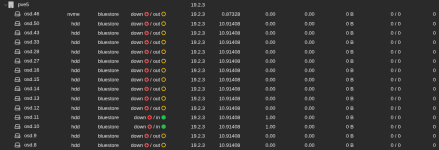
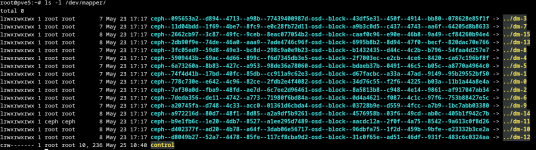
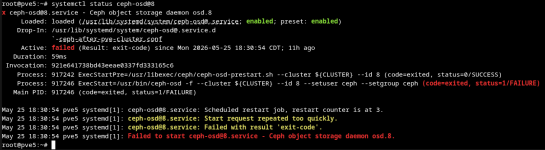
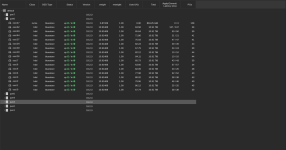
1 of my nodes from a ceph 2/3 configuration isn't picking the drives in `LVM` and `ceph` fails to set them to `UP` after a hardware change. They do, however show up in `lsblk`
The full details of my issue is as follows
A node failed to power back on after a routine update. Narrowed it down to either the motherboard or PSU. I went for the motherboard first since for the PSU; I don't know if it was the redundant modules dying at the same time (highly unlikely for anyone who doesn't have my bad luck), the the power distribution board they slot into, or possibly faulty cables to the motherboard/CPU. Turned out motherboard was the wrong choice, since I wasn't sure which part of the PSU was the issue, I just bought a new (used) chassis, and shifted my mentality from its wasting money to I need to add a fourth node in the future anyways to make it a `3/4` instead of a `2/3`, I'll just hang onto it for that. I decided to keep the new motherboard in, one other thing that changed, instead of running 4 `SFF-8643` from each `HBA` to each backplane, this chassis came with the original wiring, which only ran 2 from the `HBA` to the backplane (I think they split IIRC), mainly because those chassis are a pain in the ass to rewire. I kept both `HBA`'s though and split the backplanes 2 - 2 between the 2 `HBA`'s
# The meat and potatos
what I've found on my own so far:
Here is the output of blkid
Here is the output of `lsblk -o NAME,SIZE,TYPE,FSTYPE,PARTLABEL,UUID
I think what I need to is restore
However I get this error as an output:
Basically the
I am on the latest version of `Proxmox` 7 nodes total, 3 dedicated to just host `CEPH`, no `VM` or `LXC`, I have 3 `CEPH` pools divided int devices class; `HDD`, `SSD`, `NVME`. The one I need help with is the `HDD` pool in a `2/3` configuration and where I do my bulk storage via `unprivileged` passthrough over `cephfs`.
The boot SSD can be ignored completely and the NVME device can be ignored for now if they show up in any of the outputs I post.
# Overview of my issue I am trying to resolve
Been stuck running in circles trying to get one of my CEPH nodes back online. Been at it for a few days between prompting an LLM, online communities, and hardware troubleshooting.
The TL;DR of my issue is as follows
1 of my nodes from a ceph 2/3 configuration isn't picking the drives in `LVM` and `ceph` fails to set them to `UP` after a hardware change. They do, however show up in `lsblk`
The full details of my issue is as follows
A node failed to power back on after a routine update. Narrowed it down to either the motherboard or PSU. I went for the motherboard first since for the PSU; I don't know if it was the redundant modules dying at the same time (highly unlikely for anyone who doesn't have my bad luck), the the power distribution board they slot into, or possibly faulty cables to the motherboard/CPU. Turned out motherboard was the wrong choice, since I wasn't sure which part of the PSU was the issue, I just bought a new (used) chassis, and shifted my mentality from its wasting money to I need to add a fourth node in the future anyways to make it a `3/4` instead of a `2/3`, I'll just hang onto it for that. I decided to keep the new motherboard in, one other thing that changed, instead of running 4 `SFF-8643` from each `HBA` to each backplane, this chassis came with the original wiring, which only ran 2 from the `HBA` to the backplane (I think they split IIRC), mainly because those chassis are a pain in the ass to rewire. I kept both `HBA`'s though and split the backplanes 2 - 2 between the 2 `HBA`'s
# The meat and potatos
what I've found on my own so far:
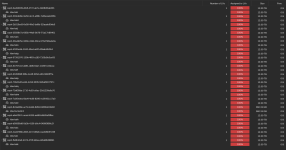
[B]blkid[/B] shows the devicesHere is the output of blkid
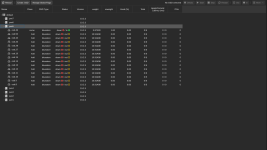
Here is the output of `lsblk -o NAME,SIZE,TYPE,FSTYPE,PARTLABEL,UUID
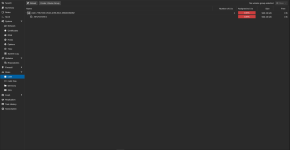
dmsetup table "<device-id>" output
Bash:
device-mapper: table ioctl on ceph-b9e1fb6c-1e20-4db7-8527-a1ee295d7489  failed: No such device or address
Command failed.
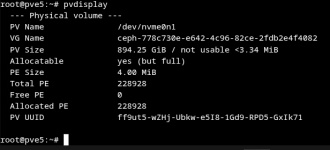
[B]ceph-volume lvm list || true[/B] only shows the 1 NVME device
Bash:
====== osd.46 ======


  [block]       /dev/ceph-778c730e-e642-4c96-82ce-2fdb2e4f4082/osd-block-34d76c55-f2f6-4225-b03a-11b1a44a8e4a


      block device              /dev/ceph-778c730e-e642-4c96-82ce-2fdb2e4f4082/osd-block-34d76c55-f2f6-4225-b03a-11b1a44a8e4a

      block uuid                KcdEnZ-Wwhs-aS7X-Csob-pBNh-bQP6-6juMo1

      cephx lockbox secret

      cluster fsid              50824a88-c4d8-40e9-aa4f-5e10c2b7c5d2

      cluster name              ceph

      crush device class        nvme

      encrypted                 0

      osd fsid                  34d76c55-f2f6-4225-b03a-11b1a44a8e4a

      osd id                    46

      osdspec affinity

      type                      block

      vdo                       0

      with tpm                  0

devices /dev/nvme0n1LVM from backup using
Bash:
pvcreate --force --uuid "<UUID>" --restorefile /etc/lvm/backup/<ceph-id> /dev/sdcHowever I get this error as an output:
Bash:
  WARNING: Couldn't find device with uuid vg0wUM-EXBK-Uh6K-T3xK-K7P3-q2ld-3SyTb7.

  Can't initialize physical volume "/dev/sdc" of volume group "ceph-b9e1fb6c-1e20-4db7-8527-a1ee295d7489" without -ff

  /dev/sdc: physical volume not initialized.
Basically the
SAS3 drives associated with CEPH are refusing to initialize for some reason, and I'm not sure why or how to get them to initialize. Any help would be massively appreciated. There is definitely some other things I've tried that I've left out, but everything I've tried so far is a jumbled mess so I apologize for that in advance, it's just been very stressful trying to resolve this issue since I don't have access to anything on there, my stress outlets like my media server are just down until I get it back up and running.