I am trying to create a MaxOS VM, using the instructions here:
https://klabsdev.com/definitive-guide-to-running-macos-in-proxmox/
Step 7 requires me to access the UEFI Shell, but I cannot get into it when I reset the VM.
I can get into Boot Manager, but if I move the cursor down to "EFI Internal Shell" then press Enter nothing happens.
The basic settings are:
- OS Type: Other
- Graphics card: VMWare Compatible
- Machine Type: q35
- BIOS: OVMF (UEFI)
- SCSI Controller: VirtIO SCSI
- Disks Bus/Device: VirtIO Block
- Cache: Write back (unsafe)
- Network model: VMware vmxnet3
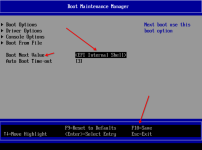
I have tried going into Boot Maintenance Manager and changing the Boot Order, so that "EFI Internal Shell" is top. If I then select "Continue" from the BIOS nothing happens.
https://i.imgur.com/uZgJeZ6.png
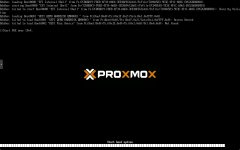
If I Reset then it tries and fails to boot from the disks:
https://i.imgur.com/YY0vzAL.png
My motherboard is an MSI B550M Pro-VDH (Socket 4) with a Ryzen 5700G CPU.
Any idea how I can get into the UEFI Shell?
https://klabsdev.com/definitive-guide-to-running-macos-in-proxmox/
Step 7 requires me to access the UEFI Shell, but I cannot get into it when I reset the VM.
I can get into Boot Manager, but if I move the cursor down to "EFI Internal Shell" then press Enter nothing happens.
The basic settings are:
- OS Type: Other
- Graphics card: VMWare Compatible
- Machine Type: q35
- BIOS: OVMF (UEFI)
- SCSI Controller: VirtIO SCSI
- Disks Bus/Device: VirtIO Block
- Cache: Write back (unsafe)
- Network model: VMware vmxnet3
I have tried going into Boot Maintenance Manager and changing the Boot Order, so that "EFI Internal Shell" is top. If I then select "Continue" from the BIOS nothing happens.
https://i.imgur.com/uZgJeZ6.png
If I Reset then it tries and fails to boot from the disks:
https://i.imgur.com/YY0vzAL.png
My motherboard is an MSI B550M Pro-VDH (Socket 4) with a Ryzen 5700G CPU.
Any idea how I can get into the UEFI Shell?