[SOLVED] Can't access Web UI after bulk shutdown my whole VM

brent729

New Member
Feb 11, 2026
6
0
1
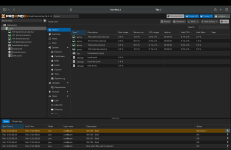
Hello, I am just learning Proxmox at the moment, I managed to get my VMs running and all, but one day I failed to attach a Virtiofs storage to one of my VM (orange text) even after shutting down and restarting the VM. So I decided to bulk shutdown my VM hoping that I will restart everything back up and hope the Virtiofs is finally attached.

What actually happened after was the Web UI froze and I lost connection to the VM. I decided to physically shut down the VM and rebooting it up but unfortunately it didn't work.

I got into the VM physically and tried several methods I found online, but I still can't get to the server. Since I bulk shutdown my VMs, none of my services are currently running. Can anyone help me with this issue?

My system looks like this
Code:
[ ISP Router ] ── [ OpnSense Router ] ── [ Switch ] ─── [ PC ]                                                                    
                                                    ├── [ Proxmox Server ]

// ISP Router 192.168.1.1
// OpnSense Router 192.168.1.10
// Switch (Manageable) 192.168.2.50
// PC 192.168.2.100 Gateway 192.168.2.1
// Proxmox Server 192.168.2.2 Gateway 192.168.2.1

pveproxy is running at the moment as shown below
Code:
root@pve:~# lsof -l -P -n | grep 8006
pveproxy 2396    33    6u    IPv6    8832    0t0    TCP *:8006 (LISTEN)
pveproxy 2397    33    6u    IPv6    8832    0t0    TCP *:8006 (LISTEN)
pveproxy 2398    33    6u    IPv6    8832    0t0    TCP *:8006 (LISTEN)
pveproxy 2399    33    6u    IPv6    8832    0t0    TCP *:8006 (LISTEN)

root@pve:~# curl -I http://192.168.2.2:8006
HTTP/1.1 501 method 'HEAD' not available
Cache-Control: max-age=0
Connection: close
Date: Wed, 11 Feb 2026 04:05:01 GMT
Pragma: no-cache
Server: pve-api-daemon/3.0
Expires: Wed, 11 Feb 2026 04:05:01 GMT

root@pve:~# pve-firewall status
Status: disabled/running

Proxmox has Outbound access, and I can also ping my gateway.
Code:
root@pve:~# ping -c 3 8.8.8.8
PING 8.8.8.8 (8.8.8.8) 56(84) bytes of data.
64 bytes from 8.8.8.8: icmp_seq=1 ttl=118 time=3.73ms
64 bytes from 8.8.8.8: icmp_seq=2 ttl=118 time=4.03ms
64 bytes from 8.8.8.8: icmp_seq=3 ttl=118 time=3.78ms

root@pve:~# ping -c 3 192.168.2.1
PING 192.168.2.1 (192.168.2.1) 56(84) bytes of data.
64 bytes from 8.8.8.8: icmp_seq=1 ttl=64 time=0.239ms
64 bytes from 8.8.8.8: icmp_seq=2 ttl=64 time=0.228ms
64 bytes from 8.8.8.8: icmp_seq=3 ttl=64 time=0.640ms

And this is the network config (I use OCR so some characters might be mispelled)

Code:
root@pve:~# ip a
1: lo: <LOOPBACK,UP, LOWER_UP> mtu 65536 qdisc noqueue state UNKNOWN group default qlen 1000
    link/loopback 00:00:00:00:00:00 brd 00:00:00:00:00:00
    inet 127.0.0.1/8 scope host lo
        valid_ift forever preferred_Ift forever
    inet6 ::1/128 scope host noprefixroute
        valid_ift forever preferred_lft forever
2: eno1: <BROADCAST, MULTICAST, UP ,LONER_UP> mtu 1500 gdisc pfito_tast master vmbr0 state up group default qlen 1000
    link/ether 84:a9:3e: 79:5f:4e brd ff:ff:ff:ff:ff:ff
    altname enp0s31f6
3: vmbr0: <BROADCAST, MULTICAST, UP, LOWER_UP> mtu 1500 gdisc noqueue state UP group default qlen 1000
    link/ether 84:a9:3e:79:5f:4e brd ff:ff:ff:ff:ff:ff
    inet 192.168.2.2/24 scope global vmbr0
        valid_lft forever preferred_lft forever
    inet6 fe80::86a9:3eff:fe79:5f4e/64 scope link valid_ift forever preferred_lft forever
   
root@pve:~# cat /etc/network/interfaces
auto lo
iface lo inet loopback

iface eno1 inet manual

auto vmbr0
iface vmbro inet static
        address 192.168.2.2/24
        gateway 192.168.2.1
        bridge-ports eno1
        bridge-stp off
        bridge-fd 0
       
source /etc/network/interfaces.d/*

root@pve:~# cat /etc/hosts
127.0.0.1 localhost.localdomain localhost
192.168.2.2 pve.localdomain pve

# The following lines are desirable for IPv6 capable hosts
::1        ip6-localhost ip6-loopback
fe00::0    ip6-localnet
ff00::0    ip6-mcastprefix
ff02::1    ip6-allnodes
ff02::2    ip6-allrouters
ff02::3    ip6-allhosts

What I do realize is, my PC can't ping the gateway, nor the proxmox server.

Code:
user@PC:~$ ping -c 3 192.168.2.1
PING 192.168.2.1 (192.168.2.1) 56(84) bytes of data.

--- 192.168.2.1 ping statistics ---
3 packets transmitted, 0 received, 100% packet loss, time 2077ms

user@PC:~$ ping -c 3 192.168.2.100
PING 192.168.2.100 (192.168.2.100) 56(84) bytes of data.

--- 192.168.2.100 ping statistics ---
3 packets transmitted, 0 received, 100% packet loss, time 2161ms
 
Last edited:
What I do realize is, my PC can't ping the gateway, nor the proxmox server.

Welcome, @brent729

As from the PC you can't ping the gateway, I would search for the reason in the PC itself or in its network connection (even something low level like a patch cable). Do the LEDs in the switch and in the PC's network card shine? Do they blink when you are trying to ping?

user@PC:~$ ping -c 3 192.168.2.100

You've written you can't ping the Proxmox server, but you've shown
user@PC:~$ ping -c 3 192.168.2.100

and ...100 is not Proxmox. Earlier you've shown that 192.168.2.100 is the PC.

Anyway, if you can't ping the PC from the very same PC then this is one more hint that the cause may be in the PC.
 
Try what @Onslow says. check the layer 1, cable, WiFi.. then make sure you don't have a VLAN set on the switch, and that you can reach your router from the PC.
Does the PC has a firewall? :P
probably seeing ip a ; ip r ; ip n on the PC will tell you what you need for troubleshooting.
Make sure also there is not another machine with the .2.1  IP  on the network maybe.. ip n on proxmox server and the pc should display the router (assuming it's .2.1) MAC there..
 
You've written you can't ping the Proxmox server, but you've shown
user@PC:~$ ping -c 3 192.168.2.100

and ...100 is not Proxmox. Earlier you've shown that 192.168.2.100 is the PC.
Apologies for the confusion, I had a brain fart when replicating the command to post it here but yes, I meant pinging the proxmox server.
Code:
user@PC:~$ ping -c 3 192.168.2.2
PING 192.168.2.2 (192.168.2.2) 56(84) bytes of data.

--- 192.168.2.100 ping statistics ---
3 packets transmitted, 0 received, 100% packet loss, time 2161ms

Try what @Onslow says. check the layer 1, cable, WiFi.. then make sure you don't have a VLAN set on the switch, and that you can reach your router from the PC.
Does the PC has a firewall? :P
probably seeing ip a ; ip r ; ip n on the PC will tell you what you need for troubleshooting.
Make sure also there is not another machine with the .2.1  IP  on the network maybe.. ip n on proxmox server and the pc should display the router (assuming it's .2.1) MAC there..

I've decided to add my macbook to my switch to test if it's only happening on my PC. The result was I can ping the proxmox server and the gateway from my macbook, but not from the PC. I can also curl the proxmox server. I have to assume that the reason why I can't ping my PC is firewall.

Code:
user@macbook:~# ping -c 3 192.168.2.1
PING 192.168.2.1 (192.168.2.1): 56 data bytes.
64 bytes from 192.168.2.1: icmp_seq=1 ttl=64 time=0.986 ms
64 bytes from 192.168.2.1: icmp_seq=2 ttl=64 time=1.222 ms
64 bytes from 192.168.2.1: icmp_seq=3 ttl=64 time=0.856 ms

user@macbook:~# ping -c 3 192.168.2.2
PING 192.168.2.2 (192.168.2.2): 56 data bytes.
64 bytes from 192.168.2.2: icmp_seq=1 ttl=64 time=0.997 ms
64 bytes from 192.168.2.2: icmp_seq=2 ttl=64 time=1.764 ms
64 bytes from 192.168.2.2: icmp_seq=3 ttl=64 time=2.191 ms

user@macbook:~# ping -c 3 192.168.2.100
PING 192.168.2.1 (192.168.2.100): 56 data bytes.
Request timeout for icmp_seq 0
Request timeout for icmp_seq 1
Request timeout for icmp_seq 2

user@macbook:~# curl -I http://192.168.2.2:8006
HTTP/1.1 501 method 'HEAD' not available
Cache-Control: max-age=0
Connection: close
Date: Thu, 12 Feb 2026 05:35:53 GMT
Pragma: no-cache
Server: pve-api-daemon/3.0
Expires: Thu, 12 Feb 2026 05:35:53 GMT

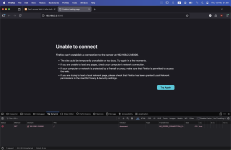
Unfortunately I still can't access the proxmox server through Web UI from the macbook. The browser (Firefox) shows "Unable to connect". Checking at the Network Monitor of the browser, I got something like to below
Code:
Status:         Blocked
Method:         GET
Domain:         192.168.2.2:8006
File:           /
Initiator:      document
Type:
Transferred:    NS_ERROR_CONNECTION_REFUSED
 
Welcome to the Proxmox Forum :-)
  • Please connect via https://192.168.2.2:8006.
  • If your PC is running Windows, it will block ICMP requests due to WFW
Hit that please (from your macbook):

curl -s --insecure https://192.168.2.2:8006 | grep "Proxmox Virtual Environment"
 
Last edited:
Welcome to the Proxmox Forum :-)
  • Please connect via https://192.168.2.2:8006.
  • If your PC is running Windows, it will block ICMP requests due to WFW
Hit that please (from your macbook):

curl -s --insecure https://192.168.2.2:8006 | grep "Proxmox Virtual Environment"
Here are the result

Code:
user@macbook:~# curl -s --insecure https://192.168.2.2:8006 | grep "Proxmox Virtual Environment"
    <title>pve - Proxmox Virtual Environment</title>
 
If curl can access it, and not your browser, your browser is at fault. Are you sure you try to reach https and not using http?
I hate those browsers hiding the scheme by default in the URL.. you can also display the details of the request to see. But I'd say you're trying to connect using http, and I don't think pveproxy does accept that.
Maybe you have proxy settings enabled as well, that should make exception for that URL..
 
If curl can access it, and not your browser, your browser is at fault. Are you sure you try to reach https and not using http?
I hate those browsers hiding the scheme by default in the URL.. you can also display the details of the request to see. But I'd say you're trying to connect using http, and I don't think pveproxy does accept that.
Maybe you have proxy settings enabled as well, that should make exception for that URL..
Well, what do you know! It works on safari. Thanks for the idea. Now the only thing I need to fix is the firewall blocking my connection between the proxmox server and my windows PC. Thanks! It's just weird that all this browser and firewall problem happened right after VM bulk shutdown. I will mark it as solved for now. Once again thank you everyone for your time.
 

Attachments

  • Screenshot 2026-02-12 at 22.59.57.png
    Screenshot 2026-02-12 at 22.59.57.png
    487.2 KB · Views: 3
Last edited:
I also just realized, after I did bulk start on my VM, i can access my proxmox server through my PC, using firefox browser as usual.
I can also ping both my proxmox server and gateway from my PC, without changing anything from my PC.

This is a very weird interaction.
 
Last edited: