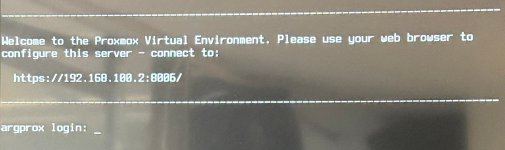
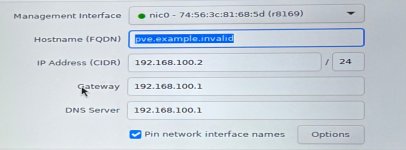
- What is the IP of your workstation?
[jerryarg@fedora]~% ip a
1: lo: <LOOPBACK,UP,LOWER_UP> mtu 65536 qdisc noqueue state UNKNOWN group default qlen 1000
link/loopback 00:00:00:00:00:00 brd 00:00:00:00:00:00
inet 127.0.0.1/8 scope host lo
valid_lft forever preferred_lft forever
inet6 ::1/128 scope host noprefixroute
valid_lft forever preferred_lft forever
2: enp0s31f6: <NO-CARRIER,BROADCAST,MULTICAST,UP> mtu 1500 qdisc fq_codel state DOWN group default qlen 1000
link/ether e8:6a:64:c3:d4:88 brd ff:ff:ff:ff:ff:ff
altname enxe86a64c3d488
3: wlp3s0: <BROADCAST,MULTICAST,UP,LOWER_UP> mtu 1500 qdisc noqueue state UP group default qlen 1000
link/ether 3e:c3:ac:4c:e2:5e brd ff:ff:ff:ff:ff:ff permaddr d4:3b:04:eb:0d:66
altname wlxd43b04eb0d66
inet 192.168.1.212/24 brd 192.168.1.255 scope global dynamic noprefixroute wlp3s0
valid_lft 86150sec preferred_lft 86150sec
inet6 2600:4040:aa6d:d200:e708:47d9:d3e3:77b2/64 scope global dynamic noprefixroute
valid_lft 7017sec preferred_lft 7017sec
inet6 fe80::d818:495a:3fa1:5ad6/64 scope link noprefixroute
valid_lft forever preferred_lft forever
- Can you ping the PVE server?
[jerryarg@fedora]~% ping 192.168.100.2
PING 192.168.100.2 (192.168.100.2) 56(84) bytes of data.
^C
--- 192.168.100.2 ping statistics ---
5 packets transmitted, 0 received, 100% packet loss, time 4125ms
[jerryarg@fedora]~%
- Can you ssh into PVE server?
[jerryarg@fedora]~% ssh
root@192.168.100.2
^C
[jerryarg@fedora]~%
- What is the output from your workstation? (ipconfig /all ; ip a)
[jerryarg@fedora]~% ip a
1: lo: <LOOPBACK,UP,LOWER_UP> mtu 65536 qdisc noqueue state UNKNOWN group default qlen 1000
link/loopback 00:00:00:00:00:00 brd 00:00:00:00:00:00
inet 127.0.0.1/8 scope host lo
valid_lft forever preferred_lft forever
inet6 ::1/128 scope host noprefixroute
valid_lft forever preferred_lft forever
2: enp0s31f6: <NO-CARRIER,BROADCAST,MULTICAST,UP> mtu 1500 qdisc fq_codel state DOWN group default qlen 1000
link/ether e8:6a:64:c3:d4:88 brd ff:ff:ff:ff:ff:ff
altname enxe86a64c3d488
3: wlp3s0: <BROADCAST,MULTICAST,UP,LOWER_UP> mtu 1500 qdisc noqueue state UP group default qlen 1000
link/ether 3e:c3:ac:4c:e2:5e brd ff:ff:ff:ff:ff:ff permaddr d4:3b:04:eb:0d:66
altname wlxd43b04eb0d66
inet 192.168.1.212/24 brd 192.168.1.255 scope global dynamic noprefixroute wlp3s0
valid_lft 86150sec preferred_lft 86150sec
inet6 2600:4040:aa6d:d200:e708:47d9:d3e3:77b2/64 scope global dynamic noprefixroute
valid_lft 7017sec preferred_lft 7017sec
inet6 fe80::d818:495a:3fa1:5ad6/64 scope link noprefixroute
valid_lft forever preferred_lft forever
- What is the output of "curl -k https://127.0.0.1:8006" when run directly from PVE (over SSH or physical console?)
[jerryarg@fedora]~% curl -k
https://127.0.0.1:8006
curl: (7) Failed to connect to 127.0.0.1 port 8006 after 0 ms: Could not connect to server
- What is the output of "curl -k https://<CHANGE_THIS_TO_YOUR_PVE_IP>:8006" when run directly from PVE (over SSH or physical console?)
[jerryarg@fedora]~% curl -k
https://192.168.100.2:8006
^C
*All those with the "^C" I exited out of cause it was taking to long too respond believing that there is not a response.