[SOLVED] Cannot Remove Disk Image

Stillkill

New Member
Oct 6, 2023
4
7
3
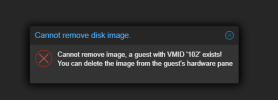
I am trying to delete an orphaned disk image so that I can reformat a drive but whenever I do I get an error:
1735681044592.png

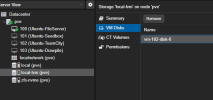
1735680990708.png

When I go to the VM with ID 102 I can see that this drive image is not referenced anywhere in the hardware, the drive image that you see referenced here lives on a different storage, not the local-lvm. I also cannot wipe the physical drive from the UI because the kernal has a hold on it.
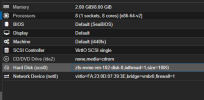
1735681223752.png


Anyone got any suggestions.
 
Proxmox probably won't let you delete any drive that appears to be related to an existing VM (as the number appears in the virtual disk name). I think that running a qm disk rescan --vmid 102 will add the (unreferenced) virtual disk to the VM again (but not connect it as a hard disk). You can then delete it (from the VM settings, not the storage).
 
Proxmox probably won't let you delete any drive that appears to be related to an existing VM (as the number appears in the virtual disk name). I think that running a qm disk rescan --vmid 102 will add the (unreferenced) virtual disk to the VM again (but not connect it as a hard disk). You can then delete it (from the VM settings, not the storage).
This worked. Thanks.
 
  • Like
Reactions: leesteken
This happens if you move a disk to a different storage via the GUI and do not select "delete source".
I would argue this is a bug in the GUI, but maybe there is some obscure reason it doesn't let you "cleanup" after.