[SOLVED] Cannot access WebGUI

Hamlet

New Member
May 6, 2024
20
4
3
Hello,
still noob and still close to zero skills so I thank you in advance for your patience.

I have launched a "app update" and "app upgrade" in my WebGUI node shell, thinking it would maybe fix my issue of container failing to autostart at reboot.

But now, I cannot access my WebGUI anymore. When I try to access the http IP address as usual, there is a timeout in the web browser.

I connected directly to my MiniPC, and I can see Proxmox launching, and reaching the "Welcome to Proxmox" login prompt. The IP address shown in the Welcome to Proxmox is the correct one (nothing changed). However, when i try to ping devices on the local network (my gateway, my laptop), the host is unreachable.

Could you help me troubleshoot my issue ? I really don't know where to start.

Thank you !
Hamlet
 
I'd take a look at these
Bash:
ip a
systemctl status pveproxy
Maybe you have a ip conflict? You can test this and see if the new ip can be reached then: https://gist.github.com/Impact123/3dbd7e0ddaf47c5539708a9cbcaab9e3#temporary-dhcp
Many thanks for your suggestion. Apologies if I cannot properly copy paste the results. Since WebGUI is not reachable, I am accessing Proxmox locally from the MiniPC host and I don"t think I can find a way to copy paste on the laptop from which I am writing here on the forum.

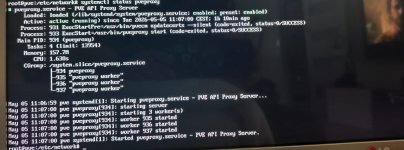
Basically it says the pveproxy is running.

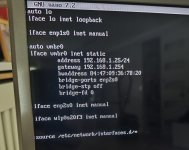
Also, I initially thought it would be an IP static address leasing issue from the router, because I think the "apt update" and "apt upgrade" changed the MAC address of my host. So I went to "interfaces" and used "hwaddress" to assign the correct MAC address associated with IP static lease, on my router, for my Proxmox MiniPC.

Unfortunately, it is still unreachable .
 
I don"t think I can find a way to copy paste on the laptop from which I am writing here on the forum.
You can :)
In the PVE create a text file with the commands and their output. Mount a USB stick in the PVE. Copy that file into the stick. Mount the stick in the laptop.
 
  • Like
Reactions: Hamlet
Thank you, I have mounted a USB drive to the MiniPC, but I am ashamed to say I don't know how to copy the outputs on the terminal without a mouse. I searched but couldn't find the solution. If you can kindly indicate me how to do it I would be much grateful !

In the meantime (and sorry about that) please find screenshots of the following. I tried to use Google Lens to extract the text but it contains errors and formatting becomes messed up.

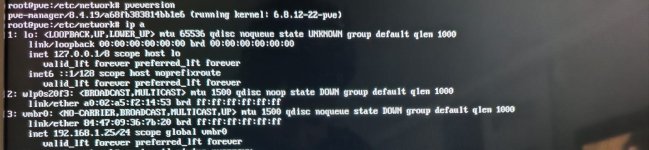
  1. "pveversion" and "ip a"WhatsApp Image 2026-05-05 at 12.28.59 (1).jpeg
  2. systemctl status pveproxyWhatsApp Image 2026-05-05 at 12.28.59.jpeg
  3. interfaces file content
WhatsApp Image 2026-05-05 at 12.32.51.jpeg


Many thanks in advance for all your help,
Hamlet
 
vmbr0 is DOWN. What's more concerning is that I don't see enp1s0 or enp2s0 (its slave) in the ip a list which explains why the bridge cannot come up. I'll assume the ip a picture is not cut off so let's see if the NICs show up here
Bash:
lspci -vnnk | awk '/Ethernet/{print $0}' RS=
ls -l /sys/class/net/*/device/driver
If not the kernel logs might have some hints for us
Bash:
journalctl -b0 -k
Is there a specific reason you're using hwaddress instead of changing the MAC in your router?
 
Last edited:
  • Like
Reactions: Hamlet
vmbr0 is DOWN. What's more concerning is that I don't see enp1s0 or enp2s0 (its slave) in the ip a list which explains why the bridge cannot come up. I'll assume the ip a picture is not cut off so let's see if the NICs show up here
Correct, it was the full "ip a" output

Bash:
lspci -vnnk | awk '/Ethernet/{print $0}' RS=
ls -l /sys/class/net/*/device/driver

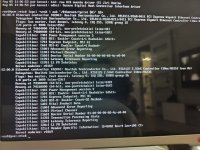
Please find the result below (the MiniPC host has two ethernet ports)

WhatsApp Image 2026-05-05 at 13.41.45.jpeg

WhatsApp Image 2026-05-05 at 13.32.20.jpeg

If not the kernel logs might have some hints for us
Bash:
journalctl -b0 -k

It unrolled ~1000 lines, if there is any specific intel you need, just let me know

Is there a specific reason you're using hwaddress instead of changing the MAC in your router?

I add this line because i believe that the MAC address of the host (or more exactly its NIC ?) changed with the "apt upgrade". On the router I had defined a static IP (192.168.1.25) for the Proxmox MiniPC host. I assumed I had lost connection because the MAC address changed and thus the router refused to assign the static IP.
So I thought that hwadress would correct the issue by reverting the MAC address before the mess, but it didn't work.
 
Last edited:
The NICs are there but their drivers aren't loaded/used. Something network related that might tell us why it isn't loading them. I'm not quite sure what to filter for exactly. I suppose you could try to filter for errors
Bash:
journalctl -b 0 -k -p err
 
  • Like
Reactions: Hamlet
The NICs are Realtek. I know historically people have been having issues with Realtek based NICs and newer Kernels. Note that I have not followed this issue closely as I am not personally affected.
Given that OP upgraded the system, perhaps a Kernel upgrade also came in. The quickest way is to see if you can drop down a Kernel:
proxmox-boot-tool kernel list
proxmox-boot-tool kernel pin [version]
reboot


Blockbridge : Ultra low latency all-NVME shared storage for Proxmox - https://www.blockbridge.com/proxmox
 
  • Like
Reactions: Hamlet
The NICs are Realtek. I know historically people have been having issues with Realtek based NICs and newer Kernels. Note that I have not followed this issue closely as I am not personally affected.
Given that OP upgraded the system, perhaps a Kernel upgrade also came in. The quickest way is to see if you can drop down a Kernel:
proxmox-boot-tool kernel list
proxmox-boot-tool kernel pin [version]
reboot


Blockbridge : Ultra low latency all-NVME shared storage for Proxmox - https://www.blockbridge.com/proxmox

This solved the issue, thank you !
After my messy upgrade I was running on kernel 6.8.12-22-pve.
The only other kernel I had on the list was 6.8.12-9-pve. By pinning it (instead of 12-22) and rebooting, I am able to access the WebGUI as before.

Thank you everyone, in particular @bbgeek17 , @Impact for your guidance.
 
Thats great to hear! Thank you for the update.
If you edit your original post there should be a drop down near the subject to mark it solved. It makes the forum presentation more uniform (vs typing in prefix).

Cheers


Blockbridge : Ultra low latency all-NVME shared storage for Proxmox - https://www.blockbridge.com/proxmox
Sure thanks ! Didn't even notice that drop down ability, great to know.
 
  • Like
Reactions: bbgeek17
I consider this more of a workaround rather than a fix. At some point you have to upgrade so it's still good to check why this happens.
 
  • Like
Reactions: Hamlet
I consider this more of a workaround rather than a fix. At some point you have to upgrade so it's still good to check why this happens.
I see that the support for my Proxmox version (8.4) ends soon- I would guess it's another reason for me to upgrade sooner than later to Proxmox 9 ?
 
I consider this more of a workaround rather than a fix. At some point you have to upgrade so it's still good to check why this happens.
There are very few reasons, if ever, for a home-laber running on mini-pc to upgrade from a known stable kernel.

Figuring out the reason would require Kernel bisect to find the differences, comparing modules across two kernels, possibly compiling an older Realtek driver, reaching out to Kernel list or Realtek driver maintainer.

If OP is up to the task - fantastic! I would just keep an eye on new kernel releases from PVE and try them from time to time if there is a real urge to upgrade.


Blockbridge : Ultra low latency all-NVME shared storage for Proxmox - https://www.blockbridge.com/proxmox
 
There are very few reasons, if ever, for a home-laber running on mini-pc to upgrade from a known stable kernel.

Figuring out the reason would require Kernel bisect to find the differences, comparing modules across two kernels, possibly compiling an older Realtek driver, reaching out to Kernel list or Realtek driver maintainer.

If OP is up to the task - fantastic! I would just keep an eye on new kernel releases from PVE and try them from time to time if there is a real urge to upgrade.


Blockbridge : Ultra low latency all-NVME shared storage for Proxmox - https://www.blockbridge.com/proxmox

This is typically the kind of thing which makes me feel enthusiastic - then I think of it more carefully and realize I will likely create more mess than anything :D. I will keep learning about Proxmox and Linux and hopefully try the upgrade. The forum support is fantastic, great to be able to count on the community.
 
I don't know how to copy the outputs on the terminal without a mouse.
@Hamlet , here you are :)
In fact, at least two options.
  • "Output redirection"

    E.g. you want to issue ip a and save the result in the file named ip_a.txt
    ip a > ip_a.txt 2>&1

    Notes:
    a) > overwrites the file
    b) >> appends to the file
    c) Don't use space etc. in filenames. Use _ (underscore) instead. That's why ip_a.txt not ip a.txt
    d) In many situations you can omit 2>&1 for speed. I included it for completeness - it's needed to save also the "standard error output" ( 2 ) in the file (in case the command produces not only "standard output" ( 1 ) , but also (or only) "standard error output" ( 2 )).
    e) Be careful not to modify accidentally some existing file.
    f) In the resulting file there are no the command itself, just the result. To document what command exactly produced that result, it's worth to edit the file and paste the command at the beginning of the file.

    For a short description of redirections see e.g. https://www.redhat.com/en/blog/redirect-operators-bash

  • Installing gpm package. It enables you to use a mouse to select, copy, paste in a text console without GUI.

    Notes:
    a) Read man gpm before starting to use it.
    b) Be careful what you copy to paste to the command line. You can easily get an unwanted and potentially disastrous effect.
    c) The formatting of a the pasted text may be lost (tabs are replaced with spaces, the places of line-wrapping may change etc.).
To preserve the exact formatting it's better to use the first option ("output redirection").

Good luck!