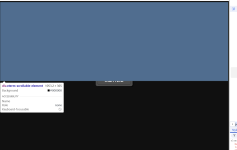
[BUG] LXC Console: xterm.js black overlay blocks Start button & causes termproxy timeout when stopped

ookouif

New Member
Aug 30, 2026
2
0
1
Environment:
  • Proxmox VE version: pve-manager/9.2.11 (Debian Trixie)
  • Browser: Tested on Chrome, Edge, and Incognito mode across multiple devices.
  • Scope: All LXC containers, including brand new ones created after the issue started.
Problem Description:
When an LXC container is in a stopped state, opening the "Console" tab causes xterm.js to render a black canvas overlay on the top half of the screen. This overlay covers the "Start Now" button, making it impossible to click directly from the console view .

Furthermore, if you attempt to interact with the console before starting the container (or if the backend mistakenly initializes the connection), PVE throws a hard backend error:

text
failed waiting for client: timed out
TASK ERROR: command '/usr/bin/termproxy 5900 --path /vms/100 --perm VM.Console --vncticket-endpoint --verify-port --ticket-fd 6 -- /usr/bin/dtach -A /var/run/dtach/vzctlconsole100 -r winch -z lxc-console -n 100 -e -1' failed: exit code 1

To Reproduce:
  1. Stop any LXC container (e.g., ID 100).
  2. Click the "Console" tab.
  3. Observe the black canvas overlay blocking the "Start Now" button .
  4. If you try to click "Start" through the console (or force the connection), the backend throws the termproxy timed out error mentioned above.
Workaround / Additional Info:
  • The issue can be bypassed by going to the "Summary" tab, clicking "Start" there first, and then opening the console. The terminal works fine when the container is running.
  • This is purely a frontend/UI issue and does not affect container performance or pct enter from the host shell.
  • I have already tried:
    • Hard browser refresh and clearing cache.
    • Using different browsers and devices.
    • Full physical host reboot.
    • Reinstalling pve-manager and pve-xtermjs via apt.
    • Cleaning /var/run/dtach and restarting pveproxy.
    • Patching the CSS (.xterm-scrollable-element { display: none !important; }) directly into /usr/share/pve-manager/css/ext6-pve.css (which hides the overlay in some contexts but does not fix the underlying rendering logic).
It seems like a z-index / CSS canvas issue combined with a logic bug in pve-xtermjs when the session is idle (container stopped) .

Has anyone else encountered this? Any feedback would be greatly appreciated.

 

Attachments

  • 01_black_overlay_blocking_start_button.png.png
    01_black_overlay_blocking_start_button.png.png
    35 KB · Views: 9
  • 02_devtools_showing_canvas_element.png.png
    02_devtools_showing_canvas_element.png.png
    38.5 KB · Views: 9
hi,

tested with multiple browsers here, but could not reproduce that. it always showed the guest not running button correctly and not any xtermjs part.

can you give me the output of

'pct config ID' for the container, and 'pveversion -v' to see which versions and configs you're running?

also, does the browser console show anything when you open the console tab this way?
 
hi,

tested with multiple browsers here, but could not reproduce that. it always showed the guest not running button correctly and not any xtermjs part.

can you give me the output of

'pct config ID' for the container, and 'pveversion -v' to see which versions and configs you're running?

also, does the browser console show anything when you open the console tab this way?
Hi,

Sorry for the late reply. I've been busy setting up my network environment, but I appreciate you taking the time to respond!

Here is my pct config 100:

text
arch: amd64
cores: 2
features: nesting=1
hostname: SubConverter-Extended
memory: 1024
net0: name=eth0,bridge=vmbr0,firewall=1,gw=192.168.2.1,hwaddr=BC:24:11:8F:56:11,ip=192.168.2.251/24,type=veth
ostype: debian
rootfs: local-lvm:vm-100-disk-0,size=10G
swap: 1024
unprivileged: 1

Here is the beginning of my pveversion -v:

text
proxmox-ve: 9.2.0 (running kernel: 7.0.14-6-pve)
pve-manager: 9.2.11 (running version: 9.2.11/f6997e698c7933ea)
proxmox-kernel-7.0.14-6-pve-signed: 7.0.14-6
proxmox-kernel-7.0: 7.0.14-6
lxc-pve: 7.0.0-2
pve-xtermjs: 6.0.0-2
I'm currently running Proxmox VE 9.2.0 with the new 7.0.14-6-pve kernel, and lxc-pve is at version 7.0.0-2.

Regarding the browser console: When I open the console tab on a stopped LXC container, I don't see any JS errors, but the black overlay (the xterm.js canvas) physically covers the "Start Now" button. It doesn't show up in devtools as a JS error, it's purely a CSS/rendering layout issue.

Could this be related to the new 7.0 kernel, or a version mismatch between lxc-pve 7.0.0-2 and pve-xtermjs 6.0.0-2? Thanks for your help!
 
I can reproduce this on my test cluster running 9.2.11 using two different browsers (Firefox 152.0.6 and Chrome 151.0.7922.137).
It doesn't matter if it is a VM or a LXC. Setting page zoom to 90% or below makes the start button visible again at least.
pveversion -v
proxmox-ve: 9.2.0 (running kernel: 7.0.14-14-pve)
pve-manager: 9.2.11 (running version: 9.2.11/f6997e698c7933ea)
proxmox-kernel-helper: 9.2.0
proxmox-kernel-7.0: 7.0.14-14
proxmox-kernel-7.0.14-14-pve-signed: 7.0.14-14
proxmox-kernel-7.0.14-4-pve-signed: 7.0.14-4
proxmox-kernel-6.17: 6.17.13-21
proxmox-kernel-6.17.13-21-pve-signed: 6.17.13-21
proxmox-kernel-6.17.2-1-pve-signed: 6.17.2-1
amd64-microcode: 3.20251202.1~bpo13+1
ceph: 20.2.2-pve1
ceph-fuse: 20.2.2-pve1
corosync: 3.1.10-pve3
criu: 4.1.1-1
frr-pythontools: 10.6.1-1+pve3
ifupdown2: 3.3.0-1+pmx12
ksm-control-daemon: 1.5-1
libjs-extjs: 7.0.0-7
libproxmox-acme-perl: 1.7.2
libproxmox-backup-qemu0: 2.0.2
libproxmox-rs-perl: 0.4.1
libpve-access-control: 9.1.1
libpve-apiclient-perl: 3.4.2
libpve-cluster-api-perl: 9.1.6
libpve-cluster-perl: 9.1.6
libpve-common-perl: 9.2.1
libpve-guest-common-perl: 6.0.5
libpve-http-server-perl: 6.0.5
libpve-network-perl: 1.6.7
libpve-notify-perl: 9.1.6
libpve-rs-perl: 0.15.3
libpve-storage-perl: 9.1.9
libspice-server1: 0.15.2-1+b1
lvm2: 2.03.31-2+pmx1
lxc-pve: 7.0.0-2
lxcfs: 7.0.0-pve1
novnc-pve: 1.7.0-2
proxmox-backup-client: 4.2.5-1
proxmox-backup-file-restore: 4.2.5-1
proxmox-backup-restore-image: 1.0.0
proxmox-enterprise-support-keyring: 1.1
proxmox-firewall: 1.2.3
proxmox-kernel-helper: 9.2.0
proxmox-mail-forward: 1.0.3
proxmox-mini-journalreader: 1.7
proxmox-offline-mirror-helper: 0.7.4
proxmox-widget-toolkit: 5.2.8
pve-cluster: 9.1.6
pve-container: 6.1.13
pve-docs: 9.2.4
pve-edk2-firmware: 4.2025.05-3
pve-esxi-import-tools: 1.0.1
pve-firewall: 6.0.5
pve-firmware: 3.18-6
pve-ha-manager: 5.2.5
pve-i18n: 3.10.0
pve-qemu-kvm: 11.0.3-3
pve-xtermjs: 6.0.0-2
qemu-server: 9.2.7
smartmontools: 7.5-pve2
spiceterm: 3.4.2
swtpm: 0.8.0+pve3
vncterm: 1.9.2
zfsutils-linux: 2.4.4-pve1

This element is shown on the screen and overlays the button:
Code:
<div class="xterm-scrollable-element " role="presentation" style="position: relative; background-color: rgb(0, 0, 0);"><div class="xterm-screen" style="width: 720px; height: 480px;"><div class="xterm-helpers"><textarea class="xterm-helper-textarea" aria-label="Terminal input" aria-multiline="false" autocorrect="off" autocapitalize="off" spellcheck="false" tabindex="0" style="width: 20px; height: 20px; left: 803px; top: 245px; z-index: 1000;"></textarea><div class="composition-view"></div></div><style>.xterm .xterm-scrollable-element > .scrollbar > .slider {
  background: #ffffff33;
}
.xterm .xterm-scrollable-element > .scrollbar > .slider:hover {
  background: #ffffff66;
}
.xterm .xterm-scrollable-element > .scrollbar > .slider.active {
  background: #ffffff80;
}</style><div class="xterm-decoration-container"></div><canvas class="xterm-link-layer" width="1440" height="960" style="z-index: 2; width: 720px; height: 480px;"></canvas><canvas width="1440" height="960" style="width: 720px; height: 480px;"></canvas></div><div role="presentation" aria-hidden="true" class="invisible scrollbar horizontal" style="position: absolute; width: 0px; height: 0px; left: 0px; bottom: 0px;"><div class="slider" style="position: absolute; top: 0px; left: 0px; height: 0px; transform: translate3d(0px, 0px, 0px); contain: strict; width: 0px;"></div></div><div role="presentation" aria-hidden="true" class="invisible scrollbar vertical" style="position: absolute; width: 14px; height: 0px; right: 0px; top: 0px;"><div class="slider" style="position: absolute; top: 0px; left: 0px; width: 14px; transform: translate3d(0px, 0px, 0px); contain: strict; height: 0px;"></div></div></div>