

Hello everyone,
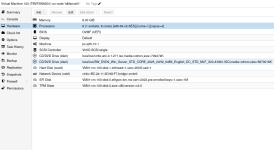
I'm experiencing issues installing Microsoft Windows Server 2025. Whenever I try to install this operating system, the installer goes up to 15% and then just shows a message: "Windows server installation has failed.", no other useful information.
Has anyone experienced this and how to resolve this issue?
What I've tried so far:
- Three different Microsoft Windows Server 2025 ISO's (all of them show the exact same problem)
- Switching from VirtIO SCSI to SATA (to make sure the VirIO drivers were not causing issues)
- Two different VirtIO driver versions
- Switching from CPU type host to x86-64-v2
I'm running Proxmox 9.1.4 on a ZFS backed store.
I'm experiencing issues installing Microsoft Windows Server 2025. Whenever I try to install this operating system, the installer goes up to 15% and then just shows a message: "Windows server installation has failed.", no other useful information.
Has anyone experienced this and how to resolve this issue?
What I've tried so far:
- Three different Microsoft Windows Server 2025 ISO's (all of them show the exact same problem)
- Switching from VirtIO SCSI to SATA (to make sure the VirIO drivers were not causing issues)
- Two different VirtIO driver versions
- Switching from CPU type host to x86-64-v2
I'm running Proxmox 9.1.4 on a ZFS backed store.
Attachments

Last edited:
