Environment:
- Proxmox VE 8.4.13
- Kernel: 6.8.12-15-pve
- Storage layout:
/dev/pve/root -> 174 GB (mounted on /)
/dev/pve/data -> 40 GB (thin pool)
/var/tmp on same filesystem as /
Issue:
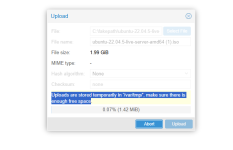
Even with enough free space in /var/tmp (≈114 GB available), the web UI still shows the warning below when uploading ISOs or templates:
"Uploads are stored temporarily in '/var/tmp/', make sure there is enough free space."
Uploads complete successfully, but the warning always appears in the upload dialog.
Troubleshooting steps performed:
- Verified /var/tmp is on the same FS as / (/dev/mapper/pve-root)
- Confirmed 114 GB free (df -h /var/tmp)
- Confirmed TMPDIR is not defined in pveproxy environment:
grep TMPDIR /proc/$(pidof pveproxy)/environ | tr '\0' '\n'
→ No output.
- Restarted services (systemctl restart pveproxy pvedaemon pvestatd)
- Rebooted host
- Warning persists
Workaround:
Manually copying ISO files to:
/var/lib/vz/template/iso
works perfectly and bypasses the warning.
Notes:
- Behavior reproduced after resizing root LV from 65 GB → 174 GB.
- Appears to be a frontend check issue (possibly in pveFileUpload.js).
- Backend (pvedaemon) handles upload correctly — the warning seems cosmetic.
Expected behavior:
When /var/tmp has enough free space, the upload dialog should not display this warning.
If needed, I can provide screenshots and df outputs. Please let me know if any logs would help confirm the frontend logic path.
- Proxmox VE 8.4.13
- Kernel: 6.8.12-15-pve
- Storage layout:
/dev/pve/root -> 174 GB (mounted on /)
/dev/pve/data -> 40 GB (thin pool)
/var/tmp on same filesystem as /
Issue:
Even with enough free space in /var/tmp (≈114 GB available), the web UI still shows the warning below when uploading ISOs or templates:
"Uploads are stored temporarily in '/var/tmp/', make sure there is enough free space."
Uploads complete successfully, but the warning always appears in the upload dialog.
Troubleshooting steps performed:
- Verified /var/tmp is on the same FS as / (/dev/mapper/pve-root)
- Confirmed 114 GB free (df -h /var/tmp)
- Confirmed TMPDIR is not defined in pveproxy environment:
grep TMPDIR /proc/$(pidof pveproxy)/environ | tr '\0' '\n'
→ No output.
- Restarted services (systemctl restart pveproxy pvedaemon pvestatd)
- Rebooted host
- Warning persists
Workaround:
Manually copying ISO files to:
/var/lib/vz/template/iso
works perfectly and bypasses the warning.
Notes:
- Behavior reproduced after resizing root LV from 65 GB → 174 GB.
- Appears to be a frontend check issue (possibly in pveFileUpload.js).
- Backend (pvedaemon) handles upload correctly — the warning seems cosmetic.
Expected behavior:
When /var/tmp has enough free space, the upload dialog should not display this warning.
If needed, I can provide screenshots and df outputs. Please let me know if any logs would help confirm the frontend logic path.