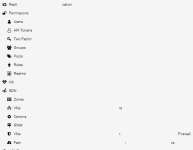
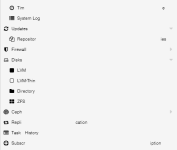
broken text in browser window

aoxomoxoa

New Member
Dec 29, 2025
16
1
3
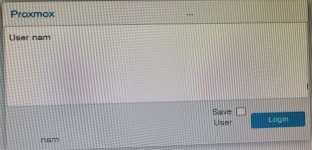
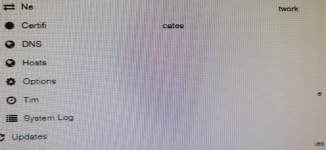
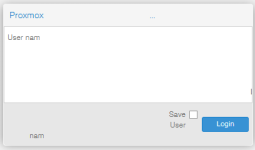
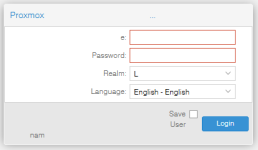
I have just installed VE, and when I open a browser window and log in, there are text strings which are broken up. In the Node pane in the center, the word "Network" appears as "Ne" where it should start, and then "twork" almost at the right edge of the pane. The word "Certificates" appears as "Certifi" where it should start, and then "cates" in the middle of the pane.

Not every word is broken up that way, and it doesn't appear to have anything to do with the length. "System Log" is not broken up, but "Time" displays as "Tim" and then "e".

The display resolution is 1600x1200 on an Acer monitor, and the video card is an AMD MSI Radeon R7 240 2GD3 64b LP.
 
Please provide a screenshot. Thanks.
 
Please provide a screenshot. Thanks.
you can see that the problem turns up right at the login dialog. before I even get to the main display.
 

Attachments

  • login-1.jpg
    login-1.jpg
    1.5 MB · Views: 16
  • login-2.jpg
    login-2.jpg
    1.3 MB · Views: 16
  • DC-1.png
    DC-1.png
    97.4 KB · Views: 16
  • node-1.png
    node-1.png
    831.2 KB · Views: 15
those arent screenshots, those are photographs of a few pixels.
hurts the eyes to look at it.
what os is this and what browserplugins are running?
does it look the same in an incognito/private window?
 
apologies.

the machine I am running the browser on is Windows 10, no plugins, incognito mode shows the saqme issue.
 

Attachments

  • login-1.png
    login-1.png
    3.6 KB · Views: 6
  • login-2.png
    login-2.png
    5.3 KB · Views: 5
  • dc-2.png
    dc-2.png
    10.5 KB · Views: 5
  • node-2.png
    node-2.png
    8.3 KB · Views: 6
  • Like
Reactions: fstrankowski
Hi,

What is your version of PVE ?

pveversion -v (in cli) or using "Package versions" button on the node pane.

No issue here with PVE8.4 and W11 with Firefox or Chrome.

Best regards,
 
root@PROX1:/etc# pveversion -v
proxmox-ve: 9.1.0 (running kernel: 6.17.2-1-pve)
pve-manager: 9.1.1 (running version: 9.1.1/42db4a6cf33dac83)
proxmox-kernel-helper: 9.0.4
proxmox-kernel-6.17.2-1-pve-signed: 6.17.2-1
proxmox-kernel-6.17: 6.17.2-1
ceph-fuse: 19.2.3-pve2
corosync: 3.1.9-pve2
criu: 4.1.1-1
frr-pythontools: 10.3.1-1+pve4
ifupdown2: 3.3.0-1+pmx11
intel-microcode: 3.20250812.1~deb13u1
ksm-control-daemon: 1.5-1
libjs-extjs: 7.0.0-5
libproxmox-acme-perl: 1.7.0
libproxmox-backup-qemu0: 2.0.1
libproxmox-rs-perl: 0.4.1
libpve-access-control: 9.0.4
libpve-apiclient-perl: 3.4.2
libpve-cluster-api-perl: 9.0.7
libpve-cluster-perl: 9.0.7
libpve-common-perl: 9.0.15
libpve-guest-common-perl: 6.0.2
libpve-http-server-perl: 6.0.5
libpve-network-perl: 1.2.3
libpve-rs-perl: 0.11.3
libpve-storage-perl: 9.0.18
libspice-server1: 0.15.2-1+b1
lvm2: 2.03.31-2+pmx1
lxc-pve: 6.0.5-3
lxcfs: 6.0.4-pve1
novnc-pve: 1.6.0-3
proxmox-backup-client: 4.0.20-1
proxmox-backup-file-restore: 4.0.20-1
proxmox-backup-restore-image: 1.0.0
proxmox-firewall: 1.2.1
proxmox-kernel-helper: 9.0.4
proxmox-mail-forward: 1.0.2
proxmox-mini-journalreader: 1.6
proxmox-offline-mirror-helper: 0.7.3
proxmox-widget-toolkit: 5.1.2
pve-cluster: 9.0.7
pve-container: 6.0.18
pve-docs: 9.1.0
pve-edk2-firmware: 4.2025.05-2
pve-esxi-import-tools: 1.0.1
pve-firewall: 6.0.4
pve-firmware: 3.17-2
pve-ha-manager: 5.0.8
pve-i18n: 3.6.2
pve-qemu-kvm: 10.1.2-3
pve-xtermjs: 5.5.0-3
qemu-server: 9.0.30
smartmontools: 7.4-pve1
spiceterm: 3.4.1
swtpm: 0.8.0+pve3
vncterm: 1.9.1
zfsutils-linux: 2.3.4-pve1
 
Changing resolutions results in what?
 
have now tried it with both an HP Envy DV7 3000 and a Dell Latitude E5520, with both Chrome and Firefox.

Same exact result.
 
to be clear, I can open any browser on any of these machines, go to any website and get a clean display of the web page.

this problem is unique to proxmox.

I had Windows installed on this exact host, and the browser worked flawlessly, whether I was browsing from it or to it.

what could possibly be wrong ?
 
stumbled across a post by a fellow who knew what the issue was.

go to /usr/share/javascript/extjs/theme-crisp/resources

edit theme-crisp-all_1.css and theme-crisp-all_2.css

delete every instance of "Helvetica, "

and now the web pages come up perfect.

why would the developers include a font with potential for this kind of damage, and put it at the head of the list ?

2 for 2. solved both this and my post on getting USB tethering to work on the host.

Not so confident about the third one: getting USB WiFi working.

Anyone up for a challenge ?