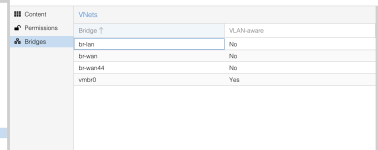
# cat /etc/network/interfaces
# /etc/network/interfaces -- configuration file for ifup(8), ifdown(8)


# The loopback interface


auto lo
iface lo inet loopback


iface eno1 inet manual


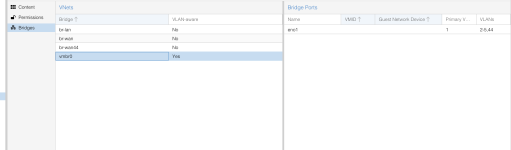
auto vmbr0
iface vmbr0 inet static
        address 169.254.255.1/32
        bridge-ports eno1
        bridge-vids 1 2 3 4 5 44
        bridge-vlan-aware yes
        bridge-fd 0
        bridge-stp off
        bridge-pvid 1


auto vmbr0.2
iface vmbr0.2 inet static
        address 192.168.200.1
        netmask 255.255.255.0
        gateway 192.168.200.254


auto vmbr0.1
iface vmbr0.1 inet static
        address 10.7.1.10
        netmask 255.255.255.0


auto eno2
iface eno2 inet static
        address 10.7.222.1
        netmask 255.255.255.0
        broadcast 10.7.222.255


# ip addr show
1: lo: <LOOPBACK,UP,LOWER_UP> mtu 65536 qdisc noqueue state UNKNOWN group default qlen 1000
    link/loopback 00:00:00:00:00:00 brd 00:00:00:00:00:00
    inet 127.0.0.1/8 scope host lo
       valid_lft forever preferred_lft forever
    inet6 ::1/128 scope host noprefixroute
       valid_lft forever preferred_lft forever
2: eno1: <BROADCAST,MULTICAST,UP,LOWER_UP> mtu 1500 qdisc mq master vmbr0 state UP group default qlen 1000
    link/ether 0c:c4:7a:cf:83:66 brd ff:ff:ff:ff:ff:ff
    altname enp3s0
    altname enx0cc47acf8366
3: eno2: <NO-CARRIER,BROADCAST,MULTICAST,UP> mtu 1500 qdisc fq_codel state DOWN group default qlen 1000
    link/ether 0c:c4:7a:cf:83:67 brd ff:ff:ff:ff:ff:ff
    altname enp0s25
    altname enx0cc47acf8367
    inet 10.7.222.1/24 brd 10.7.222.255 scope global eno2
       valid_lft forever preferred_lft forever
5: vmbr0: <BROADCAST,MULTICAST,UP,LOWER_UP> mtu 1500 qdisc noqueue state UP group default qlen 1000
    link/ether 0c:c4:7a:cf:83:66 brd ff:ff:ff:ff:ff:ff
    inet 169.254.255.1/32 scope global vmbr0
       valid_lft forever preferred_lft forever
    inet6 fe80::ec4:7aff:fecf:8366/64 scope link proto kernel_ll
       valid_lft forever preferred_lft forever
6: vmbr0.2@vmbr0: <BROADCAST,MULTICAST,UP,LOWER_UP> mtu 1500 qdisc noqueue state UP group default qlen 1000
    link/ether 0c:c4:7a:cf:83:66 brd ff:ff:ff:ff:ff:ff
    inet 192.168.200.1/24 scope global vmbr0.2
       valid_lft forever preferred_lft forever
    inet6 fde6:f6f5:c665:0:ec4:7aff:fecf:8366/64 scope global dynamic mngtmpaddr proto kernel_ra
       valid_lft forever preferred_lft forever
    inet6 fe80::ec4:7aff:fecf:8366/64 scope link proto kernel_ll
       valid_lft forever preferred_lft forever
7: vmbr0.1@vmbr0: <BROADCAST,MULTICAST,UP,LOWER_UP> mtu 1500 qdisc noqueue state UP group default qlen 1000
    link/ether 0c:c4:7a:cf:83:66 brd ff:ff:ff:ff:ff:ff
    inet 10.7.1.10/24 scope global vmbr0.1
       valid_lft forever preferred_lft forever
    inet6 fe80::ec4:7aff:fecf:8366/64 scope link proto kernel_ll
       valid_lft forever preferred_lft forever
8: tap208i0: <BROADCAST,MULTICAST,PROMISC,UP,LOWER_UP> mtu 1500 qdisc fq_codel master vmbr0 state UNKNOWN group default qlen 1000
    link/ether 5e:b1:f5:7f:2a:17 brd ff:ff:ff:ff:ff:ff
9: veth210i0@if2: <BROADCAST,MULTICAST,UP,LOWER_UP> mtu 1500 qdisc noqueue master vmbr0 state UP group default qlen 1000
    link/ether fe:76:86:95:74:55 brd ff:ff:ff:ff:ff:ff link-netnsid 0
10: veth300i0@if2: <BROADCAST,MULTICAST,UP,LOWER_UP> mtu 1500 qdisc noqueue master vmbr0 state UP group default qlen 1000
    link/ether fe:cd:82:ba:16:a0 brd ff:ff:ff:ff:ff:ff link-netnsid 1
11: veth300i1@if3: <BROADCAST,MULTICAST,UP,LOWER_UP> mtu 1500 qdisc noqueue master vmbr0 state UP group default qlen 1000
    link/ether fe:56:60:e1:d2:2e brd ff:ff:ff:ff:ff:ff link-netnsid 1
12: veth301i0@if2: <BROADCAST,MULTICAST,UP,LOWER_UP> mtu 1500 qdisc noqueue master vmbr0 state UP group default qlen 1000
    link/ether fe:ed:c8:ce:13:f1 brd ff:ff:ff:ff:ff:ff link-netnsid 2
13: veth301i1@if3: <BROADCAST,MULTICAST,UP,LOWER_UP> mtu 1500 qdisc noqueue master vmbr0 state UP group default qlen 1000
    link/ether fe:89:1b:6e:bc:90 brd ff:ff:ff:ff:ff:ff link-netnsid 2
14: veth302i0@if2: <BROADCAST,MULTICAST,UP,LOWER_UP> mtu 1500 qdisc noqueue master vmbr0 state UP group default qlen 1000
    link/ether fe:fd:c6:20:45:85 brd ff:ff:ff:ff:ff:ff link-netnsid 3
15: veth302i1@if3: <BROADCAST,MULTICAST,UP,LOWER_UP> mtu 1500 qdisc noqueue master vmbr0 state UP group default qlen 1000
    link/ether fe:6b:71:73:56:e4 brd ff:ff:ff:ff:ff:ff link-netnsid 3
16: veth200i0@if2: <BROADCAST,MULTICAST,UP,LOWER_UP> mtu 1500 qdisc noqueue master vmbr0 state UP group default qlen 1000
    link/ether fe:1e:60:46:80:4b brd ff:ff:ff:ff:ff:ff link-netnsid 4
17: veth201i0@if2: <BROADCAST,MULTICAST,UP,LOWER_UP> mtu 1500 qdisc noqueue master vmbr0 state UP group default qlen 1000
    link/ether fe:74:1f:15:fa:07 brd ff:ff:ff:ff:ff:ff link-netnsid 5
18: veth209i0@if2: <BROADCAST,MULTICAST,UP,LOWER_UP> mtu 1500 qdisc noqueue master vmbr0 state UP group default qlen 1000
    link/ether fe:9c:4c:b3:90:f2 brd ff:ff:ff:ff:ff:ff link-netnsid 6


# ip route
default via 192.168.200.254 dev vmbr0.2 proto kernel onlink
10.7.1.0/24 dev vmbr0.1 proto kernel scope link src 10.7.1.10
10.7.222.0/24 dev eno2 proto kernel scope link src 10.7.222.1 linkdown
192.168.200.0/24 dev vmbr0.2 proto kernel scope link src 192.168.200.1