

Hi,
Following is my situation: I had bought a Beelink ME mini which CPU N150. Installed the proxmox 9.1.4 and build the zimaOS. Due to the device had 6 plots PCIe m.2. I planning to build a RAID5 m.2 for the zimaOS.
But I stuck on the passthrough step.
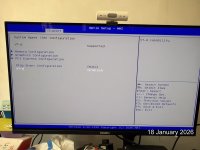
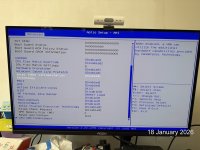
As the above photos showed, I checked the IOMMU had been turn on at BIOS level.
I follow the PCIe passthrough instruction on YT: https://youtu.be/_hOBAGKLQkI?si=CQHhkIAqVbSbxbyi
Sorry for I cannot show the promt in my server because I am in office now. But all the setting had been follow the YT video.
Every time I tried to passthrough the m.2 to zimaOS, the zimaOS hang on boot situation.
Can you tell me what's wrong with me? It stuck to passthrough the m.2 to zimaOS?
Following is my situation: I had bought a Beelink ME mini which CPU N150. Installed the proxmox 9.1.4 and build the zimaOS. Due to the device had 6 plots PCIe m.2. I planning to build a RAID5 m.2 for the zimaOS.
But I stuck on the passthrough step.
As the above photos showed, I checked the IOMMU had been turn on at BIOS level.
I follow the PCIe passthrough instruction on YT: https://youtu.be/_hOBAGKLQkI?si=CQHhkIAqVbSbxbyi
Sorry for I cannot show the promt in my server because I am in office now. But all the setting had been follow the YT video.
Every time I tried to passthrough the m.2 to zimaOS, the zimaOS hang on boot situation.
Can you tell me what's wrong with me? It stuck to passthrough the m.2 to zimaOS?
