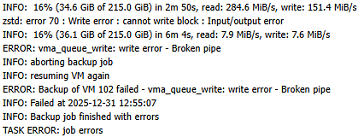
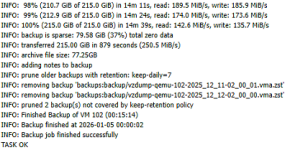
I can't seem to finish a backup. They'll get to about 50-60% and then I see these logs:
unable to activate storage 'backups' - directory '/mnt/pve/backups' does not exist or is unreachable
("backups" is the ID of the SMB server, which is a Synology NAS).
Backup job is just one VM, size of backups are around 80GB (back when they worked)
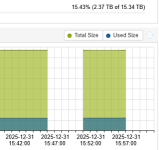
I can corroborate this disconnection in the webGUI where you can click your storage pool to check the status... the SMB target will say "Enabled - Yes" but "Active - No". Within seconds after the backup fails, that "No" will turn into a "Yes" but the backup doesn't continue, it eventually stops itself.
Synology is DS923+. ProxMox 8.3.0 running on this: https://www.minisforum.com/products/minisforum-ms-a2
I tried turning off opportunistic locking in Synology. SMB2 and 3 are allowed. There is no quota or rate limit anywhere.
I'm certain it's not a permissions issue (otherwise this would have failed way earlier.... it does indeed write data to the Synology before this disconnect).
Both ProxMox and Synology have IP's in the same subnet. All that separates them is a dumb switch.
I ran a continuous ping from my desktop to the ProxMox's IP and the IP of the NIC that ProxMox is using on the Synology... no dropped pings during this disconnect so I really don't think it's the network.

This started happening just on the 18th of Dec, once-a-day backups were running fine for over a year up until now.
Any ideas as to what else I could check? Is there a document for "best practices" when backing up to a Synology or just an SMB target in general? I tried looking but couldn't find one and most threads that talk about this say "just back up to NFS or SMB" which makes me think "basic" settings should work for the most part. Would it be a good idea to do NFS instead?
unable to activate storage 'backups' - directory '/mnt/pve/backups' does not exist or is unreachable
("backups" is the ID of the SMB server, which is a Synology NAS).
Backup job is just one VM, size of backups are around 80GB (back when they worked)
I can corroborate this disconnection in the webGUI where you can click your storage pool to check the status... the SMB target will say "Enabled - Yes" but "Active - No". Within seconds after the backup fails, that "No" will turn into a "Yes" but the backup doesn't continue, it eventually stops itself.
Synology is DS923+. ProxMox 8.3.0 running on this: https://www.minisforum.com/products/minisforum-ms-a2
I tried turning off opportunistic locking in Synology. SMB2 and 3 are allowed. There is no quota or rate limit anywhere.
I'm certain it's not a permissions issue (otherwise this would have failed way earlier.... it does indeed write data to the Synology before this disconnect).
Both ProxMox and Synology have IP's in the same subnet. All that separates them is a dumb switch.
I ran a continuous ping from my desktop to the ProxMox's IP and the IP of the NIC that ProxMox is using on the Synology... no dropped pings during this disconnect so I really don't think it's the network.
This started happening just on the 18th of Dec, once-a-day backups were running fine for over a year up until now.
Any ideas as to what else I could check? Is there a document for "best practices" when backing up to a Synology or just an SMB target in general? I tried looking but couldn't find one and most threads that talk about this say "just back up to NFS or SMB" which makes me think "basic" settings should work for the most part. Would it be a good idea to do NFS instead?