

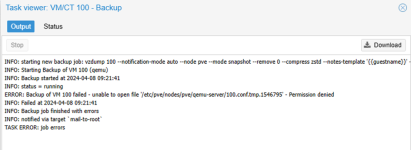
Backup of VM failed - unable to open file
- Thread starter zygmar
- Start date
You are using an out of date browser. It may not display this or other websites correctly.
You should upgrade or use an alternative browser.
You should upgrade or use an alternative browser.

What is the output of
Probably you have a Cluster without Quorum. Search for "pvecm expeced" for a tempory workaround and for "quorum device" for a solution.
Best regards
pvecm status? (Please post in [CODE]...[/CODE]-Tags).Probably you have a Cluster without Quorum. Search for "pvecm expeced" for a tempory workaround and for "quorum device" for a solution.
Best regards
When I try to run shell I get the message:
TASK ERROR: command '/usr/bin/termproxy 5900 --path /nodes/pve --perm Sys.Console -- /bin/login -f root' failed: exit code 1
How can I make a vm backup in this situation? This is a priority. If I succeed, I will reinstall PVE1 again.
TASK ERROR: command '/usr/bin/termproxy 5900 --path /nodes/pve --perm Sys.Console -- /bin/login -f root' failed: exit code 1
How can I make a vm backup in this situation? This is a priority. If I succeed, I will reinstall PVE1 again.
I am not sure where you got this message. Debugging your situation should take place as user "root" at the local console - either physically or via IPMI/Drac/Amt/Serial... Edit: or ssh of course, if the network is available...When I try to run shell I get the message:
TASK ERROR: command '/usr/bin/termproxy 5900 --path /nodes/pve --perm Sys.Console -- /bin/login -f root' failed: exit code 1
What about the output of "pvecm status" I'd asked for?
Last edited:
Almost sure you have a lost-quorum situation. Don't know what cluster setup you have corosync, storage, ceph, qdevice etc. Search the forums as applicable. You'll find what you need.TASK ERROR: command '/usr/bin/termproxy 5900 --path /nodes/pve --perm Sys.Console -- /bin/login -f root' failed: exit code 1
If you are really frustrated; see this, it may even help you.
Last edited: