

I have a NAS to which I backup my VMs and containers.
All my containers backup to this NAS fine.
Not so for my two VMs - pfSense and Home assistant OS. Here is a log from the pfSense backup :
INFO: starting new backup job: vzdump 103 --mode snapshot --node proxmox --compress 0 --notes-template '{{guestname}}' --notification-mode notification-system --storage zfs_nas --remove 0
INFO: Starting Backup of VM 103 (qemu)
INFO: Backup started at 2026-08-28 06:54:48
INFO: status = running
INFO: VM Name: pfSense
INFO: include disk 'sata0' 'xfs_storage:103/vm-103-disk-1.qcow2' 61058M
INFO: include disk 'efidisk0' 'xfs_storage:103/vm-103-disk-0.qcow2' 528K
INFO: backup mode: snapshot
INFO: ionice priority: 7
INFO: creating vzdump archive '/mnt/backups/dump/vzdump-qemu-103-2026_08_28-06_54_48.vma'
INFO: skipping guest filesystem freeze - disabled in VM options
INFO: starting backup via QMP command
INFO: started backup task 'bcf0ebcb-e9ad-4622-a747-0172a4a3158a'
INFO: resuming VM again
INFO: 11% (6.7 GiB of 59.6 GiB) in 3s, read: 2.2 GiB/s, write: 711.9 MiB/s
INFO: 25% (15.3 GiB of 59.6 GiB) in 6s, read: 2.9 GiB/s, write: 727.9 MiB/s
INFO: 42% (25.3 GiB of 59.6 GiB) in 9s, read: 3.3 GiB/s, write: 446.3 MiB/s
INFO: 52% (31.3 GiB of 59.6 GiB) in 12s, read: 2.0 GiB/s, write: 402.3 MiB/s
INFO: 64% (38.6 GiB of 59.6 GiB) in 15s, read: 2.4 GiB/s, write: 631.7 MiB/s
INFO: 79% (47.2 GiB of 59.6 GiB) in 18s, read: 2.9 GiB/s, write: 272.1 MiB/s
INFO: 88% (52.8 GiB of 59.6 GiB) in 21s, read: 1.9 GiB/s, write: 197.1 MiB/s
INFO: 100% (59.6 GiB of 59.6 GiB) in 45s, read: 290.9 MiB/s, write: 38.3 MiB/s
ERROR: vma_writer_close: close failed - Host is down
INFO: aborting backup job
INFO: resuming VM again
ERROR: Backup of VM 103 failed - vma_writer_close: close failed - Host is down
INFO: Failed at 2026-08-28 06:55:34
INFO: Backup job finished with errors
INFO: notified via target `mail-to-root`
TASK ERROR: job errors
The NAS host is most definitely not down.
If I shut down this pfSense VM, I am able to back it up to the NAS without this error.
Also, I can back them up to local storage without this error, even if they are live.
Same exact symptom with the HAOS VM.
I have other VMs that are not always on, for instance an HAOS development VM. I can back it up to NAS without problem, whether it's running or not.
So, the problem seems to be very specific to the 2 live VMs I have - I can't back up either of them to NAS for some reason.
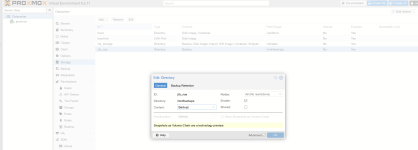
The NAS is a Ubuntu box. The ZFS volume is mounted over Samba and defined as directory storage. Here is the /etc/fstab entry and GUI config :
//server10g.localdomain/zfs/Backups/proxmox /mnt/backups cifs credentials=/etc/creds,x-systemd.automount,x-systemd.idle-timeout=60,nofail,uid=100000,gid=100000,file_mode=0777,dir_mode=0777,iocharset=utf8,vers=3.0 0 0
The NAS is not always-on - I use WOL to wake it up when needed. I trigger the backup job manually. It is not scheduled.
All my containers backup to this NAS fine.
Not so for my two VMs - pfSense and Home assistant OS. Here is a log from the pfSense backup :
INFO: starting new backup job: vzdump 103 --mode snapshot --node proxmox --compress 0 --notes-template '{{guestname}}' --notification-mode notification-system --storage zfs_nas --remove 0
INFO: Starting Backup of VM 103 (qemu)
INFO: Backup started at 2026-08-28 06:54:48
INFO: status = running
INFO: VM Name: pfSense
INFO: include disk 'sata0' 'xfs_storage:103/vm-103-disk-1.qcow2' 61058M
INFO: include disk 'efidisk0' 'xfs_storage:103/vm-103-disk-0.qcow2' 528K
INFO: backup mode: snapshot
INFO: ionice priority: 7
INFO: creating vzdump archive '/mnt/backups/dump/vzdump-qemu-103-2026_08_28-06_54_48.vma'
INFO: skipping guest filesystem freeze - disabled in VM options
INFO: starting backup via QMP command
INFO: started backup task 'bcf0ebcb-e9ad-4622-a747-0172a4a3158a'
INFO: resuming VM again
INFO: 11% (6.7 GiB of 59.6 GiB) in 3s, read: 2.2 GiB/s, write: 711.9 MiB/s
INFO: 25% (15.3 GiB of 59.6 GiB) in 6s, read: 2.9 GiB/s, write: 727.9 MiB/s
INFO: 42% (25.3 GiB of 59.6 GiB) in 9s, read: 3.3 GiB/s, write: 446.3 MiB/s
INFO: 52% (31.3 GiB of 59.6 GiB) in 12s, read: 2.0 GiB/s, write: 402.3 MiB/s
INFO: 64% (38.6 GiB of 59.6 GiB) in 15s, read: 2.4 GiB/s, write: 631.7 MiB/s
INFO: 79% (47.2 GiB of 59.6 GiB) in 18s, read: 2.9 GiB/s, write: 272.1 MiB/s
INFO: 88% (52.8 GiB of 59.6 GiB) in 21s, read: 1.9 GiB/s, write: 197.1 MiB/s
INFO: 100% (59.6 GiB of 59.6 GiB) in 45s, read: 290.9 MiB/s, write: 38.3 MiB/s
ERROR: vma_writer_close: close failed - Host is down
INFO: aborting backup job
INFO: resuming VM again
ERROR: Backup of VM 103 failed - vma_writer_close: close failed - Host is down
INFO: Failed at 2026-08-28 06:55:34
INFO: Backup job finished with errors
INFO: notified via target `mail-to-root`
TASK ERROR: job errors
The NAS host is most definitely not down.
If I shut down this pfSense VM, I am able to back it up to the NAS without this error.
Also, I can back them up to local storage without this error, even if they are live.
Same exact symptom with the HAOS VM.
I have other VMs that are not always on, for instance an HAOS development VM. I can back it up to NAS without problem, whether it's running or not.
So, the problem seems to be very specific to the 2 live VMs I have - I can't back up either of them to NAS for some reason.
The NAS is a Ubuntu box. The ZFS volume is mounted over Samba and defined as directory storage. Here is the /etc/fstab entry and GUI config :
//server10g.localdomain/zfs/Backups/proxmox /mnt/backups cifs credentials=/etc/creds,x-systemd.automount,x-systemd.idle-timeout=60,nofail,uid=100000,gid=100000,file_mode=0777,dir_mode=0777,iocharset=utf8,vers=3.0 0 0
The NAS is not always-on - I use WOL to wake it up when needed. I trigger the backup job manually. It is not scheduled.