

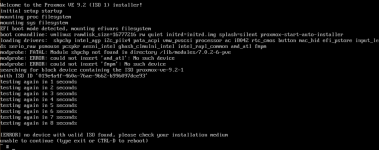
When I try to install VE 9.2-1 with the system booted in UEFI mode it will not mount the iso which the init file says should live in /proxmox.iso. When I BIOS boot the system this does not happen. I've read other threads that suggest putting the iso into the initrd.img file but I was hoping to avoid that.
I prepared the files using the proxmox-auto-install-assistant
Screenshot of the error:
ipxe config:
I've mostly copied the layout of the above from the generated boot.ipxe file from the automated installer.
I have also tried adding
Apologies if this is horridly wrong and I have misunderstood something.
I prepared the files using the proxmox-auto-install-assistant
proxmox-auto-install-assistant prepare-iso proxmox-ve_9.2-1.iso --fetch-from http --url "https://answer-server:8443/api2/json/auto-install/answer" --pxe --output /mnt/data/prox-auto-pxe/ --pxe-loader ipxeScreenshot of the error:
ipxe config:
Code:
set proxmox-path http://path/to/files
kernel ${proxmox-path}/vmlinuz ramdisk_size=16777216 rw quiet initrd=initrd.img splash=silent proxmox-start-auto-installer
initrd ${proxmox-path}/initrd.img
bootI have also tried adding
initrd ${proxmox-path}proxmox-ve_9.2-1-auto-from-http-url.iso proxmox.isoApologies if this is horridly wrong and I have misunderstood something.
