Arc B50 Pro Crashes VM

bellaireroad

New Member
Sep 30, 2025
28
3
3
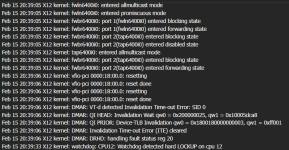
Hello, not sure where I have gone wrong, but I am trying to add an ARC Pro B50, and it is crashing the W11 VM and Mint VM. They freeze on startup, will not shutdown, and the node freezes as well..showing a watchdog error on a core. This requires a cold boot to restart the node

Proxmox version 9.1.5
6.17.9-1-pve
The machine is a SM X12SDV 20C

WHAT HAS BEEN DONE

BIOS has above 4G encoding enabled
Intel Vt-D is enabled
SRIOV is enabled
(There is no rebar setting in the latest BIOS)


intel_iommu=on iommu=pt

(added to /etc/modules)
vfio
vfio_iommu_type1
vfio_pci
vfio_virqfd

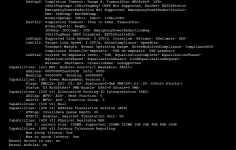
Please see attachments, thank you
 

Attachments
Last edited:
I don't know what you based your settings on, but you should start by configuring them correctly.

If you asked AI or something, don't bring those results here. It merely spits out results—mixing in version mismatches and failed configurations—without actually creating anything.

You should always use documentation for configuration.

https://pve.proxmox.com/wiki/PCI(e)_Passthrough
 
Last edited:
I don't know what you based your settings on, but you should start by configuring them correctly.

If you asked AI or something, don't bring those results here. It merely spits out results—mixing in version mismatches and failed configurations—without actually creating anything.

You should always use documentation for configuration.

https://pve.proxmox.com/wiki/PCI(e)_Passthrough
Thank you for your reply.

In response, I followed other posts in the forum dealing specifically with the B50 configuration. After reviewing the wiki, it seems that the kernal modification has not been added in my config, but I don't recall seeing that in other forum posts.(edit- it has been added) I wonder if it is recommended with the Xe kernal.

What did you see that told you it was configured incorrectly, and that AI was used?

The configuration I created is causing the system to lock up, and triggering a watchdog function on a CPU core. I have not seen that mentioned in any other posts.
 
Last edited:
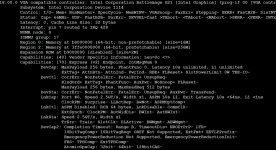
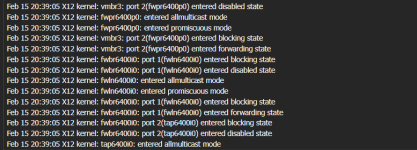
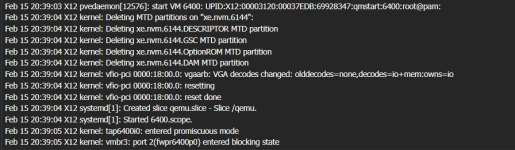
Here is the output of system log, from the time the VM is started to the time the CPU locks up. Anyone see the problem? thanks1.png2.png3.png
 
Last edited:
Got a little closer to the golden ring today.
Connected the ARC Pro B50 with occulink
both Win11 and Mint started without crashing

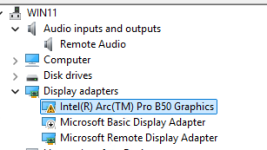
Opened Win 11 and loaded the XE drivers, but they would not stay enabled to a "43 error"
It is running on remote audio and display adapter drivers which are better than baseline
Screenshot 2026-02-20 212209.png

Unfortunately, Mint doesn't like it
It will start up, but stops at this point, before getting to login
Screenshot 2026-02-20 212357.png

It also has problems shutting down, this is reported. but will eventually close after a few minutes

Any ideas why Mint is a problem?
 

Attachments

  • Screenshot 2026-02-20 212521.png
    Screenshot 2026-02-20 212521.png
    6.2 KB · Views: 1
Last edited:
First, you should try using x16 lanes.

You should check the specifications of your motherboard and CPU.

https://www.intel.com/content/www/u...-30m-cache-up-to-3-10-ghz/specifications.html

The CPU has 32 lanes, with 49 lanes in use. 17 lanes are connected via the PCH.

https://gzhls.at/blob/ldb/0/a/7/a/664710fd94d0f966728d105fb157499a6a7f.pdf

https://www.supermicro.com/ja/products/motherboard/x12sdv-20c-spt8f

I don't think the GPU will run on the PCH's PCIe lanes.

It should work with either slimSAS x8 or PCIe x16.

*By the way, this motherboard doesn't seem to have a Rebar, but will the B50 work with it?

*I cannot confirm whether it will work on your PC. However, I was able to get the GPU (rx9070, b580) functioning properly in both the PCIe x16 slot on the CPU lane and the M.2 x4 slot on the CPU lane.
 
Last edited:
slim sas is out. there are 4 NVME running there
The Arc Pro B50 is PCIs 5.0 x8, and fit into a PCIe 16 slot where the other 8 lanes are used for power
For Occulink, you need a card that has an ATX power header
the card has a PCIe 16 slot for the B5O and power from the ATX header
Yes, it was running, and did not crash the VMs when they booted
However, the Win 11 gave a code 43, and the mint hung during boot
I also tried Zorin and Ubuntu desktop, they both hung as well
If I don't get the video figured out, I'll create a Jellyfin container, and try to pass it for transcoding