[SOLVED] An odd issue in Windows 11 quest -> Network Adapter -> No IP -> No DHCP -> Drivers are OK

adrian-1030

New Member
Jan 21, 2026
5
1
3
Hello community!

I wanted to test Proxmox on my powerful local machine to check the API and the overall performance of the VE server in order to prepare for migration to a dedicated server.

Host configuration:

1. Proxmox VE is installed in VMware Workstation Pro on Linux Fedora 43 + Wi-Fi network connection is applied on my PC:
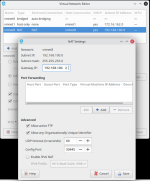
1769018484807.png

2. Proxmox configuration for virtual machines:

1769018566274.png

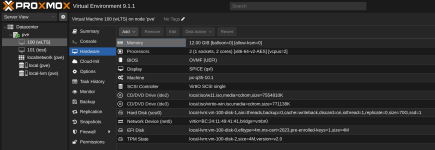
3. My VM hardware config:

1769018623014.png

4. Regardless of whether I set the IP to MANUAL or DHCP, the problem remains the same:

- no internet connection,
- ping to GUI at 192.168.100.128
- ping does not go to WAN outside Proxmox or to gateway 192.168.100.2
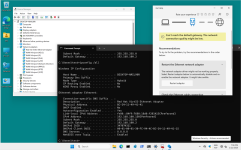
1769018793498.png

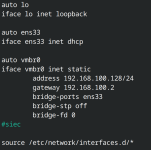
5. /etc/network config:

1769019016532.png

Please ask any additional questions you may have so that we can debug the problem.

Regards.
 
Last edited:
"iface ens33 inet dhcp" does not seem to make any sense, in combination with "bridge ports ens33".
Set the "physical" interface "ens33" to "manual".
 
Unfortunately, it didn't help at all. The problem remains the same on DHCP or manual IP in Windows.

CMD Windows:

Code:
>ipconfig /renew

Windows IP Configuration

An error occurred while renewing interface Ethernet : unable to contact your DHCP server. Request has timed out.
 
Hi @adrian-1030, welcome to the forum.

What you’re running is a fairly complex nested virtualization and networking setup, and it’s unlikely this is a Proxmox VE issue. If I understand correctly, your topology is:
Fedora (Wi-Fi) > VMware Workstation (NAT) > Proxmox VE (VM/Bridge) > Windows VM

The fact that the Windows VM can reach Proxmox but not the upstream gateway suggests a routing/NAT deficiency.
Keep in mind that similar limitations apply to Fedora Linux as they do in PVE: https://pve.proxmox.com/wiki/WLAN

Additionally, if .2 is an external GW (as it appears to be), both PVE and VMware have to allow ARP passthrough properly to train the ARP table on the clients/gw. This may require IP forwarding enabled and Promiscuous mode may need to be enabled on VMware, MAC address changes may need to be allowed.

There are a lot of maybes above. This is due to the config being unusual and not something we'd see in production. While someone may have experience with exactly such configuration, the chances are low. Unless you are willing to simplify things significantly, I'd say you are going to continue experimenting with various options in both VMware and PVE. The DHCP vs Manual IP settings on Windows is unlikely to play any difference.

You can also use tcpdump or similar tool to find out if any packets from Windows make it up to VMware virtual interface.

Good luck


Blockbridge : Ultra low latency all-NVME shared storage for Proxmox - https://www.blockbridge.com/proxmox
 
Hi @adrian-1030, welcome to the forum.

What you’re running is a fairly complex nested virtualization and networking setup, and it’s unlikely this is a Proxmox VE issue. If I understand correctly, your topology is:
Fedora (Wi-Fi) > VMware Workstation (NAT) > Proxmox VE (VM/Bridge) > Windows VM

The fact that the Windows VM can reach Proxmox but not the upstream gateway suggests a routing/NAT deficiency.
Keep in mind that similar limitations apply to Fedora Linux as they do in PVE: https://pve.proxmox.com/wiki/WLAN

Additionally, if .2 is an external GW (as it appears to be), both PVE and VMware have to allow ARP passthrough properly to train the ARP table on the clients/gw. This may require IP forwarding enabled and Promiscuous mode may need to be enabled on VMware, MAC address changes may need to be allowed.

There are a lot of maybes above. This is due to the config being unusual and not something we'd see in production. While someone may have experience with exactly such configuration, the chances are low. Unless you are willing to simplify things significantly, I'd say you are going to continue experimenting with various options in both VMware and PVE. The DHCP vs Manual IP settings on Windows is unlikely to play any difference.

You can also use tcpdump or similar tool to find out if any packets from Windows make it up to VMware virtual interface.

Good luck


Blockbridge : Ultra low latency all-NVME shared storage for Proxmox - https://www.blockbridge.com/proxmox
Hi, unfortunately, it cannot be helpful because it will not work in VMware Workstation Pro.
  • Promiscuous mode: ACCEPT
  • MAC address changes: ACCEPT
  • Forged transmits: ACCEPT
This solution is only suitable for VMware ESXi.
 
Okay, I found the solution.

An additional NAT had to be added ->

1769074871002.png

Steps to do on Proxmox server:​

Create internal bridge vmbr1 - by GUI or Manually:

iface vmbr1 inet static
address 10.10.10.1
bridge_ports
bridge_stp
bridge_fd


Enable IP forwarding

sysctl -w net.ipv4.ip_forward=1
echo "net.ipv4.ip_forward=1" >> /etc/sysctl.conf


Configure NAT
iptables -t nat -A POSTROUTING -s 10.10.10.0/24 -o vmbr0 -j MASQUERADE
iptables -A FORWARD -i vmbr1 -o vmbr0 -j ACCEPT
iptables -A FORWARD -i vmbr0 -o vmbr1 -m state --state RELATED,ESTABLISHED -j ACCEPT


Install DHCP (dnsmasq)
apt install -y dnsmasq


cat >/etc/dnsmasq.d/vmbr1.conf <<EOF
interface=vmbr1
bind-interfaces
dhcp-range=10.10.10.50,10.10.10.200,255.255.255.0,12h
dhcp-option=3,10.10.10.1
dhcp-option=6,8.8.8.8,1.1.1.1
EOF


Windows VM:
  • Network bridge: vmbr1
  • Model: VirtIO
  • DHCP enabled

After reboot, Windows gets:
  • IP: 10.10.10.x
  • Gateway: 10.10.10.1

Internet works :)

It may not be the ideal solution, but it works for testing purposes.
 
Last edited:
  • Like
Reactions: Onslow
Unfortunately, the issue persists even after trying both DHCP and manual IP configurations in Windows. I ran the CMD commands as suggested, but the results didn’t resolve the problem. The network still behaves the same, and connectivity issues remain. It seems the root cause might be deeper, possibly related to drivers, firewall settings, or router configurations. Additional troubleshooting steps or a different approach may be necessary to fix this.
I used the latest versions of Red Hat + Qemu agent + for the driver and an older version, and the problem was the same:

https://fedorapeople.org/groups/virt/virtio-win/direct-downloads/archive-virtio/

My instructions do not include a solution to the problem on Proxmox: the NAT routing applied after each restart is not remembered. I used AI to figure out how to do it permanently.

My config:

- host Fedora: 192.168.88.0/24
- VMware Workstation with Proxmox: NAT (vmnet 8) 192.168.100.0/24 (gateway 192.168.100.2)
- Proxmox two adapters: as on the screen above
- Windows VM: IP/DNS from DHCP 10.10.10.X
- firewall on Proxmox OFF.

The solution has been reviewed, please check again. The mistake occured in Enable IP forwarding.
 
Last edited: