Good day,
I have one VM that runs on Alpine
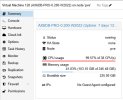
and so far, it was working fine for several years already. It has 2 CPU cores and 1GB RAM allocated. Now, since a couple of weeks, I have the VM intermittently being frozen. When this happens, the CPU usage shown on the Proxmox GUI goes to 100%, and I can no longer log into the machine, either by Console or by SSH. Also the machine does not react to STOP, but only to RESET.
Of course, because the only way to revive the machine is via RESET, the dmesg of the VM is cleared after reboot, and I don't see anything useful in the syslog. Further, in the syslog of PVE, I cannot find anything related to this, too.
What I can find in the VM's syslog is flooded messages such as
which I think is related to the guest agent?
I have disk usage only 2%, so the lockup is not due to full disk. RAM is also not fully used, so he is also not swapping.
About one or 2 months ago, I saw in the syslog lots of messages of the sorts
and ethernet performance of this VM was incredibly bad. I found one solution which said that in the virtio ethernet driver is a bug and one shall use Intel E1000E. I switched the VM's network adapter to this Intel thingy, and indeed, the network performance is good again, but I have the feeling that the random lockups occur since then. However, it was so far not possible for me to reproduce the lockup. I have now htop open since ~10 days, in the hope that I could see something when the VM locks up. But nothing. Today it locked up again, and I couldn't see a thing in htop (and of course, htop was also frozen).
I saw already this thread
https://forum.proxmox.com/threads/vms-freeze-with-100-cpu.127459/page-12
but I have not seen a solution so far. I wonder, how can I debug this sort of problem? I am sure in the VM's dmesg I could see something, but unfortunately, it is cleared when the VM resets.
I have one VM that runs on Alpine
Code:
# cat /etc/alpine-release
3.20.3
and so far, it was working fine for several years already. It has 2 CPU cores and 1GB RAM allocated. Now, since a couple of weeks, I have the VM intermittently being frozen. When this happens, the CPU usage shown on the Proxmox GUI goes to 100%, and I can no longer log into the machine, either by Console or by SSH. Also the machine does not react to STOP, but only to RESET.
Of course, because the only way to revive the machine is via RESET, the dmesg of the VM is cleared after reboot, and I don't see anything useful in the syslog. Further, in the syslog of PVE, I cannot find anything related to this, too.
What I can find in the VM's syslog is flooded messages such as
Code:
user.info : info: guest-ping calledwhich I think is related to the guest agent?
I have disk usage only 2%, so the lockup is not due to full disk. RAM is also not fully used, so he is also not swapping.
About one or 2 months ago, I saw in the syslog lots of messages of the sorts
Code:
Aug 8 07:21:37 kern warn kernel [50706.507735] eth1: bad gso: type: 1, size: 1452
Aug 8 07:21:38 kern warn kernel [50706.829626] eth1: bad gso: type: 4, size: 1440
Aug 8 07:21:38 kern warn kernel [50706.830058] eth1: bad gso: type: 4, size: 1440
Aug 8 07:21:38 kern warn kernel [50707.532034] eth1: bad gso: type: 4, size: 1440
Aug 8 07:21:39 kern warn kernel [50707.912949] eth1: bad gso: type: 1, size: 1452
Aug 8 07:21:43 kern warn kernel [50712.035334] net_ratelimit: 15 callbacks suppressed
and ethernet performance of this VM was incredibly bad. I found one solution which said that in the virtio ethernet driver is a bug and one shall use Intel E1000E. I switched the VM's network adapter to this Intel thingy, and indeed, the network performance is good again, but I have the feeling that the random lockups occur since then. However, it was so far not possible for me to reproduce the lockup. I have now htop open since ~10 days, in the hope that I could see something when the VM locks up. But nothing. Today it locked up again, and I couldn't see a thing in htop (and of course, htop was also frozen).
I saw already this thread
https://forum.proxmox.com/threads/vms-freeze-with-100-cpu.127459/page-12
but I have not seen a solution so far. I wonder, how can I debug this sort of problem? I am sure in the VM's dmesg I could see something, but unfortunately, it is cleared when the VM resets.