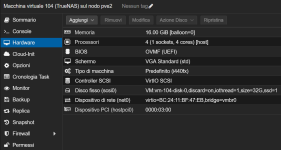
After upgrading from 9.0 and 9.1 VM Truenas won't start

Mario Rossi

New Member
Apr 4, 2024
21
1
3
Hi, today I updated my PVE 9.0 installation, which had been stuck for a few months.
It's now 9.1.4, and everything's fine, except that my Truenas Core VM won't boot anymore.

I pinned the Linux kernel 6.14.11-5-pve and rebooted the host, but that didn't fix the issue.
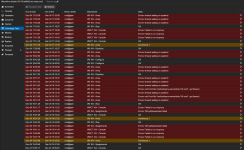
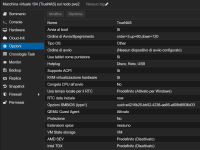
1767546907993.png

1767547027928.png
1767547054542.png
I also restored the VM from the backup, but it doesn't want to start.
I think there's something on the qemu/kernel side that's preventing the VM from starting.
The kernel before the upgrade was 6.12.57+deb13-amd64
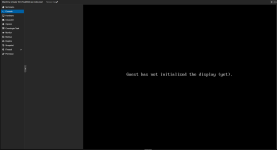
1767547187553.png
 
Last edited:
I finally decided to create a new VM. I had to configure it in SeaBIOS because UEFI no longer seemed compatible and wouldn't boot the ISO.

Then I imported the TrueNAS configuration backup and reconnected the PCI host with the SATA hard drives. (Backups are always welcome!)

I finally got it back up and running, but I'm not sure why the VM died after the update and there was no way to fix it.
 
Maybe the Machine Version was set to Latest and the TrueNAS VM cannot deal with the change from 10.0(-pve1) to 10.1 (like Windows often has issues with this)?
Please show the VM configuration file (qm config 104) instead of screenshots, if you want me to have a look at the old and new VM configuration.
 
Old Truenas VM:
Code:
agent: 1
balloon: 0
bios: ovmf
boot: order=scsi0
cores: 4
cpu: host
hostpci0: 0000:03:00
hotplug: disk,network,usb
memory: 16384
meta: creation-qemu=8.1.5,ctime=1712744821
name: TrueNAS
net0: virtio=BC:24:11:BF:47:EB,bridge=vmbr0
numa: 0
ostype: other
scsi0: VM:vm-104-disk-0,discard=on,iothread=1,size=32G,ssd=1
scsihw: virtio-scsi-single
smbios1: uuid=e4216b25-bb52-4238-ae85-a608d8936d33
sockets: 1
startup: order=3,up=60,down=120
vmgenid: e78d060f-e2c2-490c-8918-45f837df7a6f

New Truenas VM:
Code:
root@pve2:~# qm config 110
agent: 1
balloon: 0
bios: seabios
boot: order=scsi0
cores: 4
cpu: host
hostpci0: 0000:03:00
machine: q35
memory: 16384
meta: creation-qemu=10.1.2,ctime=1767552918
name: TrueNasv2
net0: virtio=BC:24:11:85:34:D5,bridge=vmbr0
numa: 0
onboot: 1
ostype: other
scsi0: VM:vm-110-disk-1,discard=on,iothread=1,size=32G,ssd=1
scsihw: virtio-scsi-single
smbios1: uuid=01d914f0-d5fc-4bca-98d7-988443dc995c
sockets: 1
startup: order=3,up=60,down=120
vga: std
vmgenid: cc2e525c-22f4-4c0b-b212-ce4a4fabe869


I'd already tried running it on 10.1, 10.0+pve, and 10.0, but nothing changed.

Oddly enough, after creating and configuring the new VM, the old VM without passthrough started... but only once; subsequent reboots would freeze when loading the OS.

Maybe it's time to upgrade TrueNAS from Core to Scale...
 
The old VM was probably created with Machine Version 8.1. The VM was not set to a fixed Machine Version and maybe FreeBSD does not like to many changes to the virtual machine virtual layout? Sorry but I have very little experience with FreeBSD (and usually this is a Windows problem which is given a fixed Machine Version by Proxmox because of this).
 
I understand.
I have another VM with FreeBSD OPNsense, but that one updates constantly and has no problems.
 
bios: ovmf

Press any key to enter the Boot Manager menu, then enter EFI Firmware Setup.

Open Device Manager - Secure Boot Configuration and uncheck “attempt secure boot”.

edit : Oh. If that screen doesn't even display, I can't tell.

I wrote this because it's necessary to boot TrueNAS Core 13's ISO in UEFI mode, but it doesn't guarantee it will fix your PC.

*You should stop using TrueNAS Core 13 as soon as possible since it no longer receives updates.
 
Last edited:
That's the new VM.
The old one installed in UEFI mode. The new one clearly said it couldn't boot from the ISO because it wasn't UEFI compatible, so I had to use seabios.
 
Hello,

With TrueNAS, I find I have a similar problem, and have narrowed it down to passing through my SATA controller. If I remove the PCI device the VM boots fine, but ofc. without the storage disks attached.

Changing the PVE version seems to make no difference.

Edit: I have passed the disks through to Truenas directly, I don't know if this can help your issue.
Also talked to someone with more experience than me, he thinks the kernel update might be the root cause, combined with IOMMU.... but this is far beyond my knowledge.

Best!
JNR
 
Last edited:
Hi all,

I think I'm having the same problem. Proxmox 9.1.4 trying to install TrueNAS Scale 25.10.1. The install goes fine, I hit problems when it tries to boot into TrueNAS. When I use the OVMF Bios the system hangs during boot, it seems to hang right after scsi device discovery.

1768145521957.png

This only occurs when I'm using OVMF, SeaBIOS works fine. I'm trying to do a PCI passthrough of a Broadcom HBA which is why I need to use OVMF.

I've tried booting with and without the HBA passed through with the same results. I'm using the q35 machine and have tried using the latest and each other version back to 8.1. I've also tried running with the default i440fx with similar results.

Has anyone been able to get HBA passthrough working to TrueNAS with Proxmox 9.1.4?

Thank you!
 
Last edited: