

Hi Fiona,
I've got a tiny proxmox cluster, two N100/N150 32GB nodes, with an extra one as a pbs, same specs (except 16GB).
The pbs is an extra quorum device to make up for the three node cluster.
For cluster storage I use an NFS server, which worked fine for version 8.4.
After the update the pbs storage came up fine, but not the nfs share, on both nodes.
Here's my storage.cfg:
root@pve1:/etc/pve# cat storage.cfg
dir: local
disable
path /var/lib/vz
content iso,vztmpl,backup
shared 0
lvmthin: local-lvm
disable
thinpool data
vgname pve
content images,rootdir
dir: Storage
path /mnt/pve/Storage
content import,snippets,iso,rootdir,vztmpl,images
nodes pve2
prune-backups keep-all=1
shared 0
pbs: Backup_General
datastore PBSStorage
server pbs.pauw.local
content backup
fingerprint ######################################
namespace Backup
prune-backups keep-all=1
username root@pam
pbs: Backup_Mail
datastore PBSStorage
server pbs.pauw.local
content backup
fingerprint ######################################
namespace MailBackup
prune-backups keep-all=1
username root@pam
nfs: Storage_NFS
export /mnt/user/nfs
path /mnt/pve/Storage_NFS
server nfs.pauw.local
content images,iso
nodes pve2,pve1
preallocation metadata
prune-backups keep-all=1
root@pve1:/etc/pve# showmount -e nfs.pauw.local
Export list for nfs.pauw.local:
/mnt/user/nfs 192.168.2.*
Here are the settings:
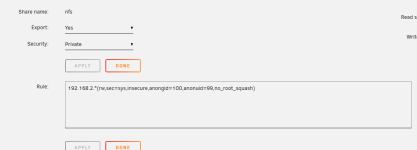
These settings haven't changed.
And here are the last bits of the /var/log/syslog on one of the nodes:
2025-08-06T17:31:40.346419+02:00 pve1 pvedaemon[24999]: mount error: exit code 32
2025-08-06T17:31:43.572887+02:00 pve1 pve-firewall[1307]: status update error: iptables_restore_cmdlist: Try `iptables-restore -h' or 'iptables-restore --help' for more information.
2025-08-06T17:31:49.430577+02:00 pve1 pvestatd[1312]: mount error: exit code 32
2025-08-06T17:31:53.585853+02:00 pve1 pve-firewall[1307]: status update error: iptables_restore_cmdlist: Try `iptables-restore -h' or 'iptables-restore --help' for more information.
2025-08-06T17:31:59.891675+02:00 pve1 pvestatd[1312]: mount error: exit code 32
2025-08-06T17:32:03.599348+02:00 pve1 pve-firewall[1307]: status update error: iptables_restore_cmdlist: Try `iptables-restore -h' or 'iptables-restore --help' for more information.
2025-08-06T17:32:09.381852+02:00 pve1 pvestatd[1312]: mount error: exit code 32
2025-08-06T17:32:13.612597+02:00 pve1 pve-firewall[1307]: status update error: iptables_restore_cmdlist: Try `iptables-restore -h' or 'iptables-restore --help' for more information.
2025-08-06T17:32:20.097216+02:00 pve1 pvestatd[1312]: mount error: exit code 32
2025-08-06T17:32:23.625870+02:00 pve1 pve-firewall[1307]: status update error: iptables_restore_cmdlist: Try `iptables-restore -h' or 'iptables-restore --help' for more information.
2025-08-06T17:32:29.583974+02:00 pve1 pvestatd[1312]: mount error: exit code 32
2025-08-06T17:32:33.639030+02:00 pve1 pve-firewall[1307]: status update error: iptables_restore_cmdlist: Try `iptables-restore -h' or 'iptables-restore --help' for more information.
2025-08-06T17:32:40.077188+02:00 pve1 pvestatd[1312]: mount error: exit code 32
2025-08-06T17:32:43.652503+02:00 pve1 pve-firewall[1307]: status update error: iptables_restore_cmdlist: Try `iptables-restore -h' or 'iptables-restore --help' for more information.
2025-08-06T17:32:49.567686+02:00 pve1 pvestatd[1312]: mount error: exit code 32
2025-08-06T17:32:53.665460+02:00 pve1 pve-firewall[1307]: status update error: iptables_restore_cmdlist: Try `iptables-restore -h' or 'iptables-restore --help' for more information.
2025-08-06T17:32:59.027332+02:00 pve1 pvestatd[1312]: mount error: exit code 32
2025-08-06T17:33:03.678988+02:00 pve1 pve-firewall[1307]: status update error: iptables_restore_cmdlist: Try `iptables-restore -h' or 'iptables-restore --help' for more information.
2025-08-06T17:33:09.515679+02:00 pve1 pvestatd[1312]: mount error: exit code 32
2025-08-06T17:33:13.693012+02:00 pve1 pve-firewall[1307]: status update error: iptables_restore_cmdlist: Try `iptables-restore -h' or 'iptables-restore --help' for more information.
2025-08-06T17:33:20.136445+02:00 pve1 pvestatd[1312]: mount error: exit code 32
2025-08-06T17:33:23.706329+02:00 pve1 pve-firewall[1307]: status update error: iptables_restore_cmdlist: Try `iptables-restore -h' or 'iptables-restore --help' for more information.
2025-08-06T17:33:29.499493+02:00 pve1 pvestatd[1312]: mount error: exit code 32
2025-08-06T17:33:33.719479+02:00 pve1 pve-firewall[1307]: status update error: iptables_restore_cmdlist: Try `iptables-restore -h' or 'iptables-restore --help' for more information.
2025-08-06T17:33:39.212533+02:00 pve1 pvestatd[1312]: mount error: exit code 32
2025-08-06T17:33:43.732868+02:00 pve1 pve-firewall[1307]: status update error: iptables_restore_cmdlist: Try `iptables-restore -h' or 'iptables-restore --help' for more information.
2025-08-06T17:33:49.701220+02:00 pve1 pvestatd[1312]: mount error: exit code 32
2025-08-06T17:33:53.745871+02:00 pve1 pve-firewall[1307]: status update error: iptables_restore_cmdlist: Try `iptables-restore -h' or 'iptables-restore --help' for more information.
2025-08-06T17:33:59.064411+02:00 pve1 pvestatd[1312]: mount error: exit code 32
2025-08-06T17:34:03.758995+02:00 pve1 pve-firewall[1307]: status update error: iptables_restore_cmdlist: Try `iptables-restore -h' or 'iptables-restore --help' for more information.
2025-08-06T17:34:09.811517+02:00 pve1 pvestatd[1312]: mount error: exit code 32
2025-08-06T17:34:13.771930+02:00 pve1 pve-firewall[1307]: status update error: iptables_restore_cmdlist: Try `iptables-restore -h' or 'iptables-restore --help' for more information.
2025-08-06T17:34:19.274108+02:00 pve1 pvestatd[1312]: mount error: exit code 32
2025-08-06T17:34:23.785331+02:00 pve1 pve-firewall[1307]: status update error: iptables_restore_cmdlist: Try `iptables-restore -h' or 'iptables-restore --help' for more information.
2025-08-06T17:34:29.634605+02:00 pve1 pvestatd[1312]: mount error: exit code 32
2025-08-06T17:34:33.798431+02:00 pve1 pve-firewall[1307]: status update error: iptables_restore_cmdlist: Try `iptables-restore -h' or 'iptables-restore --help' for more information.
2025-08-06T17:34:39.378052+02:00 pve1 pvestatd[1312]: mount error: exit code 32
2025-08-06T17:34:43.811844+02:00 pve1 pve-firewall[1307]: status update error: iptables_restore_cmdlist: Try `iptables-restore -h' or 'iptables-restore --help' for more information.
2025-08-06T17:34:49.740474+02:00 pve1 pvestatd[1312]: mount error: exit code 32
2025-08-06T17:34:53.824880+02:00 pve1 pve-firewall[1307]: status update error: iptables_restore_cmdlist: Try `iptables-restore -h' or 'iptables-restore --help' for more information.
2025-08-06T17:34:59.329388+02:00 pve1 pvestatd[1312]: mount error: exit code 32
2025-08-06T17:35:03.838031+02:00 pve1 pve-firewall[1307]: status update error: iptables_restore_cmdlist: Try `iptables-restore -h' or 'iptables-restore --help' for more information.
2025-08-06T17:35:09.819183+02:00 pve1 pvestatd[1312]: mount error: exit code 32
2025-08-06T17:35:13.851237+02:00 pve1 pve-firewall[1307]: status update error: iptables_restore_cmdlist: Try `iptables-restore -h' or 'iptables-restore --help' for more information.
2025-08-06T17:35:19.437252+02:00 pve1 pvestatd[1312]: mount error: exit code 32
2025-08-06T17:35:23.864735+02:00 pve1 pve-firewall[1307]: status update error: iptables_restore_cmdlist: Try `iptables-restore -h' or 'iptables-restore --help' for more information.
2025-08-06T17:35:29.926698+02:00 pve1 pvestatd[1312]: mount error: exit code 32
2025-08-06T17:35:33.877564+02:00 pve1 pve-firewall[1307]: status update error: iptables_restore_cmdlist: Try `iptables-restore -h' or 'iptables-restore --help' for more information.
2025-08-06T17:35:39.415107+02:00 pve1 pvestatd[1312]: mount error: exit code 32
2025-08-06T17:35:40.104395+02:00 pve1 systemd[1]: Started session-16.scope - Session 16 of User root.
2025-08-06T17:35:43.890755+02:00 pve1 pve-firewall[1307]: status update error: iptables_restore_cmdlist: Try `iptables-restore -h' or 'iptables-restore --help' for more information.
2025-08-06T17:35:49.902984+02:00 pve1 pvestatd[1312]: mount error: exit code 32
I have never configured anything for the firewall.
As a bonus, another problem cropt up. I restored a VM from the pbs to local storage and tried to start it and got this:
TASK ERROR: KVM virtualisation configured, but not available. Either disable in VM configuration or enable in BIOS.
Which puzzeled me, as nothing was changed in the BIOS of the nodes.
I've got a tiny proxmox cluster, two N100/N150 32GB nodes, with an extra one as a pbs, same specs (except 16GB).
The pbs is an extra quorum device to make up for the three node cluster.
For cluster storage I use an NFS server, which worked fine for version 8.4.
After the update the pbs storage came up fine, but not the nfs share, on both nodes.
Here's my storage.cfg:
root@pve1:/etc/pve# cat storage.cfg
dir: local
disable
path /var/lib/vz
content iso,vztmpl,backup
shared 0
lvmthin: local-lvm
disable
thinpool data
vgname pve
content images,rootdir
dir: Storage
path /mnt/pve/Storage
content import,snippets,iso,rootdir,vztmpl,images
nodes pve2
prune-backups keep-all=1
shared 0
pbs: Backup_General
datastore PBSStorage
server pbs.pauw.local
content backup
fingerprint ######################################
namespace Backup
prune-backups keep-all=1
username root@pam
pbs: Backup_Mail
datastore PBSStorage
server pbs.pauw.local
content backup
fingerprint ######################################
namespace MailBackup
prune-backups keep-all=1
username root@pam
nfs: Storage_NFS
export /mnt/user/nfs
path /mnt/pve/Storage_NFS
server nfs.pauw.local
content images,iso
nodes pve2,pve1
preallocation metadata
prune-backups keep-all=1
root@pve1:/etc/pve# showmount -e nfs.pauw.local
Export list for nfs.pauw.local:
/mnt/user/nfs 192.168.2.*
Here are the settings:
These settings haven't changed.
And here are the last bits of the /var/log/syslog on one of the nodes:
2025-08-06T17:31:40.346419+02:00 pve1 pvedaemon[24999]: mount error: exit code 32
2025-08-06T17:31:43.572887+02:00 pve1 pve-firewall[1307]: status update error: iptables_restore_cmdlist: Try `iptables-restore -h' or 'iptables-restore --help' for more information.
2025-08-06T17:31:49.430577+02:00 pve1 pvestatd[1312]: mount error: exit code 32
2025-08-06T17:31:53.585853+02:00 pve1 pve-firewall[1307]: status update error: iptables_restore_cmdlist: Try `iptables-restore -h' or 'iptables-restore --help' for more information.
2025-08-06T17:31:59.891675+02:00 pve1 pvestatd[1312]: mount error: exit code 32
2025-08-06T17:32:03.599348+02:00 pve1 pve-firewall[1307]: status update error: iptables_restore_cmdlist: Try `iptables-restore -h' or 'iptables-restore --help' for more information.
2025-08-06T17:32:09.381852+02:00 pve1 pvestatd[1312]: mount error: exit code 32
2025-08-06T17:32:13.612597+02:00 pve1 pve-firewall[1307]: status update error: iptables_restore_cmdlist: Try `iptables-restore -h' or 'iptables-restore --help' for more information.
2025-08-06T17:32:20.097216+02:00 pve1 pvestatd[1312]: mount error: exit code 32
2025-08-06T17:32:23.625870+02:00 pve1 pve-firewall[1307]: status update error: iptables_restore_cmdlist: Try `iptables-restore -h' or 'iptables-restore --help' for more information.
2025-08-06T17:32:29.583974+02:00 pve1 pvestatd[1312]: mount error: exit code 32
2025-08-06T17:32:33.639030+02:00 pve1 pve-firewall[1307]: status update error: iptables_restore_cmdlist: Try `iptables-restore -h' or 'iptables-restore --help' for more information.
2025-08-06T17:32:40.077188+02:00 pve1 pvestatd[1312]: mount error: exit code 32
2025-08-06T17:32:43.652503+02:00 pve1 pve-firewall[1307]: status update error: iptables_restore_cmdlist: Try `iptables-restore -h' or 'iptables-restore --help' for more information.
2025-08-06T17:32:49.567686+02:00 pve1 pvestatd[1312]: mount error: exit code 32
2025-08-06T17:32:53.665460+02:00 pve1 pve-firewall[1307]: status update error: iptables_restore_cmdlist: Try `iptables-restore -h' or 'iptables-restore --help' for more information.
2025-08-06T17:32:59.027332+02:00 pve1 pvestatd[1312]: mount error: exit code 32
2025-08-06T17:33:03.678988+02:00 pve1 pve-firewall[1307]: status update error: iptables_restore_cmdlist: Try `iptables-restore -h' or 'iptables-restore --help' for more information.
2025-08-06T17:33:09.515679+02:00 pve1 pvestatd[1312]: mount error: exit code 32
2025-08-06T17:33:13.693012+02:00 pve1 pve-firewall[1307]: status update error: iptables_restore_cmdlist: Try `iptables-restore -h' or 'iptables-restore --help' for more information.
2025-08-06T17:33:20.136445+02:00 pve1 pvestatd[1312]: mount error: exit code 32
2025-08-06T17:33:23.706329+02:00 pve1 pve-firewall[1307]: status update error: iptables_restore_cmdlist: Try `iptables-restore -h' or 'iptables-restore --help' for more information.
2025-08-06T17:33:29.499493+02:00 pve1 pvestatd[1312]: mount error: exit code 32
2025-08-06T17:33:33.719479+02:00 pve1 pve-firewall[1307]: status update error: iptables_restore_cmdlist: Try `iptables-restore -h' or 'iptables-restore --help' for more information.
2025-08-06T17:33:39.212533+02:00 pve1 pvestatd[1312]: mount error: exit code 32
2025-08-06T17:33:43.732868+02:00 pve1 pve-firewall[1307]: status update error: iptables_restore_cmdlist: Try `iptables-restore -h' or 'iptables-restore --help' for more information.
2025-08-06T17:33:49.701220+02:00 pve1 pvestatd[1312]: mount error: exit code 32
2025-08-06T17:33:53.745871+02:00 pve1 pve-firewall[1307]: status update error: iptables_restore_cmdlist: Try `iptables-restore -h' or 'iptables-restore --help' for more information.
2025-08-06T17:33:59.064411+02:00 pve1 pvestatd[1312]: mount error: exit code 32
2025-08-06T17:34:03.758995+02:00 pve1 pve-firewall[1307]: status update error: iptables_restore_cmdlist: Try `iptables-restore -h' or 'iptables-restore --help' for more information.
2025-08-06T17:34:09.811517+02:00 pve1 pvestatd[1312]: mount error: exit code 32
2025-08-06T17:34:13.771930+02:00 pve1 pve-firewall[1307]: status update error: iptables_restore_cmdlist: Try `iptables-restore -h' or 'iptables-restore --help' for more information.
2025-08-06T17:34:19.274108+02:00 pve1 pvestatd[1312]: mount error: exit code 32
2025-08-06T17:34:23.785331+02:00 pve1 pve-firewall[1307]: status update error: iptables_restore_cmdlist: Try `iptables-restore -h' or 'iptables-restore --help' for more information.
2025-08-06T17:34:29.634605+02:00 pve1 pvestatd[1312]: mount error: exit code 32
2025-08-06T17:34:33.798431+02:00 pve1 pve-firewall[1307]: status update error: iptables_restore_cmdlist: Try `iptables-restore -h' or 'iptables-restore --help' for more information.
2025-08-06T17:34:39.378052+02:00 pve1 pvestatd[1312]: mount error: exit code 32
2025-08-06T17:34:43.811844+02:00 pve1 pve-firewall[1307]: status update error: iptables_restore_cmdlist: Try `iptables-restore -h' or 'iptables-restore --help' for more information.
2025-08-06T17:34:49.740474+02:00 pve1 pvestatd[1312]: mount error: exit code 32
2025-08-06T17:34:53.824880+02:00 pve1 pve-firewall[1307]: status update error: iptables_restore_cmdlist: Try `iptables-restore -h' or 'iptables-restore --help' for more information.
2025-08-06T17:34:59.329388+02:00 pve1 pvestatd[1312]: mount error: exit code 32
2025-08-06T17:35:03.838031+02:00 pve1 pve-firewall[1307]: status update error: iptables_restore_cmdlist: Try `iptables-restore -h' or 'iptables-restore --help' for more information.
2025-08-06T17:35:09.819183+02:00 pve1 pvestatd[1312]: mount error: exit code 32
2025-08-06T17:35:13.851237+02:00 pve1 pve-firewall[1307]: status update error: iptables_restore_cmdlist: Try `iptables-restore -h' or 'iptables-restore --help' for more information.
2025-08-06T17:35:19.437252+02:00 pve1 pvestatd[1312]: mount error: exit code 32
2025-08-06T17:35:23.864735+02:00 pve1 pve-firewall[1307]: status update error: iptables_restore_cmdlist: Try `iptables-restore -h' or 'iptables-restore --help' for more information.
2025-08-06T17:35:29.926698+02:00 pve1 pvestatd[1312]: mount error: exit code 32
2025-08-06T17:35:33.877564+02:00 pve1 pve-firewall[1307]: status update error: iptables_restore_cmdlist: Try `iptables-restore -h' or 'iptables-restore --help' for more information.
2025-08-06T17:35:39.415107+02:00 pve1 pvestatd[1312]: mount error: exit code 32
2025-08-06T17:35:40.104395+02:00 pve1 systemd[1]: Started session-16.scope - Session 16 of User root.
2025-08-06T17:35:43.890755+02:00 pve1 pve-firewall[1307]: status update error: iptables_restore_cmdlist: Try `iptables-restore -h' or 'iptables-restore --help' for more information.
2025-08-06T17:35:49.902984+02:00 pve1 pvestatd[1312]: mount error: exit code 32
I have never configured anything for the firewall.
As a bonus, another problem cropt up. I restored a VM from the pbs to local storage and tried to start it and got this:
TASK ERROR: KVM virtualisation configured, but not available. Either disable in VM configuration or enable in BIOS.
Which puzzeled me, as nothing was changed in the BIOS of the nodes.

