I've damaged my Intern m2sata storeage, had a new disc and reinstalled my PVE
Inside the PVE - I have a virtual Machine for the backup Server - and no Can't remember the direct path of the Datastorage here on my PBS Server
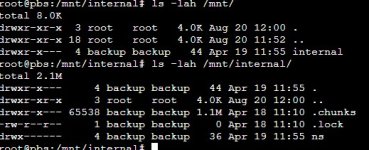
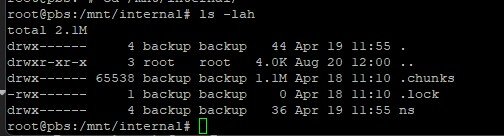
I've added the disc again in my PBS Server - and can see my Backups in my namespaces on the disc which is mounted at /mnt/Internal :
I've googled about this error and found this and tried changing the owner from this link:
but listing the disc with df -lah - I'm seeing the disc is almost filled - is normally been pruned through time.
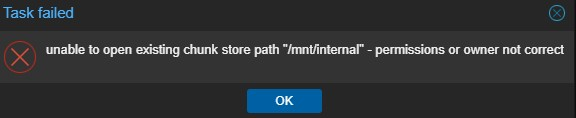
But when adding the storage through the GUI - I'm getting this error:
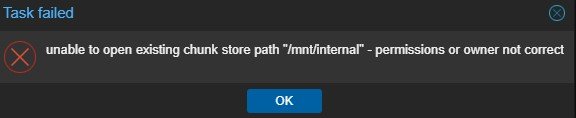
So what Can I do since my settings are correct - the permissions for the share are added - but saying there the wrong persmissions.
The backup user and group is 34 - so what goes wrong here
Looking in /etc/proxmox-backup - I do not see the datastore.cfg only seeing .datastore.lck vand the journalctl -f shows only this:


So what can I do - to add this datastorage correctly and beeing able to restore my machines from there
But I can not get or understand why the persmission is the error here.....
Inside the PVE - I have a virtual Machine for the backup Server - and no Can't remember the direct path of the Datastorage here on my PBS Server
I've added the disc again in my PBS Server - and can see my Backups in my namespaces on the disc which is mounted at /mnt/Internal :
I've googled about this error and found this and tried changing the owner from this link:
Bash:
chmod backup:backup -R /mnt/datastore/Intern
chmod -R 700 /mnt/datastore/Intern
systemctl restart proxmox-backup
but listing the disc with df -lah - I'm seeing the disc is almost filled - is normally been pruned through time.
Code:
/dev/sdb1 2.0T 2,0T 53G 98% /mnt/datastore/InternBut when adding the storage through the GUI - I'm getting this error:
So what Can I do since my settings are correct - the permissions for the share are added - but saying there the wrong persmissions.
The backup user and group is 34 - so what goes wrong here
Looking in /etc/proxmox-backup - I do not see the datastore.cfg only seeing .datastore.lck vand the journalctl -f shows only this:
So what can I do - to add this datastorage correctly and beeing able to restore my machines from there
But I can not get or understand why the persmission is the error here.....
Attachments
Last edited: