Additional Network configuration

galaxys5

New Member
Jun 30, 2026
6
0
1
Hi
I am new to proxmox. I have installed proxmox on desktop machine which has x2 onborad NIC and one NIC installed machine.
When install time I used one of the on board NIC connected with UTP and static IP.
My proxmox virtual machine working fine.

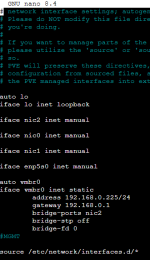
Now I am plan to add the other onboard or installed NIC to proxmox. I have try what ever suggest on the internet. see the below pictureScreenshot 2026-06-30 100330.png
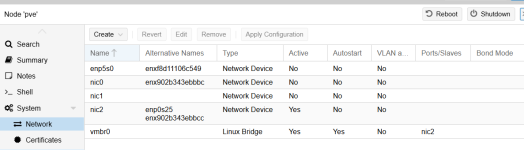
nic 2 is connected to vmbr0
When try to create linux bridge vmbr1 following message appears
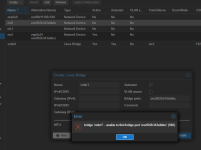
Screenshot 2026-06-30 101052.png

what could be the issue?
My other question is when install proxmox, on borad NIC drivers will automatically installed? The seperate NIC card drivers also need to installed?

Thanks in Advance
 
Does the nicX name work?
Hi Impact,
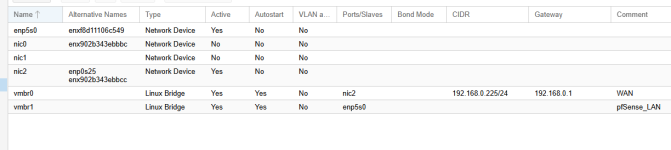
Thx for reply. when I used proxmox GUI Create--->New bridge, I pasted NIC0 altenative name( enx902b343ebbbc) as vmbr1 bridge ports as shown in my second picture. But no luck. Is it the one your question for me?
 
Interfaces can have multiple names. Names such as nic0, nic1, etc. are the "real" names, while names such as enx902b43ebbbc, enp0s25, etc. are alternative interface names. We currently only support "real" names in the ui input fields. So you'd have to use nic0 instead of enx902b43ebbbc in the input box.
 
ggoller’s point is the key one. To avoid guessing, check the real interface name on the PVE host with `ip -br link` or `ip -d link show`. Use the real name that Proxmox shows/uses, not the `enx...` alternative name, in the bridge port field. After changing `/etc/network/interfaces`, I’d also double-check that the NIC is not already listed under another bridge and then apply from the GUI or use `ifreload -a` from a local console/SSH session so you do not lock yourself out.
 
Interfaces can have multiple names. Names such as nic0, nic1, etc. are the "real" names, while names such as enx902b43ebbbc, enp0s25, etc. are alternative interface names. We currently only support "real" names in the ui input fields. So you'd have to use nic0 instead of enx902b43ebbbc in the input box.
Hi Ggoller,

Thank you very much. After I enter real name it works for me.

Screenshot 2026-07-01 041222.png
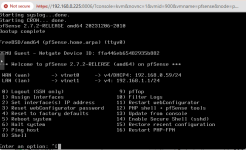
I am able to add vmbr1 interface and I installed pfsense successfully.

Screenshot 2026-07-01 042028.png

Sorry to bother you again. I have another question. Now I can't reach pfsense default page (192.168.1.1) although I have disabled the firewall of pfsense in virtual machine.
My working PC is 192.168.0.1/24 network. But pfsense is 192.168.1.1/24.
what could be the reason I am unable to reach pfsense default page 192.168.1.1?

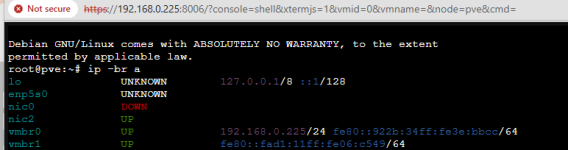
below is summary from proxmox
Screenshot 2026-07-01 045601.png

Thanks in Advance
 
Last edited:
what could be the reason I am unable to reach pfsense default page 192.168.1.1?
It is a different network --> reachable only with an active router and your working PC using that route.

My answer does not directly solve your problem, sorry. Just use the other IP (.0.59) for setup, that does work, right?

I recommend to draw a network diagram with networks, NICs and IP-addresses in beforehand :-)
 
It is a different network --> reachable only with an active router and your working PC using that route.

My answer does not directly solve your problem, sorry. Just use the other IP (.0.59) for setup, that does work, right?

I recommend to draw a network diagram with networks, NICs and IP-addresses in beforehand :-)
Hi
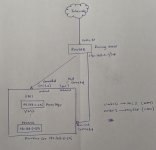
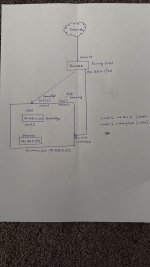
Thanks for your reply. Yes I can access pfsense using 192.168.0.59. But this is WAN interface right? I have attached the diagram. (sorry not a good one) Before pf sense installed I installed few VM's and running in proxmox. In this situation how can I created different LAN place all VM's behind the pfsence. Currently all traffic come from internet to router then direct to Nginx Proxy Mgr. Proxy mgr routed traffic to relevant VM's

Thanks in advancediagram.jpeg
 

Attachments

  • diagram.jpeg
    diagram.jpeg
    136.1 KB · Views: 3
Last edited:
But this is WAN interface right?
Right. From pfSense's point of view.

Basically "WAN" + "LAN" are just names. Plus some default rules created already for you - allow output through WAN w/ or w/o NAT, deny input at WAN. Also enable routing inside pfSense.

If you label the current WAN DMZ instead then the final picture may make more sense.

Inside of the LAN there are no real (virtual or physical) machines currently, right? Put some test-VM into that network and examine the pfSense GUI to see what happens...

----

Back to our initial "what could be the reason I am unable to reach pfsense default page 192.168.1.1?": there are two ways to make it work:

1) tell the existing router that there is a network ...1.0/24 which is reachable via ...0.59. This approach is elegant because all DHCP-clients in WAN will inherit this knowledge. They just use the Default Gateway which sends the traffic to pfSense or to the outer internet

2) tell a client which is inside WAN that there is that route. For Linux it is something like ip route add 192.168.1.0/24 via 192.168.0.59 Note that the default route is still ...0.1. Verify this with "ip route show". Windows has the same command with a slightly different syntax.

Have fun :-)
 
Right. From pfSense's point of view.

Basically "WAN" + "LAN" are just names. Plus some default rules created already for you - allow output through WAN w/ or w/o NAT, deny input at WAN. Also enable routing inside pfSense.

If you label the current WAN DMZ instead then the final picture may make more sense.

Inside of the LAN there are no real (virtual or physical) machines currently, right? Put some test-VM into that network and examine the pfSense GUI to see what happens...

----

Back to our initial "what could be the reason I am unable to reach pfsense default page 192.168.1.1?": there are two ways to make it work:

1) tell the existing router that there is a network ...1.0/24 which is reachable via ...0.59. This approach is elegant because all DHCP-clients in WAN will inherit this knowledge. They just use the Default Gateway which sends the traffic to pfSense or to the outer internet

2) tell a client which is inside WAN that there is that route. For Linux it is something like ip route add 192.168.1.0/24 via 192.168.0.59 Note that the default route is still ...0.1. Verify this with "ip route show". Windows has the same command with a slightly different syntax.

Have fun :-)
Hi UdoB,

Thanks for your reply. I have mess up few things here.

  • I was able to access pfsense using 192.168.0.59 when install time, after I logged out ,now I can’t login because its different network.I haven't configured pfsence correctly. so to rectify
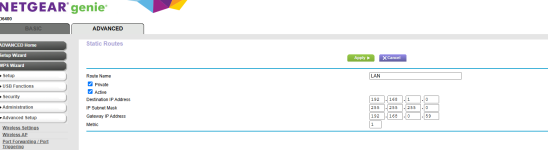
  • I add route to 192.168.1.0/24 network using my Netgear D6400 router as below
Screenshot 2026-07-02 051233.png

At the same time I need to add static route to my win11 PC which is different network ? (192.168.0.1/24)
so I added to my Win11 PC
Route –p add 192.168.1.0 mask 255.255.255.0 192.168.0.59

But Still I can’t access pfsense because I haven’t configure pfsense correctly. Do I need a re-install again?

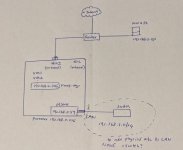
My diagram was wrong. Right? Because I have x2 UTP connections to router. Is it need to go for switch if I need a setup physical LAN machine?

Inside of the LAN there are no real (virtual or physical) machines currently, right?

Yes. Because I installed VM's before the pfsense,

As your advice If I create a TestVM it should be vmbr1.? Before install Test VM do I need to fix pfsense issue otherwise it won’t work? I have attached revised diagram please advise.
diagram2.jpeg

PS: sorry about my too much questions