3 node Proxmox cluster high shared memory usage

thelovebelow

New Member
Oct 10, 2025
13
0
1
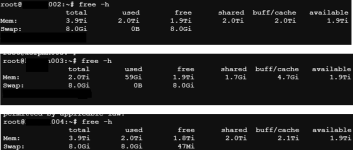
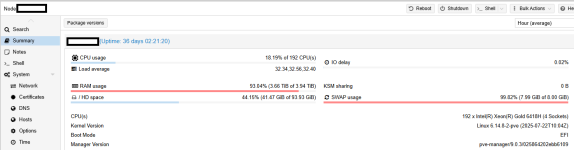
I just started my Proxmox journey so forgive me for asking stupid questions. I created a cluster from scratch with 3 nodes and played around with the ESXi migration wizard. I have maybe 8 VMs running, doing not at lot at the moment. Two PVE nodes have 4 TB RAM, 1 node has 2 TB RAM. On the nodes with 4 TB, I noticed 50% RAM usage, which surprised me, because it doesn't run (almost) anything. On the node with 2 TB, no shared memory is assigned. Upon investigating where this 50% consumption is coming from, I saw 2 TB is used as 'Shared'. Is this normal behavior?

shared_mem.png

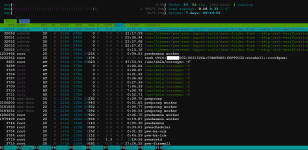
See htop output, there's no VM nothing running on this 4 TB node:
htop.png
 
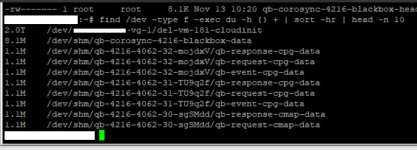
I don't think this is expected. This issue popped up again this week. As we have sufficient RAM available, I didn't really look into it. We had a workaround by manually rebooting the host. A couple of hours ago, I saw it popping up on another host. When looking into it, I noticed the 2TB is in use by this:

korpmh002_1.png

I deleted VM 181 this morning, so it looks like deleting a VM triggers this behavior. When I manually delete the file, it frees up the 2TB RAM in use. It looks like Proxmox cannot fully delete the VM, and afterwards it decided to consume 2TB of RAM. Inspecting the file with the 'file' informs me it is seen as a 'data' file, and running lsof doesn't return anything.

Vgs and pvs are all reporting healthy. I'm running PVE 9.0.3.
 
Can you please poste the complete path of the 2TB file? Your screenshots shows whitespace. Personally I don't think it's a good idea trying to be smarter than the kernel (see the links I posted earlier). Normally I would expect that the kernel/qemu will free the cache if more RAM is needed. Since you have more than enough free RAM I would assume that the kernel still keeps the file in cache until the remaining free RAM is exchausted. And (like explained int he links) this behaviour is not only expected but actually a good thing: The kernel can and will use a large amount of RAM for caching so file access doesn't need to read from the (slower compared to RAM) disc storage.
 
Can you please poste the complete path of the 2TB file? Your screenshots shows whitespace. Personally I don't think it's a good idea trying to be smarter than the kernel (see the links I posted earlier). Normally I would expect that the kernel/qemu will free the cache if more RAM is needed. Since you have more than enough free RAM I would assume that the kernel still keeps the file in cache until the remaining free RAM is exchausted. And (like explained int he links) this behaviour is not only expected but actually a good thing: The kernel can and will use a large amount of RAM for caching so file access doesn't need to read from the (slower compared to RAM) disc storage.
the whitespace is just the name of the storage it resides on. I rather not disclose this information on a public forum. It could be for example "/dev/netapp-vg-1/del-vm-181-cloudinit ". Well I got it to a point I didn't had sufficient RAM to run all VM workloads. I had +/- 85GB RAM available and still had to migrate a 150GB VM. It's not something I like to test, these hosts run around 150 VMs each.

I had this behavior on 2 different hosts. On both hosts, I deleted a VM, and than it kicked in. I will pay close attention the next time I will delete a VM, but it's very likely this again will occur.

The first time, I moved all VMs to 2 hosts out of 3. As my 3rd host also had this RAM usage by the del-vm*. I didn't had enough RAM to run all the VMs. Luckily I could power down some temporarily and reboot the host. Post reboot, the RAM usage is fine, and the file is deleted.
On the other host, I manually deleted the file holding the 2TB RAM. This took a bit of time, but afterwards the RAM usage was cleared.
So same results, except for the 2nd attempt, I didn't had to move all the VMs to another host, which takes a bit of time when you have 150 VMs.