

203.30.8.0/21 is listed on the Policy Block List (PBL)
- Thread starter Kodey
- Start date
You are using an out of date browser. It may not display this or other websites correctly.
You should upgrade or use an alternative browser.
You should upgrade or use an alternative browser.
GPT5 tells me:
is there a problem receiving emails for example.com on a dynamic ip?
Yes — there can be problems.
I'm reluctant to install pmg on the vps as it already hosts a website and that would complicate maintenance and security significantly.
The best solution seems to be providing a static ip. Hopefully getting a reverse dns from my isp won't be too difficult.
is there a problem receiving emails for example.com on a dynamic ip?
Yes — there can be problems.
- Deliverability: Many MTAs and anti-spam services reject or defer mail to hosts in dynamic-IP ranges or IPs listed on PBL/RBLs, so other MTAs may refuse to deliver to your MX.
- ...
- Actual behavior depends on each sending operator’s configuration; being listed in a particular RBL/PBL or lacking PTR/DNS is what causes rejection/deferral, not an inherent property of every sender.
- For authoritative, actionable remediation: host MX on a static IP with proper PTR and publish SPF/DKIM, or place a static relay (smarthost/MX) in front of your dynamic host.
I'm reluctant to install pmg on the vps as it already hosts a website and that would complicate maintenance and security significantly.
The best solution seems to be providing a static ip. Hopefully getting a reverse dns from my isp won't be too difficult.
Of course you need a static IP (with good reputation) in order to be able to send out mails.
While that can be done in a variety of ways, I prefer to use it on a PMG that is on a PVE host at a hoster. Some types of VPS can also run PVE.
Security-wise, you can isolate each of the LXCs or VMs in separate VLANs, so you can even put separate websites. All of this is put behind an OpnSense that also has a reverse proxy in order to take only one IPv4.
While that can be done in a variety of ways, I prefer to use it on a PMG that is on a PVE host at a hoster. Some types of VPS can also run PVE.
Security-wise, you can isolate each of the LXCs or VMs in separate VLANs, so you can even put separate websites. All of this is put behind an OpnSense that also has a reverse proxy in order to take only one IPv4.

The vps has a static ip and a reverse ptr which is why I want to relay outbound mail through it. Postfix and opendkim can manage that but I'm not sure how to configure pmg to relay all outgoing mail via the vps.
I also discovered that some mta won't deliver mail to a host mx not on a static ip with a proper reverse ptr and I wouldn't know about it.
Your setup sounds fine, but I was hoping to spare the expense of another vps. I've been trying to get support for a reverse ptr and static ip with my isp, but they seem incapable of creating the ptr record for me. I even wrote to their netadmin@ and apnic.manager@ addresses but received only stony silence.
I also discovered that some mta won't deliver mail to a host mx not on a static ip with a proper reverse ptr and I wouldn't know about it.
Your setup sounds fine, but I was hoping to spare the expense of another vps. I've been trying to get support for a reverse ptr and static ip with my isp, but they seem incapable of creating the ptr record for me. I even wrote to their netadmin@ and apnic.manager@ addresses but received only stony silence.
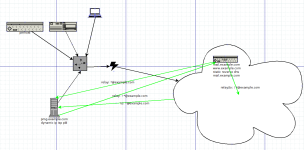
The solution was fairly straightforward and involves only a vpn and lightly modified postfix on the pve.
It isn't exactly as the diagram specifies since no emails traverse the pmg public ip, only the pve ip which has reverse ptr
I know there are other, perhaps better methods but this one leaves iptables untouched
If you have any suggestions or spot errors/omissions/simplifications or want more details, please add a comment
1. Optionally configure a dedicated subnet or similar. I created a new host only bridge since these exist as unprivileged containers
1. Configure wireguard in the pmg network. This one got it's own container
2. Add a permanent route to the wg subnet on pmg
3. Configure wireguard client on the pve including AllowedIPs for the pmg subnet.
4. Setup postfix on the pve: (shouldn't be able to send mail to the internet directly, but does send local mail to pmg:26)
6. Set the wg client and the dedicated subnet as a trusted network in pmg
7. Set the pve postfix ip as the smarthost in pmg
It must be said that this pmg was already working only mails were increasingly being denied because pmgs public ip is on pbls.
This solves that problem.
It isn't exactly as the diagram specifies since no emails traverse the pmg public ip, only the pve ip which has reverse ptr
I know there are other, perhaps better methods but this one leaves iptables untouched
If you have any suggestions or spot errors/omissions/simplifications or want more details, please add a comment
1. Optionally configure a dedicated subnet or similar. I created a new host only bridge since these exist as unprivileged containers
1. Configure wireguard in the pmg network. This one got it's own container
2. Add a permanent route to the wg subnet on pmg
3. Configure wireguard client on the pve including AllowedIPs for the pmg subnet.
4. Setup postfix on the pve: (shouldn't be able to send mail to the internet directly, but does send local mail to pmg:26)
a. add public ip and wg client ip to mynetworks in /etc/postfix/main.cf
b. add the pmg host name and port 25 to /etc/postfix/transport and that transport_maps references that
c. make sure mydestination includes the mail mx as it is in the dns records
d. add public ip; wg ip and localhost to inet_interfaces
e. set myhostname to the mx name as it is in the dns records
f. set the domain name in relay_domains
g. edit /etc/aliases so that root mail is in the pmg domain
5. Add the reverse ptr record for the pve6. Set the wg client and the dedicated subnet as a trusted network in pmg
7. Set the pve postfix ip as the smarthost in pmg
It must be said that this pmg was already working only mails were increasingly being denied because pmgs public ip is on pbls.
This solves that problem.
How many do that I wonder? To refuse to deliver an email because the receiving domain's MX is on a PBL (or other BL for that matter) doesn't seem inline with intended use of blocklists.Yes — there can be problems.
- Deliverability: Many MTAs and anti-spam services reject or defer mail to hosts in dynamic-IP ranges or IPs listed on PBL/RBLs, so other MTAs may refuse to deliver to your MX.[/]
A good quest @keeka I'd like to know as well but it's a matter of policy for the sender and the bl providers mostly say it's intended for that purpose.
Actually, I ran into another problem with spf, particularly involving hotmail. Apparently pmg uses the relay_domains postfix host ip to check spf.
I can imagine some pre/post routing table rules that might work but maybe that's not the best answer.
The could be a different setting on postfix than relay_domains or I didn't do it correctly
I could do spf checking on postfix pve and disable it on pmg. I don't like that idea.
Any clues?
Actually, I ran into another problem with spf, particularly involving hotmail. Apparently pmg uses the relay_domains postfix host ip to check spf.
I can imagine some pre/post routing table rules that might work but maybe that's not the best answer.
The could be a different setting on postfix than relay_domains or I didn't do it correctly
I could do spf checking on postfix pve and disable it on pmg. I don't like that idea.
Any clues?
In these instances, where some MTA declines to relay a sender's message because the recipient domain fails some PBL/RBL query, I wonder if that MTA:
- sends an SMTP reject/fail response during the initial transaction.
- sends a failed delivery notification to the sender some point after accepting the mail for relay.
- silently drops the message!