Possible mismatch of reported and actual machine version

Aug 4, 2026
10
2
3
Hi,

while creating a small script for exporting information about running VMs I noticed something unusual:
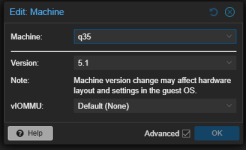
Some of our Windows VMs show machine type q35 5.1 in the web UI.
No matter whether I try to get VM information via the API (/nodes/<node>/qemu/<vmid>/config) or via cli (qm config <vmid>) or even ps aux | grep <vmid> I find nothing but creation version 11.0, or this cli flag from the command line: "-machine type=pc-q35-11.0+pve0".

Now I am beginning to question, if the UI reports the wrong version.
How can I figure this out?
 
Hey,
When you say "in the web UI" what do you mean exactly? Are you talking about the field: "Your Windows VM" -> Hardware -> Machine?

Best Regards,
Tom
 
What versions are you running? I have just created a test VM and set the machine type to 'q35' with version '6.0' which then shows up in the output of `qm config ...` this line:

Code:
$ sudo qm config 100
....
machine: pc-q35-6.0
....
 
Last edited:
Machine type there is just "q35", without a specific version - so it should use latest which would be 11.0, also:
meta: creation-qemu=11.0.0,ctime=1784036198

That's what I meant in my first message.
 
Sorry then I'm not understanding where the `5.1` comes from? If the ui only shows q35 then I'm guessing that running `qm config` also only shows `machine: q35`, (or actually nothing, if I have understood correctly)?
 
When you don't set a specific Machine Version (the GUI calls this Latest) then you get the latest when the VM is started. The version is not saved in the configuration and can only be known once the VM starts on a particular node in the cluster.
Windows does not have virtual hardware changes so Proxmox started saving the initial version when OS Type is Microsoft Windows. Linux VMs usually don't care and can be started with (almost) any version.
 
  • Like
Reactions: tomellm
1785841163211.png
the ui shows 5.1 for the same machine that returned 11 for qm config, the API call and the ps call. that is my whole point.
Sorry then I'm not understanding where the `5.1` comes from? If the ui only shows q35 then I'm guessing that running `qm config` also only shows `machine: q35`, (or actually nothing, if I have understood correctly)?
 
When you don't set a specific Machine Version (the GUI calls this Latest) then you get the latest when the VM is started. The version is not saved in the configuration and can only be known once the VM starts on a particular node in the cluster.
Windows does not have virtual hardware changes so Proxmox started saving the initial version when OS Type is Microsoft Windows. Linux VMs usually don't care and can be started with (almost) any version.
I have understood that but that does not explain the discrepancy between the CLI and API reporting version 11 while the UI shows 5.1
(or I have some giant misunderstanding - in that case please explain)
 
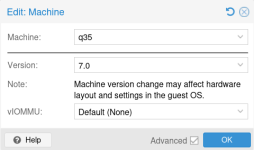
Okay, so the UI has a specific version set. Does it not look like this when you go into changing the machine type?
1785843198243.png
Also, this line: `meta: creation-qemu=11.0.0,ctime=1784036198` has nothing to do with the machine type, it's the QEMU version the VM was created with.

That said, if the UI does show `pc-q35-5.1` on the Overview, and then `q35` and `Latest` in the Advanced section. But `qm config ...` does not output any line that starts with `machine: ...`, then it might be an actual issue.

But please do doublecheck everything, and if the issue still shows up, please share the output of `pveversion --verbose`.
 
1785843865558.png
The UI is consistent in itself.
I also know what the meta line means, I wanted to include it just to show that the VM was already created with version 11 (and recently).

The mismatch is between what the UI (which in itself is consistent) shows and what everything else (API, CLI, kvm command line) reports.
 
  • Like
Reactions: tomellm
Any further ideas? Maybe from Proxmox staff? We only have a limited number of support tickets in our subscriptions and as this doesn't really affect the VMs I don't necessarily want to waste one for this but it is driving me a bit mad.
 
 
Thanks I had not found that but it still isn't very comforting.
In our case the VM (as seen above) has a creation version in it's config (meaning your explanation from this post does not really apply if I understand it correctly).
This just seems like an actual bug to me which should be fixed. I do not want to manually set all affected VMs to a specific version as I want them to use latest but I also don't want the wrong version shown as that will irritate other admins as well.
 
you did not understand it correctly. the backend will select the actual (running) machine version based on the creation date. the frontend displays the "oldest" version, because the frontend code does not have the logic to do that mapping. it could display a different string, but the issue is only cosmetic.

there is a reason PVE will (explicitly) pin the machine version for newly created VMs, and implicitly pins it based on the creation QEMU version as a fallback. windows tends to be rather sensitive about subtle changes in the machine hardware layout, and using the "latest" model just doesn't work well in practice.

the solution to get rid of the cosmetic issue is simple - pick a machine version and pin it. if a new QEMU version comes along and you want to try the new machine version, update it - then you will also immediately know if something breaks ;)
 
  • Like
Reactions: leesteken
okay, thanks. I now understand. I still think, that at least for running machines the actual version should be displayed or that at least something else than the _wrong_ version 5.1 should be displayed but I understand why it happens.