ZFS raidz1 and snapshots, again

Jan 13, 2026
30
3
8
Sorry to ask again but I could use some definitive advice. I have a couple of Proxmox servers that have a zfs mirror for the os and a 4 disk storage array in zfs raidz1. Everything works as expected or so I thought. When I take a snapshot of any VM it seems to increase the storage used on Proxmox by the amount of data in the VM. Problematic as the VM I want to snapshot had 10TB of data. I see references to "zfs set refreservation=none pool_name/dataset_name" but this is normally followed by a lot of other things to set/look at. And seems to be VM disk specific. So I really need to know is...

Will this command result in a small snapshot?
Can this be run at the ZFS pool level so all snapshots for every VM are small when created?
We need to do this on a critical production machine so IS THIS SAFE :eek:


zfs list
NAME USED AVAIL REFER MOUNTPOINT
Primary-ZFS 47.3T 10.7T 291G /Primary-ZFS
Primary-ZFS/base-499-disk-0 60.4G 10.8T 5.08G -
Primary-ZFS/base-499-disk-1 111G 10.8T 3.18M -
Primary-ZFS/base-499-disk-2 221G 10.9T 4.37M -
Primary-ZFS/base-599-disk-0 60.4G 10.8T 5.08G -
Primary-ZFS/base-599-disk-1 111G 10.8T 3.18M -
Primary-ZFS/vm-103-disk-0 22.1G 10.7T 12.8G -
Primary-ZFS/vm-103-disk-1 1.08T 10.8T 992G -
Primary-ZFS/vm-103-disk-2 1.08T 10.8T 997G -
Primary-ZFS/vm-103-disk-3 1.08T 10.8T 1000G -
Primary-ZFS/vm-132-disk-0 166G 10.8T 100G -
Primary-ZFS/vm-141-disk-0 166G 10.9T 35.9G -
Primary-ZFS/vm-305-disk-0 55.3G 10.7T 37.3G -
.............................. etc etc

Thanks all.
 
First, please put command output in CODE tags.

Please check the refreservation for all via:

Code:
zfs get refreservation
 
You can call something like this:
Code:
zfs list -t snapshot -r rpool # rpool is the pool name

And check on github zfs with checkzfs --sourceonly, if you run, so i do, automatic zfs snapshots.
So i can see, if the apt package zfs-auto-snapshot work properly.
 
I setup a test PVE with a test VM and then "zfs set refreservation=none My-Storage/vm-100-disk-1" This seemed to reduce the VM disk usage immediately and when creating a snapshot doesn't use extra storage

On Production... zfs get refreservation for one disk shows...

Primary-ZFS/vm-714-disk-2 refreservation 4.32T local

And that disk in proxmox is a 4TB disk with about 800GB available inside the VM

When I snapshot 714 the storage goes up by 1.38TB

zfs list -t snapshot -r Primary-ZFS....

......
Primary-ZFS/vm-714-disk-0@Test 1.08M - 3.70G -
Primary-ZFS/vm-714-disk-1@Test 0B - 117M -
Primary-ZFS/vm-714-disk-2@Test 0B - 2.18T -
......
 
Last edited:
before we dive too deep into snapshots and their storage consumption, we should IMHO look first at two more important issues.

We need to do this on a critical production machine so IS THIS SAFE :eek:
I would argue that running RAIDZ1 is unsafe. Dell marked RAID5 to be against best practice and unsafe something around back in 2013 when 8TB became to norm. Running RAIDZ1 with such huge drives is IMHO VERY UNSAFE!

Second potential issue is pool geometry.
Do you use the default volblocksize? Did you made any changes to that 16k default?
 
Last edited:
  • Like
Reactions: Johannes S
On Production... zfs get refreservation for one disk shows...
Therefore I did not specify the disk. If you do, you need -r as option

I setup a test PVE with a test VM and then "zfs set refreservation=none My-Storage/vm-100-disk-1" This seemed to reduce the VM disk usage immediately and when creating a snapshot doesn't use extra storage
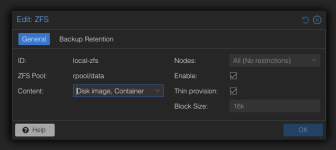
So you missed checking the thin provision box in your storage configuration in the PVE UI:

1782992367363.png
 
Thanks all for replies.

Got to admit I usually just keep default settings as I figure Proxmox knows better than me. Thin provision is off my default and I think there might be arguments that this is the safer option until you have massive snapshots to do. It looks like setting thin provisioning on VM disks by VM disks basis will work.

yeah zfs get refreservation was run in full with the pool I just took the info for one disk for this thread.

These servers have 4 disk bays so no option to add more or increase the raid level. Which is why we have 3 backups of all VMs :)
 
I would argue that running RAIDZ1 is unsafe. Dell marked RAID5 to be against best practice and unsafe something around back in 2013 when 8TB became to norm. Running RAIDZ1 with such huge drives is IMHO VERY UNSAFE!

I agree. First performance and iops will suffer compared to a mirror or striped setup, second it will lead to waste due to padding see:

Another issue are the large resilver times of raidz compared to mirrors if a disc fails see https://jrs-s.net/2015/02/06/zfs-you-should-use-mirror-vdevs-not-raidz/

Basically RAIDZ is ok for large amount of data where you want higher resilency and don't care about iops or performance and can tolerate the risk of days or weeks of resilvering in case of a disc failure. For VM os diskc and any workload which needs huge iops ( aka random access of many small files ) e.g. databases a mirror or striped mirror is more suitable.
 
Last edited:
So you missed checking the thin provision box in your storage configuration in the PVE UI
Lots do. I also always have to suggest this as well. If it were such a bad idea local-zfs wouldn't use it. I made a ticket in argument of changing the default if you care.

It looks like setting thin provisioning on VM disks by VM disks basis will work.
I have a little snippet here which might be useful if you still need to apply it retroactively.
 
Last edited:
second it will lead to waste due to padding see:
I know it is pedantic, but in this specific case, there is no padding :)
He/she is wasting storage because of pool geomerty.

With 4 drives, we get a stripe 4 drives wide.
Each stripe has three 4k data sectors (12k) and one 4k parity sector.
For a volblock of 16k, we need 1.33 stripes (16k/12k).
The first stripe has three 4k data sectors, in total 12k.
The first stripe also has one 4k sector for parity.The second stripe has one 4k data sector.
The second stripe also has one 4k sector for parity.
In total, we have four 4k data sectors and two 4k parity sectors.
That gets us to 24k in total to store 16k.
24k is 6 sectors and that can be divided by 2 so there is no padding needed.
We expected a storage efficiency of 75%, but only got 66.66%!


See: https://github.com/jameskimmel/opinions_about_tech_stuff/blob/main/ZFS/The problem with RAIDZ.md#raidz1-with-4-drives
 
  • Like
Reactions: UdoB and Johannes S
With the amount of data we need to store and the drive bays available mirrors are not an option, higher raid levels also require more space so not an option. raidz1 is the only option we have with these servers providing a degree of resilience. I've bumped the ARC to 128GB and added separate SLOG and L2ARC SSDs so that increased performance significantly.

Back to the original issue I have set thin provisioning so new VMs will benefit. I've also set refreservation for the larger test VMs so they can be snapshotted without filling storage, I've left the others as is as we have enough space and it'll reduce the risk of filling storage.
 
With the amount of data we need to store and the drive bays available mirrors are not an option
For your information, your 4 wide RAIDZ1 offers 66.66% storage efficiency, while being very insecure. That is not that much better than a way better performing mirror at 50%.

You won't see this problem directly in ZFS. You will notice that putting a 1TB VM disk on your pool, does take up more than 1TB.
ZFS calculates with the dataset default of 128k, where you would get 75%. But your volblock will only yield 66.66%.
Just so you don't wonder later on why your 47TB pool is full, despite you only having 41TB of VM disk on your pool.

A 6 drives wide RAIDZ2 would give you the same 66.66%, but two disks that can fail.

Offtopic: I would recommend you to offload data from VMs. Blockstorage has many disadvantages, despite pool geometry and padding. L2ARC, ARC will perform worse, worse compression, more metadata overhead, the list goes on. Problably the worst part is that you can't really backup such huge disks.
 
  • Like
Reactions: UdoB
Thanks. Wish I could offload data but every bit is required for the system as a whole to work. Setting refreservation on a few of the larger VMs has brought storage down and importantly stopped it from increasing much when snapshotting. So right now I am able to keep the storage size to safe levels.

Am interested to know why raidz1 even exists if the use of it just results in a barrage of replies saying don't use it? Surely it have to be better than no raid at all? Bare in mind we can't go the raidz2 as we do not have enough bays/drives to increase storage. Yeah resilver may take a long time and if another drive goes you are in trouble but that's better than no raid as you are stuffed regardless with one drive failure.
 
Last edited:
ZFS is very flexible, so you can setup more the one RaidZn in a ZFS Dataset.

Example, Get VDEVn, n € {0,1,2} and setup for every VDEV a zfs RaidZ1 with 4 Drives.
So you need 3x 4 Drives in total fĂĽr the new zfs pool and combined these 3 VDEV are as ZFS Stipe-Set across the total zfs pool.
I'm not saying this is your way, but i can setup it, if i like to.

Example Youtube Video
# https://www.youtube.com/watch?v=Xt436NAjpZA&t=154s
 
Sure but in my specific scenario I have a 1 U server with 4 22 TB drives. That's it, no option to change/expand that config. Starting point of 47TB of data and I need to have to option of snapshotting some large VMs. So no expansion available, not possible to reduce data so my option to get any level of redundancy is raidz1 even if it take 3 days to resilver.

The original question was how can I safely implement refreservation so my snapshots don't steal all my storage, it's wasn't is raidz1 safe to use.
 
Sorry for your small 1 U server with 4x 22 TB hdd drives.
So you can't setup a zfs special device mirror for that pool, a zfs mirror start with 2 device.
that zfs vdev will than take new metadata written to this pool and speed up this access.
may be you can test the zfs special device mirror with 2x ssd sata3 over usb3 Adapter?
then you would switch your setup.
 
Im interested to know why raidz1 even exists if the use of it just results in a barrage of replies saying don't use it?
Maybe you are using SSDs or only 1TB drives with a low resilver time. IMHO even then RAIDZ1 is not really save. Imagine if one disk fails, and you switch out the wrong disk. ZFS has almost no guardrails and will let you do many stupid things.

Surely it have to be better than no raid at all?
Looking back at the traditional RAIDs back in the early 2000s, I would argue that RAID mirrors lead to more data loss than "no RAID", simply because the risk of user error is higher than a drive failing.

RAID is not a backup! And since you apparently can't offload the data, you can't really back it up properly.

I don't know where you coming from, what you have used before Proxmox, what your safety needs are, what use case you have or how your company(?) is structured. You remind of my younger self with a very high risk tolerance.
I just hope that you and your boss know that you are playing with fire.
Best practice is to use mirrors for Proxmox.
ZFS best practice is to only fill blockstorage pools to 50% when you use HDDs because of fragmentation.

RAIDZ1 with such huge resilver times is risky.

But even without the risk of two drives failing, this setup will be a PITA further down the road. You can't back it up, usage will grow, fragmentation will grow and sooner or later it will perform bad, despite SLOG and L2ARC.
 
  • Like
Reactions: Johannes S
Agreed, this is a terrible setup. But also, so many (rhetorical?) questions! What do you have for a backup? How long will it take to restore the data?

I'm curious what the plan is if a server fails, or second drive fails (or has a read error) during a rebuild, etc. Where are you going to restore the lost VMs to if there is no extra space anywhere else?

What is the type of data being stored? Is ZFS compression enabled?

Also, what is the purpose of these snapshots?
 
We have PBS for local backup of our HA cluster, various proxmox servers around the server room and our build proxmox servers. They have various schedules and retention times dependent on data and all encrypted of course. Then we have an air gapped USB syncing once a week taken offsite as our DR plan (a) and recently PBS 4.x S3 sync for DR (b). Restore tests suggest 2 days of restore using both S3 and USB if we lost a build server. Backups are verified with test restores done weekly to an offsite location to replicate replacement hardware. All working great, shout out to PBS 4.x. The builds servers, 2 of them, were given to me and told to make a build system hence the fixed hardware and no expansion options. So I got to make that work and you've all been there.

We cloned one of our large VMs and the snapshots are for test upgrades to that systems before we apply to production which will also require snapshotting. Pretty typical straight forward stuff.

Yep compression is on but as this is a repo mirror the data is already heavily compressed so we are only getting 1.02 compression rate.

But it's OK, I worked out the refreservation and that's working fine.
 
  • Like
Reactions: IsThisThingOn