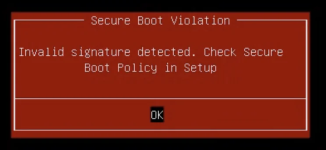
Now it won't boot unless I disable Secure Boot.
I think it's related to the 2023 CA Keys.
Probably 9.2 is using the 2023 but my BIOS only has the 2011 keys.



Not sure, they ditched old computers (produced in 2018 and before, see https://support.hp.com/us-en/document/ish_13070353-13070429-16), and they will not provide any BIOS update (i know cause we have the issue with Windows instead of proxmox).if you got some time and nerves you might want contact HP w.r.t. this, they are the ones that can help best.

yes, new shims are available now.Are the new shims already available? I asked about this recently:
I noticed that my Secure Boot shim on my proxmox host is only signed by the 2011 CA. Has anyone managed to update the boot shim to the 2023 CA? All the discussions I've seen have been about key enrollment on the guests. I haven't seen any discussions about the Proxmox hypervisor host itself. With the certificate set to expire next month, we are trying to get everything updated to a good baseline
- Upstairs_Cycle384
- Replies: 4
- Forum: Proxmox VE: Installation and configuration
I did a full update on my proxmox host (now running 9.2.2) and I can see that the shims are still only signed by the 2011 certs
you should be able to enroll the keys using your bios, hopefully. alternatively, deploying your own PK via setup mode should also work, then you can sign all the key/cert updates you want yourselfThank you t.lamprecht
Sadly, as janus57 mentioned, currently HP doesn't want to provide BIOS updates.
I'm going to try the recommendation I got to see if I can update the Certs without a BIOS update.

Hey Squirrel. Thanks for the tip.I've seen similar messages on HP Elitedesks when I want to install a new OS such as Proxmox itself or even just boot off Ventoy so I can start the install. In the bios I disabled everything having to do with secure boot, UEFI etc and it eventually went away, took a few tries, it's like it doesn't save the first time and you have to go back and do it a few times.

Thank you @fionaHi @Darkbotic,
there is a report in Debian about buggy firmware that won't boot a dual-signed shim. Maybe it's the same for your setup:
https://wiki.debian.org/SecureBoot/BuggyFirmware
Do you see the 2023 certs when runningI downloaded this https://sources.debian.org/src/shim-signed/1.51/shimx64.efi.signed.MS-2023 and copied it as /mnt/boot/EFI/custom-boot/shimx64.efi but it didn't work. It showed a Security Policy Violation message in the blue MokManager screen.
mokutil --db? Otherwise, you might still need to update the firmware on the host. See also: https://techcommunity.microsoft.com...re-boot-certificates-expiring-in-2026/4530725Do you see the 2023 certs when runningmokutil --db? Otherwise, you might still need to update the firmware on the host. See also: https://techcommunity.microsoft.com...re-boot-certificates-expiring-in-2026/4530725
mokutil --db | grep 2023 Not Before: Jun 13 18:58:29 2023 GMT Subject: C=US, O=Microsoft Corporation, CN=Windows UEFI CA 2023 Not Before: Jun 13 19:21:47 2023 GMT Subject: C=US, O=Microsoft Corporation, CN=Microsoft UEFI CA 2023 Not Before: Oct 26 19:02:20 2023 GMT Subject: C=US, O=Microsoft Corporation, CN=Microsoft Option ROM UEFI CA 2023mokutil --db | grep 2011 Not Before: Jun 27 21:22:45 2011 GMT Subject: C=US, ST=Washington, L=Redmond, O=Microsoft Corporation, CN=Microsoft Corporation UEFI CA 2011We use essential cookies to make this site work, and optional cookies to enhance your experience.

